RAG开发
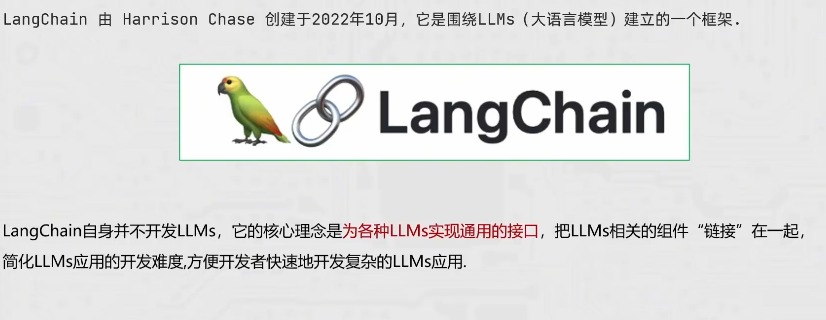
LangChain简介
主要功能
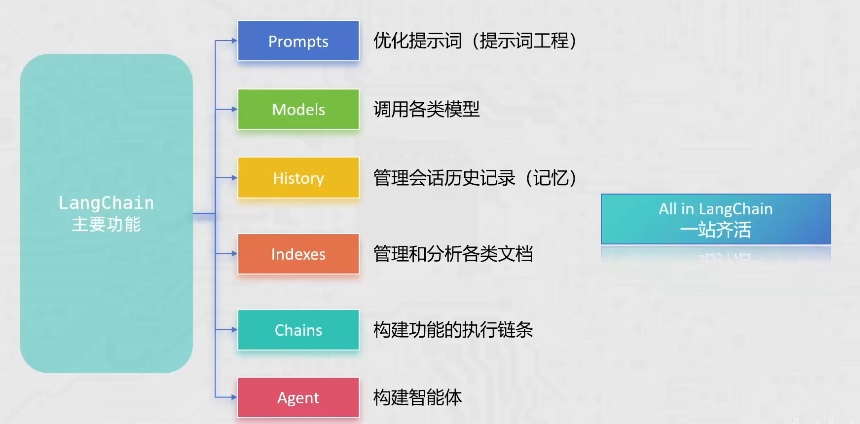
提供:
- 提示词优化的相关功能API
- 调用各类模型的功能API
- 会话记忆的相关功能API
- 各类文档管理分析的功能API
- 构建Agent智能体的相关功能API
- 各类功能链式执行的能力
LangChain是后续学习RAG开发的主力框架
LangChain环境部署
LangChain安装
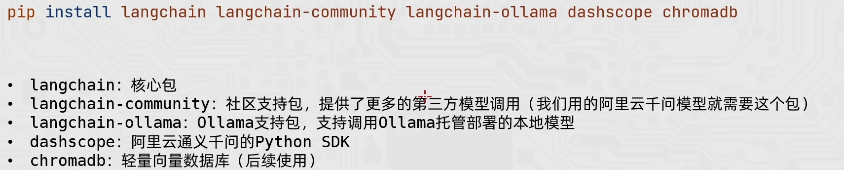
如果清华镜像源不行,可以使用以下命令:
(社区版)
官方PyPI源:python -m pip install langchain-community langchain-ollama dashscope chromadb -i https://pypi.org/simple/
阿里云镜像:python -m pip install langchain-community langchain-ollama dashscope chromadb -i
https://mirrors.aliyun.com/pypi/simple/
基础langchain包:
官方PyPI源:python -m pip install langchain -i https://pypi.org/simple/
阿里云镜像:python -m pip install langchain -i https://mirrors.aliyun.com/pypi/simple/
安装完可以输入python进入python环境进行验证
进入到python环境中输入
import langchain
print(langchain.version)
进行验证
RAG
介绍
通⽤的基础⼤模型存在一些问题:
- LLM的知识不是实时的,模型训练好后不具备自动更新知识的能力,会导致部分信息滞后
- LLM领域知识是缺乏的,大模型的知识来源于训练数据,这些数据主要来自公开的互联网和开源数据集,无法覆盖特定领域或高度专业化的内部知识
- 幻觉问题,LLM有时会在回答中⽣成看似合理但实际上是错误的信息
- 数据安全性
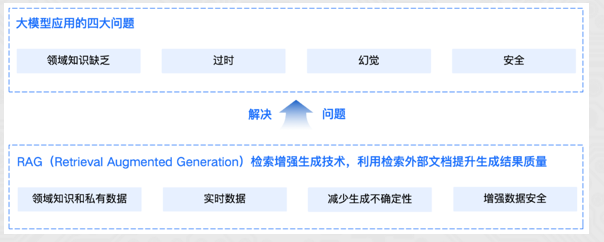
RAG(Retrieval-Augmented Generation)即检索增强生成,为大模型提供了从特定数据源检索到的信息,以此来修正和补充生成的答案。可以总结为一个公式:RAG = 检索技术 + LLM 提示
工作原理
工作流程图解:
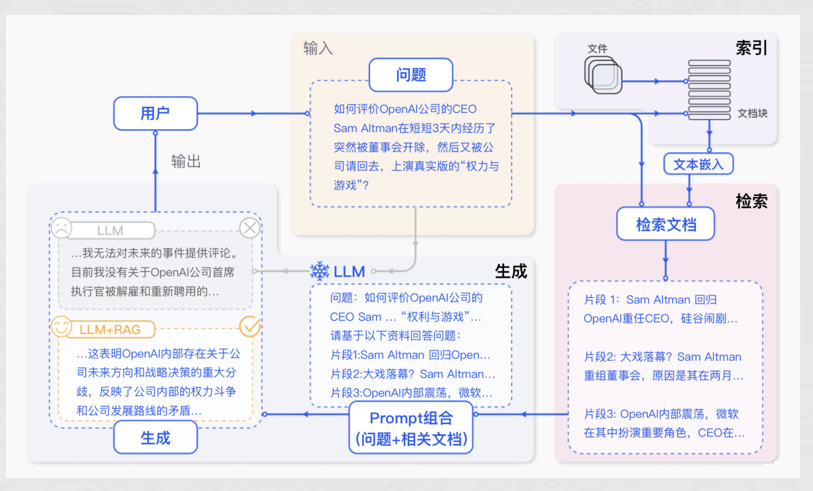
RAG标准流程:
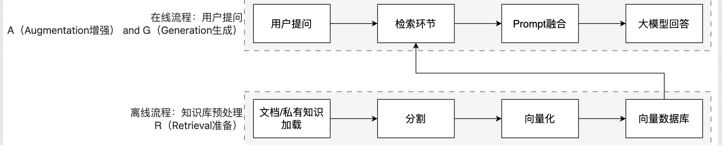
简单来说,RAG工作分为两条线:离线准备线 / 在线服务线
标准流程
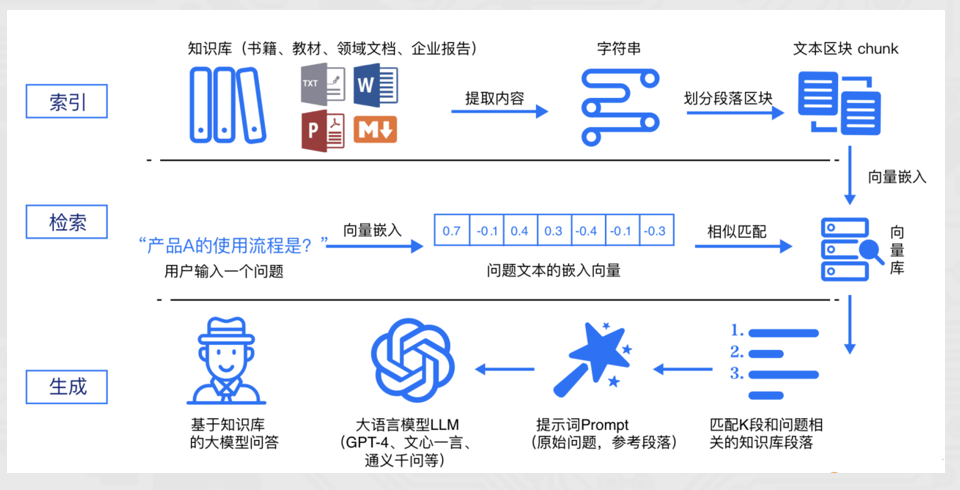
RAG 标准流程由索引(Indexing)、检索(Retriever)和生成(Generation)三个核心阶段组成。
- 索引阶段:通过处理多种来源多种格式的文档提取其中文本,将其切分为标准长度的文本块(chunk),并进行嵌入向量化(embedding),向量存储在向量数据库(vector database)中。
- 加载文件
- 内容提取
- 文本分割 ,形成chunk
- 文本向量化
- 存向量数据库
- 检索阶段,用户输入的查询(query)被转化为向量表示,通过相似度匹配从向量数据库中检索出最相关的文本块。
- query向量化
- 在文本向量中匹配出与问句向量相似的top_k个
- 生成阶段,检索到的相关文本与原始查询共同构成提示词(Prompt),输入大语言模型(LLM),生成精确且具备上下文关联的回答。
- 匹配出的文本作为上下文和问题一起添加到prompt中
- 提交给LLM生成答案
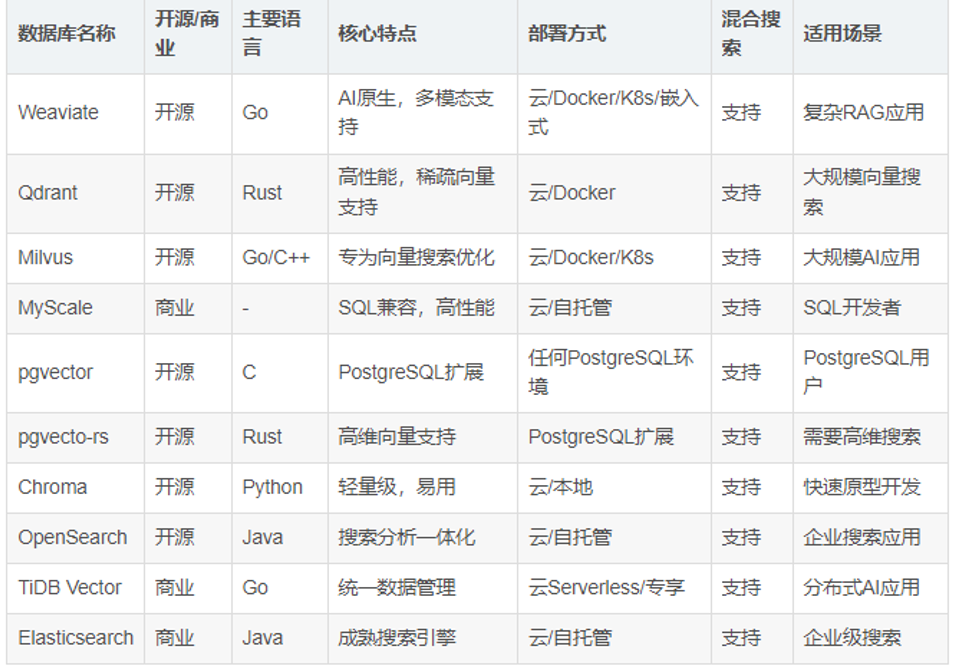
主流向量数据库:
RAG的核心价值:
- 解决知识实效性问题:大模型的训练数据有截止时间,RAG 可以接入最新文档(如公司财报、政策文件),让模型输出 “与时俱进”。
- 降低模型幻觉:模型的回答基于检索到的事实性资料,而非纯靠自身记忆,大幅减少编造信息的概率。
- 无需重新训练模型:相比微调(Fine-tuning),RAG 只需更新知识库,成本更低、效率更高。
向量
基础概念
RAG流程中,向量库是一个重要的节点。
- 离线流程:知识和信息 → 向量嵌入(向量化) → 存入向量库
- 在线流程:用户的提问 → 向量嵌入(向量化) → 在向量库中匹配
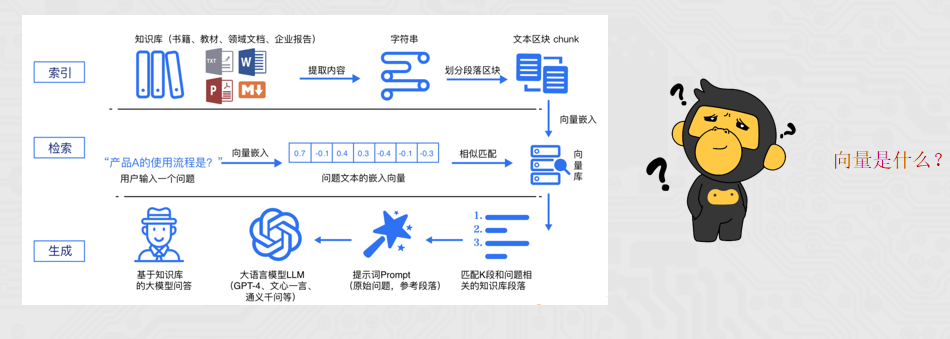
向量(Vector)就是文本的 “数学身份证”:它把一段文字的语义信息,转换成一串固定长度的数字列表,让计算机能 “看懂” 文字的含义并做相似度计算。
简单来说,就是让计算机更方便的理解不同的文本内容,是否表述的是一个意思。
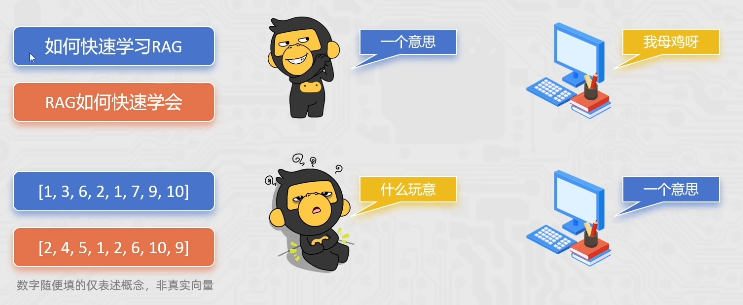
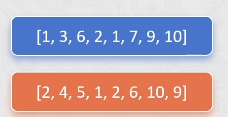
文本嵌入模型(如text-embedding-v1)通过深度学习等技术,从文本提取语义特征并映射为固定长度的数字序列。
向量嵌入的过程,我们一般选用合适的文本嵌入模型来完成。
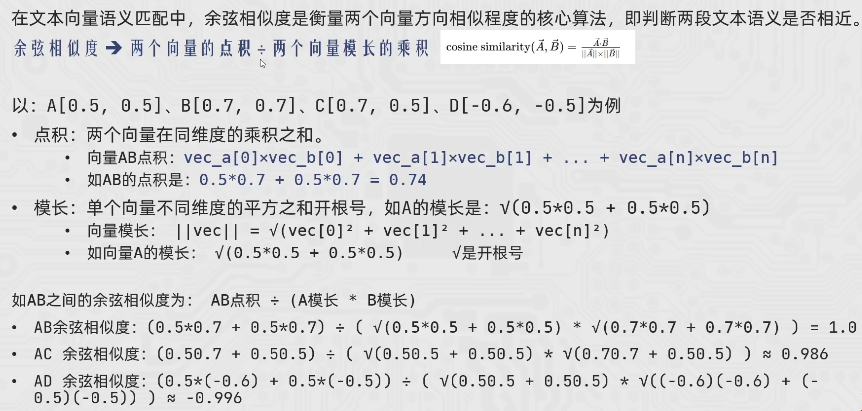
在向量匹配的过程中,如何识别2段文本是否表述相似的含义,主要可以通过如余弦相似度等算法来完成。比如(下列案例中向量为示例,仅描述概念,非真实向量):
- A: “如何快速学打篮球” → [0.2, 0.5, 0.8]
- B: “打篮球怎么学得快” → [0.18, 0.52, 0.79]
- C: “运动后吃什么好呢” → [0.9, 0.1, 0.2]
通过余弦相似度算法可以计算得到:A和B相似度0.999789,A和C相似度0.361446
由此可通过精确的数学计算,去匹配2段文本是否描述同一个意思,提高语义匹配的效率和精度。
如何更为精准的完成语义匹配,生成向量的维度是一个很重要的指标。
如text-embedding-v1模型,可以生成1536维的向量(一段文本固定得到1536个数字序列),比较实用。
- 1536个数字表示,这段文本在1536个主题(抽象的语义特征)方向上的得分(强度)

- 生成向量的维度越多,就更好的记录文本的语义特征,做语义匹配会更加精准。
- 更多的向量会在计算、存储和匹配过程中,带来更大的压力。
选择合适的向量维度需要在精确和性能之间做平衡。一般1536维算是比较好的选择。
【扩展】余弦相似度
向量的数字序列,共同决定了向量在高维空间中的方向和长度.而余弦相似度主要就是撇除长度的影响,得到方向的夹角。夹角越小越相似,即方向相同。
如何体现向量的方向和长度呢?以一维向量为例:

向量:[-0.5]、[0.5]、[1]的方向和长度。
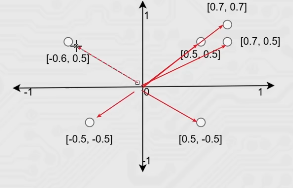
向量:[0.5, 0.5]
[0.7, 0.7]
[0.7, 0.5]
[0.5, -0.5]
[-0.5, -0.5]
[-0.6, 0.5]
的方向和长度
PS:3维乃至更高纬度难以描述,但概念一致
余弦相似度主要匹配的就是:同向(无所谓长度)
我们能直接发现
- [0.5, 0.5]和[0.7, 0.7]是同向不同长那计算机如何判定就依赖余弦相似度算法了。
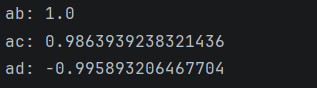
代码示例
 1
 2
 3
 4
 5
 6
 7
 8
 9
10
11
12
13
14
15
16
17
18
19
20
21
22
23
24
25
26
27
28
29
30
31
32
33
34
35
36
37
38
39
40
41
42
43
44
45
46
47
48
49
50
51
52
53
54
55
56
57
58
59
60
61
|
import numpy as np
"""
计算两个向量的余弦相似度(衡量方向相似性,剔除长度影响)

参数:
    vec_a (np.array): 向量A
    vec_b (np.array): 向量B
返回:
    float: 余弦相似度结果(范围[-1,1],越接近1方向越一致)
公式:
    cos_sim = (vec_a · vec_b) / (||vec_a|| × ||vec_b||)
    拆解:
    1. 点积:vec_a · vec_b = vec_a[0]×vec_b[0] + vec_a[1]×vec_b[1] + ... + vec_a[n]×vec_b[n]
    2. 模长:||vec_a|| = √(vec_a[0]² + vec_a[1]² + ... + vec_a[n]²)
    3. 模长:||vec_b|| = √(vec_b[0]² + vec_b[1]² + ... + vec_b[n]²)

A: [0.5, 0.5]
B: [0.7, 0.7]
C: [0.7, 0.5]
D: [-0.6, -0.5]
"""


def get_dot(vec_a, vec_b):
    """计算2个向量的点积,2个向量同维度数字乘积之和"""
    if len(vec_a) != len(vec_b):
        raise ValueError("2个向量必须维度数量相同")

    dot_sum = 0
    for a, b in zip(vec_a, vec_b):
        dot_sum += a * b

    return dot_sum


def get_norm(vec):
    """计算单个向量的模长:对向量的每个数字求平方再求和再开根号"""
    sum_square = 0
    for v in vec:
        sum_square += v * v

    # numpy sqrt函数完成开根号
    return np.sqrt(sum_square)


def cosine_similarity(vec_a, vec_b):
    """余弦相似度:2个向量的点积 除以 2个向量模长的乘积"""

    result = get_dot(vec_a, vec_b) / (get_norm(vec_a) * get_norm(vec_b))
    return result


if __name__ == '__main__':
    vec_a = [0.5, 0.5]
    vec_b = [0.7, 0.7]
    vec_c = [0.7, 0.5]
    vec_d = [-0.6, -0.5]

    print("ab:", cosine_similarity(vec_a, vec_b))
    print("ac:", cosine_similarity(vec_a, vec_c))
    print("ad:", cosine_similarity(vec_a, vec_d))
|
Langchain组件
Models:大语言模型的使用
现在市面上的模型多如牛毛,各种各样的模型不断出现,LangChain模型组件提供了与各种模型的集成,并为所有模型提供一个精简的统一接口。
LangChain目前支持三种类型的模型:LLMs(大语言模型)、Chat Models(聊天模型)、Embeddings Models(嵌入模型).
- LLMs:是技术范畴的统称,指基于大参数量、海量文本训练的 Transformer 架构模型,核心能力是理解和生成自然语言,主要服务于文本生成场景
- 聊天模型:是应用范畴的细分,是专为对话场景优化的 LLMs,核心能力是模拟人类对话的轮次交互,主要服务于聊天场景
- 文本嵌入模型: 文本嵌入模型接收文本作为输入, 得到文本的向量.LangChain支持的三类模型,它们的使用场景不同,输入和输出不同,开发者需要根据项目需要选择相应。
我们所用的阿里云通义千问系列主要来自于:langchain_community包
LLMs(阿里云大语言模型的访问)
LLMs使用场景最多,常用大模型的下载库:
同时LangChain支持对许多模型的调用,以通义千问为例:
1
2
3
4
5
6
|
from langchain_community.llms.tongyi import Tongyi
### 实例化模型
llm = Tongyi(model='qwen-max')
### 模型推理
res = llm.invoke("帮我讲个笑话吧")
print(res)
|

如果用的python太新了(比如我的是python3.14) - langchain-tongyi 尚未发布 3.14 的 wheel 包,所以无法安装。
会出现以下错误:
DeprecationWarning: langchain-community is being sunset and is no longer actively maintained. See https://github.com/langchain-ai/langchain-community/issues/674 for details and migration guidance toward standalone integration packages.
有两个解决方案:
方案一(推荐):用 Python 3.10~3.12 运行项目
通义千问相关的 LangChain 包对 3.14 支持不完善,建议用 conda 或 pyenv 创建一个 3.11 环境:
1
2
3
4
5
|
conda create -n rag python=3.11 -y

conda activate rag

pip install langchain langchain-tongyi
|
方案二:忽略警告继续用旧包
当前代码功能上是正常的,DeprecationWarning 只是提醒 langchain-community 未来不再维护,现在还能用。如果只是学习用途,可以先忽略:
1
2
3
4
5
|
import warnings

warnings.filterwarnings("ignore", category=DeprecationWarning)

from langchain_community.llms.tongyi import Tongyi
|
如果要访问本地Ollama的模型,简单更改一下代码。
通过langchain_ollama包导入OllamaLLM类即可(请确保Ollama已经启动并提前下载好要使用的模型)。
1
2
3
4
5
6
7
|
from langchain_ollama import OllamaLLM
model = OllamaLLM(model="qwen3")

# 通过invoke方法去调用模型
res = model.invoke(input="你是谁呀能做什么?")

print(res)
|
Models的流失输出
如果需要流式输出结果,需要将模型的invoke方法改为stream方法即可。
- invoke方法:一次型返回完整结果
- stream方法:逐段返回结果流式输出
阿里云:
 1
 2
 3
 4
 5
 6
 7
 8
 9
10
11
|
# langchain_community
from langchain_community.llms.tongyi import Tongyi

# 不用qwen3-max,因为qwen3-max是聊天模型,qwen-max是大语言模型
model = Tongyi(model="qwen-max")

# 调用invoke向模型提问
res = model.stream(input="你是谁呀能做什么?")

for chunk in res:
	print(chunk, end="", flush=True)
|
ollama:
1
2
3
4
5
6
7
8
|
from langchain_ollama import OllamaLLM

model = OllamaLLM(model="qwen3")

res = model.stream(input="你是谁呀能做什么?")

for chunk in res:
    print(chunk, end="", flush=True)
|
Models:聊天模型的使用
Chat Models
聊天消息包含下面几种类型,使用时需要按照约定传入合适的值:
- AIMessage: 就是 AI 输出的消息,可以是针对问题的回答. (OpenAI库中的assistant角色)
- HumanMessage: 人类消息就是用户信息,由人给出的信息发送给LLMs的提示信息,比如“实现一个快速排序方法”. (OpenAI库中的user角色)
- SystemMessage: 可以用于指定模型具体所处的环境和背景,如角色扮演等。你可以在这里给出具体的指示,比如“作为一个代码专家”,或者“返回json格式”. (OpenAI库中的system角色)
单独使用HumanMessage
 1
 2
 3
 4
 5
 6
 7
 8
 9
10
11
12
13
14
15
16
17
|
from langchain_community.chat_models.tongyi import ChatTongyi
from langchain_core.messages import HumanMessage, AIMessage, SystemMessage

# 得到模型对象, qwen3-max就是聊天模型
model = ChatTongyi(model="qwen3-max")

# 准备消息列表
messages = [
    HumanMessage(content="写一首唐诗"),
]

# 调用stream流式执行
res = model.stream(input=messages)

# for循环迭代打印输出,通过.content来获取到内容
for chunk in res:
    print(chunk.content, end="", flush=True)
|
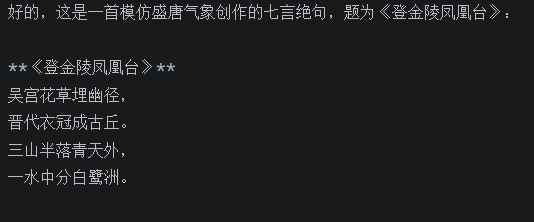
SystemMessage + HumanMessage
 1
 2
 3
 4
 5
 6
 7
 8
 9
10
11
12
13
14
15
16
17
18
|
from langchain_community.chat_models.tongyi import ChatTongyi
from langchain_core.messages import HumanMessage, AIMessage, SystemMessage

# 得到模型对象, qwen3-max就是聊天模型
model = ChatTongyi(model="qwen3-max")

# 准备消息列表
messages = [
    SystemMessage(content="你是一个边塞诗人。"),
    HumanMessage(content="写一首唐诗"),
]

# 调用stream流式执行
res = model.stream(input=messages)

# for循环迭代打印输出,通过.content来获取到内容
for chunk in res:
    print(chunk.content, end="", flush=True)
|
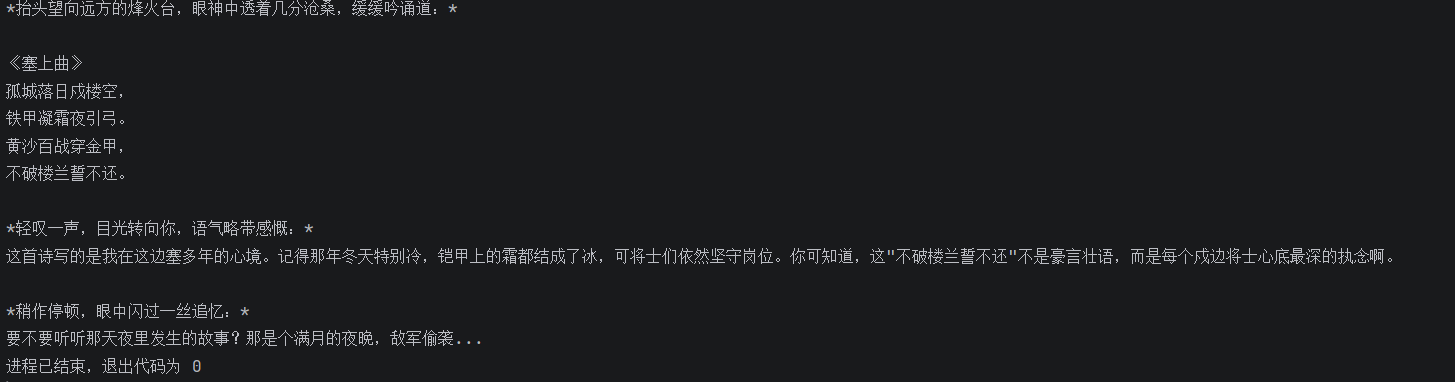
SystemMessage + HumanMessage + AIMessage
 1
 2
 3
 4
 5
 6
 7
 8
 9
10
11
12
13
14
15
16
17
18
19
20
|
from langchain_community.chat_models.tongyi import ChatTongyi
from langchain_core.messages import HumanMessage, AIMessage, SystemMessage

# 得到模型对象, qwen3-max就是聊天模型
model = ChatTongyi(model="qwen3-max")

# 准备消息列表
messages = [
    SystemMessage(content="你是一个边塞诗人。"),
    HumanMessage(content="写一首唐诗"),
    AIMessage(content="锄禾日当午,汗滴禾下土,谁知盘中餐,粒粒皆辛苦。"),
    HumanMessage(content="按照你上一个回复的格式,在写一首唐诗。")
]

# 调用stream流式执行
res = model.stream(input=messages)

# for循环迭代打印输出,通过.content来获取到内容
for chunk in res:
    print(chunk.content, end="", flush=True)
|
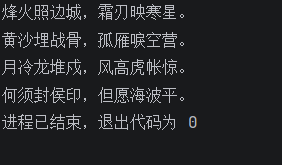
Models:消息的简写形式
SystemMessage、HumanMessage、AIMessage可以有如下的简写形式
原:
 1
 2
 3
 4
 5
 6
 7
 8
 9
10
11
12
13
14
15
16
17
18
19
20
|
from langchain_community.chat_models.tongyi import ChatTongyi
from langchain_core.messages import HumanMessage, AIMessage, SystemMessage

# 得到模型对象, qwen3-max就是聊天模型
model = ChatTongyi(model="qwen3-max")

# 准备消息列表
messages = [
    SystemMessage(content="你是一个边塞诗人。"),
    HumanMessage(content="写一首唐诗"),
    AIMessage(content="锄禾日当午,汗滴禾下土,谁知盘中餐,粒粒皆辛苦。"),
    HumanMessage(content="按照你上一个回复的格式,在写一首唐诗。")
]

# 调用stream流式执行
res = model.stream(input=messages)

# for循环迭代打印输出,通过.content来获取到内容
for chunk in res:
    print(chunk.content, end="", flush=True)
|
简:
 1
 2
 3
 4
 5
 6
 7
 8
 9
10
11
12
13
|
# 得到模型对象, qwen3-max就是聊天模型
model = ChatTongyi(model="qwen3-max")
# 准备消息列表
messages = [
    #(角色,内容) 角色:system/human/ai
	("system", "你是一个边塞诗人。"),
    ("human", "写一首唐诗"),
    ("ai", "锄禾日当午,汗滴禾下土,谁知盘中餐,粒粒皆辛苦。"),
    ("human", "按照你上一个回复的格式,再写一首唐诗。")
 ]
# for循环迭代打印输出,通过.content来获取到内容
for chunk in model.stream(input=messages):
	print(chunk.content, end="", flush=True)
|
通过2元元组封装信息;第一个元素为角色字符串:system/human/ai第二个元素为内容
区别和优势在于,使用类对象的方式,如下:
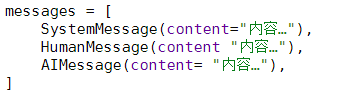
是静态的,一步到位
直接就得到了Message类的类对象
简写形式如下:
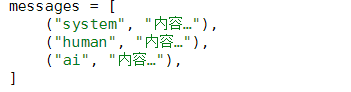
是动态的,需要在运行时
由LangChain内部机制转换为Message类对象
好处就在于,简写形式避免导包、写起来更简单,更重要的是支持:
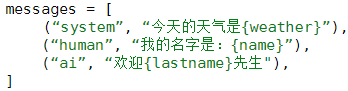
由于是动态,需要转换步骤
所以简写形式支持内部填充{变量}占位
可在运行时填充具体值(后续学习提示词模板时用到)
Models:嵌入模型的使用
Embeddings Models(文本嵌入模型)
Embeddings Models嵌入模型的特点:将字符串作为输入,返回一个浮点数的列表(向量)。
在NLP中,Embedding的作用就是将数据进行文本向量化。
阿里云千问模型访问方式:
 1
 2
 3
 4
 5
 6
 7
 8
 9
10
|
from langchain_community.embeddings import DashScopeEmbeddings

# 初始化嵌入模型对象,其默认使用模型是:text-embedding-v1
embed = DashScopeEmbeddings()

# 测试
# 单次转换
print(embed.embed_query("我喜欢你"))
# 批量转换
print(embed.embed_documents(['我喜欢你', '我稀饭你', '晚上吃啥']))
|

本地Ollama模型访问方式:
通过langchain_ollama导入OllamaEmbeddings使用,其余不变。
1
2
3
4
5
6
7
8
9
|
from langchain_ollama import OllamaEmbeddings


model = OllamaEmbeddings(model="qwen3-embedding")

# 不用invoke stream
# embed_query、embed_documents
print(model.embed_query("我喜欢你"))
print(model.embed_documents(["我喜欢你", "我稀饭你", "晚上吃啥"]))
|
在本地下载模型:
打开命令行,输入ollama pull 模型
目前所掌握的LangChain API如下:
| 方式 |
LLMs大语言模型 |
聊天模型 |
文本嵌入模型 |
| 阿里云千问 |
from langchain_community.llms.tongyi import Tongyi |
from langchain_community.chat_models.tongyi import ChatTongyi |
from langchain_community.embeddings import DashScopeEmbeddings |
| ollama本地模型 |
from langchain_ollama import OllamaLLM |
from langchain_ollama import ChatOllama |
from langchain_ollama import OllamaEmbeddings |
| 反复噶 |
invoke批量 / stream流式 |
invoke批量 / stream流式 |
embed_query单次转换 / embed_documents批量转换 |
通用prompts【zero-shot】
提示词优化在模型应用中非常重要,LangChain提供了PromptTemplate类,用来协助优化提示词。
PromptTemplate表示提示词模板,可以构建一个自定义的基础提示词模板,支持变量的注入,最终生成所需的提示词。
标准写法:
 1
 2
 3
 4
 5
 6
 7
 8
 9
10
11
12
13
|
from langchain_core.prompts import PromptTemplate
from langchain_community.llms.tongyi import Tongyi
prompt_template = PromptTemplate.from_template(
“我的邻居姓{lastname}, 刚生了{gender}, 帮忙起名字,请简略回答。”
)
# 变量注入,生成提示词文本
prompt_text = prompt_template.format(lastname="张", gender="女儿")�
model = Tongyi(model="qwen-max") # 创建模型对象
res = model.invoke(input=prompt_text) # 调用模型获取结果
print(res)
|
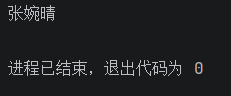
基于chain链的写法
 1
 2
 3
 4
 5
 6
 7
 8
 9
10
11
12
13
|
from langchain_core.prompts import PromptTemplate
from langchain_community.llms.tongyi import Tongyi

#zero-shot
prompt_template = PromptTemplate.from_template(
	“我的邻居姓{lastname}, 刚生了{gender}, 帮忙起名字,请简略回答。”
)
model = Tongyi(model=“qwen-max”)        # 创建模型对象
# 生成链
chain = prompt_template | model
# 基于链,调用模型获取结果
res = chain.invoke(input={"lastname": "张", "gender": "女儿"})
print(res)
|
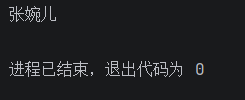
- zero-sho思想下,可以基于PromptTemplate直接完成
- few-shot思想下,需要更换为FewShotPromptTemplate
PS:使用PromptTemplate还不如自己手动拼接字符串?
- 使用Template模板构建提示词,在大型工程中更容易做标准化模板
- Template模板类,支持LangChian框架的链式调用(Runnable接口)
- PromptTemplate
- FewShotPromptTemplate
- ChatPromptTemplate
FewShotPromptTemplate的使用
1
2
3
4
5
6
7
8
9
|
from langchain_core.prompts import FewShotPromptTemplate

FewShotPromptTemplate(
	examples=None,
    example_prompt=None,
    prefix=None,
    suffix=None,
    input_variables=None
)
|
参数:
examples:示例数据,list,内套字典
example_prompt:示例数据的提示词模板
prefix:组装提示词,示例数据前内容
suffix:组装提示词,示例数据后内容
input_variables:列表,注入的变量列表
 1
 2
 3
 4
 5
 6
 7
 8
 9
10
11
12
13
14
15
16
17
18
19
20
21
22
23
24
25
26
27
|
from langchain_core.prompts import PromptTemplate, FewShotPromptTemplate
from langchain_community.llms.tongyi import Tongyi

# 示例的模板
example_template = PromptTemplate.from_template("单词:{word}, 反义词:{antonym}")

# 示例的动态数据注入 要求是list内部套字典
examples_data = [
    {"word": "大", "antonym": "小"},
    {"word": "上", "antonym": "下"},
]

few_shot_template = FewShotPromptTemplate(
    example_prompt=example_template,    # 示例数据的模板
    examples=examples_data,             # 示例的数据(用来注入动态数据的),list内套字典
    prefix="告知我单词的反义词,我提供如下的示例:",                   # 示例之前的提示词
    suffix="基于前面的示例告知我,{input_word}的反义词是?",          # 示例之后的提示词
    input_variables=['input_word']      # 声明在前缀或后缀中所需要注入的变量名(可以多个)
)

prompt_text = few_shot_template.invoke(input={"input_word": "左"}).to_string() # to_string()转为字符串输出
print(prompt_text)

# 创建模型对象
model = Tongyi(model="qwen-max")

print(model.invoke(input=prompt_text))
|
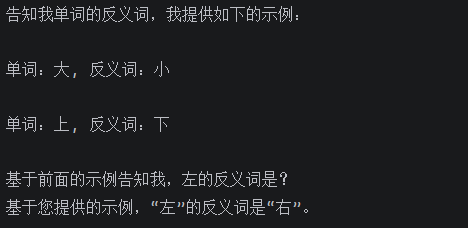
在PromptTemplate(通用提示词模板)和FewShotPromptTemplate(FewShot提示词模板)的使用中,我们使用了如下:

PromptTemplate、FewShotPromptTemplate、ChatPromptTemplate都拥有format和invoke这2类方法。
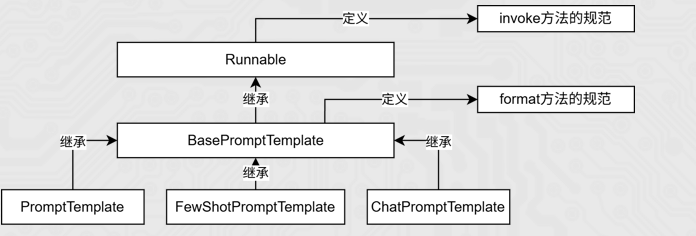
format和invoke的区别在于:
| 区别 |
format |
invoke |
| 功能 |
纯字符串替换 |
Runnable接口标准方法,解析占位符生辰提示词 |
| 返回值 |
字符串 |
PromptValue类对象 |
| 传参 |
.format(k=v,k=v,…) |
.invoke({“k”:v,“k”:v,…}) |
| 解析 |
支持解析{}占位符 |
支持解析{}占位符和MessagePlaceholder结构化占位符 |
 1
 2
 3
 4
 5
 6
 7
 8
 9
10
11
12
13
14
15
16
17
18
19
20
21
22
23
24
|
from langchain_core.prompts import PromptTemplate
from langchain_core.prompts import FewShotPromptTemplate
from langchain_core.prompts import ChatPromptTemplate
from langchain_community.llms.tongyi import Tongyi
from langchain_community.chat_models.tongyi import ChatTongyi

# 模板继承关系
"""
PromptTemplate -> StringPromptTemplate -> BasePromptTemplate -> RunnableSerializable -> Runnable
FewShotPromptTemplate -> StringPromptTemplate -> BasePromptTemplate  -> RunnableSerializable -> Runnable
ChatPromptTemplate -> BaseChatPromptTemplate -> BasePromptTemplate  -> RunnableSerializable -> Runnable
Tongyi -> BaseLLM -> BaseLanguageModel -> RunnableSerializable -> Runnable
ChatTongyi -> BaseChatModel -> BaseLanguageModel -> RunnableSerializable -> Runnable
"""


template = PromptTemplate.from_template("我的邻居是:{lastname},最喜欢:{hobby}")

res = template.format(lastname="张大明", hobby="钓鱼")
print(res, type(res))


res2 = template.invoke({"lastname": "周杰伦", "hobby": "唱歌"})
print(res2, type(res2))
|

ChatPromptTemplate的使用
**PromptTemplate:**通用提示词模板,支持动态注入信息。
**FewShotPromptTemplate:**支持基于模板注入任意数量的示例信息。
ChatPromptTemplate:支持注入任意数量的历史会话信息。
- 通过from_messages方法,从列表中获取多轮次会话作为聊天的基础模板
- PS: 前面PromptTemplate类用的from_template仅能接入一条消息,而from_messages可以接入一个list的消息
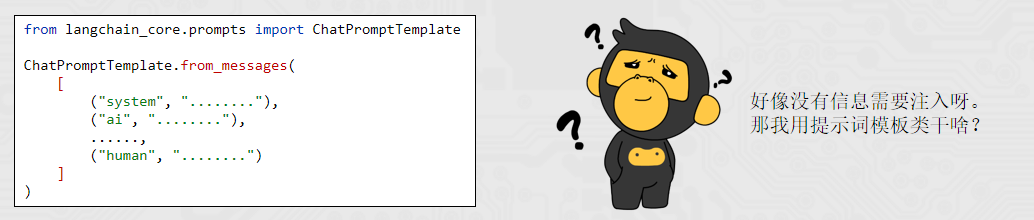
历史会话信息并不是静态的(固定的),而是随着对话的进行不停地积攒,即动态的。所以,历史会话信息需要支持动态注入。
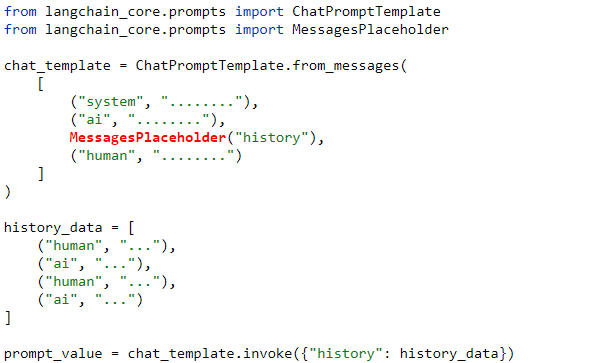
- MessagePlaceholder作为占位
- 基于invoke动态注入历史会话记录
必须是invoke,format无法注入
代码示例
 1
 2
 3
 4
 5
 6
 7
 8
 9
10
11
12
13
14
15
16
17
18
19
20
21
22
23
24
25
26
27
|
from langchain_core.prompts import ChatPromptTemplate, MessagesPlaceholder
from langchain_community.chat_models.tongyi import ChatTongyi

chat_prompt_template = ChatPromptTemplate.from_messages(
    [
        ("system", "你是一个边塞诗人,可以作诗。"),
        MessagesPlaceholder("history"),
        ("human", "请再来一首唐诗"),
    ]
)

history_data = [
    ("human", "你来写一首唐诗"),
    ("ai", "床前明月光,疑是地上霜,举头望明月,低头思故乡"),
    ("human", "好诗再来一首"),
    ("ai", "锄禾日当午,汗滴禾下锄,谁知盘中餐,粒粒皆辛苦"),
]

# invoke的返回类型是StringPromptValue → to_string() 变为字符串
prompt_text = chat_prompt_template.invoke({"history": history_data}).to_string()

#聊天模型
model = ChatTongyi(model="qwen3-max")

res = model.invoke(prompt_text)

print(res.content, type(res))# .content的作用是只取模型返回的内容
|
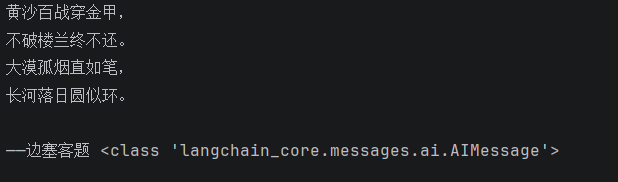
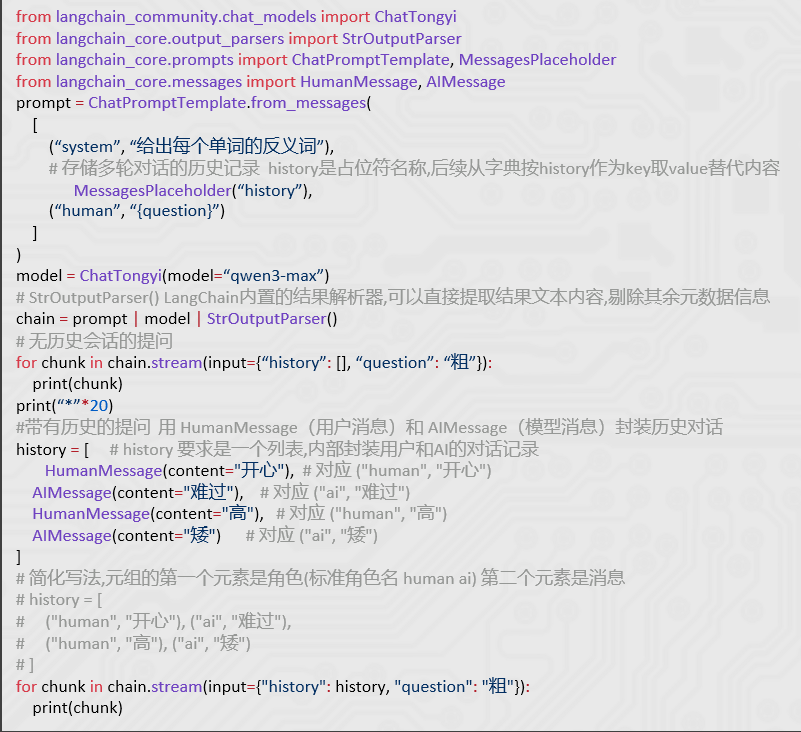
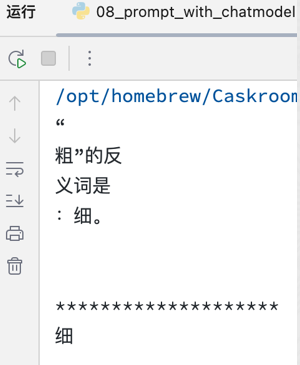
也可以基于聊天模型,并组装聊天历史的模式,做提示词工程。
few-shot提示方式:求反义词 examples = [ {“word”: “开心”, “antonym”: “难过”}, {“word”: “高”, “antonym”: “矮”}, ]
chain链的基础使用
「将组件串联,上一个组件的输出作为下一个组件的输入」是 LangChain 链(尤其是 | 管道链)的核心工作原理,这也是链式调用的核心价值:实现数据的自动化流转与组件的协同工作,如下。
chain = prompt_template | model
核心前提:即Runnable子类对象才能入链(以及Callable、Mapping接口子类对象也可加入(后续了解用的不多))。
我们目前所学习到的组件,均是Runnable接口的子类,如下类的继承关系:
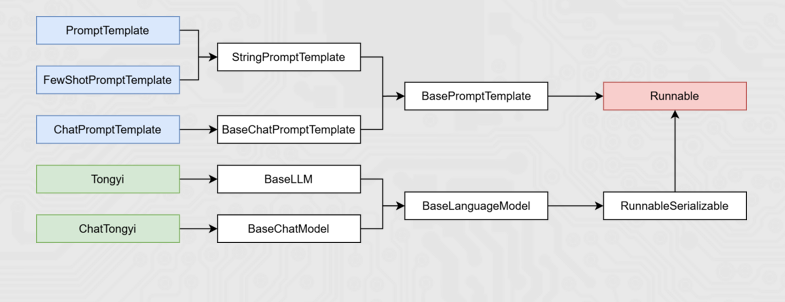
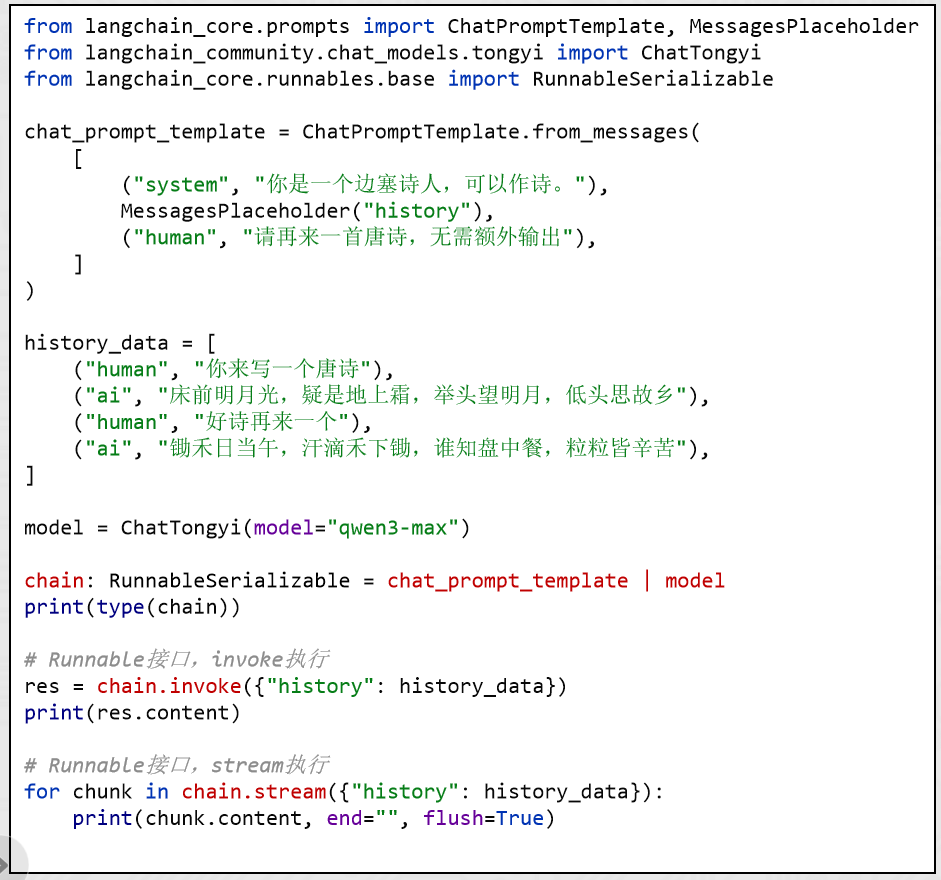
- 通过|链接提示词模板对象和模型对象
- 返回值chain对象是RunnableSerializable对象
- 是Runnable接口的直接子类
- 也是绝大多数组件的父类
- 通过invoke或stream进行阻塞执行或流式执行
组成的链在执行上有:上一个组件的输出作为下一个组件的输入的特性。
所以有如下执行流程:

 1
 2
 3
 4
 5
 6
 7
 8
 9
10
11
12
13
14
15
16
17
18
19
20
21
22
23
24
25
26
27
28
29
30
31
32
|
from langchain_core.prompts import ChatPromptTemplate, MessagesPlaceholder
from langchain_community.chat_models.tongyi import ChatTongyi

chat_prompt_template = ChatPromptTemplate.from_messages(
    [
        ("system", "你是一个边塞诗人,可以作诗。"),
        MessagesPlaceholder("history"),
        ("human", "请再来一首唐诗"),
    ]
)

history_data = [
    ("human", "你来写一个唐诗"),
    ("ai", "床前明月光,疑是地上霜,举头望明月,低头思故乡"),
    ("human", "好诗再来一个"),
    ("ai", "锄禾日当午,汗滴禾下锄,谁知盘中餐,粒粒皆辛苦"),
]

model = ChatTongyi(model="qwen3-max")

# 组成链,要求每一个组件都是Runnable接口的子类
chain = chat_prompt_template | model #| xxx | xxx | model2 | model3 | ...

# 通过链去调用invoke或stream
# 通过invoke去触发链条,原始输入是"history": history_data(提供给chat_prompt_template)
# 然后再给到model
# res = chain.invoke({"history": history_data})
# print(res.content)

# 通过stream流式输出
for chunk in chain.stream({"history": history_data}):
    print(chunk.content, end="", flush=True)
|