Web后端实战(2)

Tlias智能学习辅助系统

实现了部门管理的功能之后,接下来我们再来实现员工管理的功能。
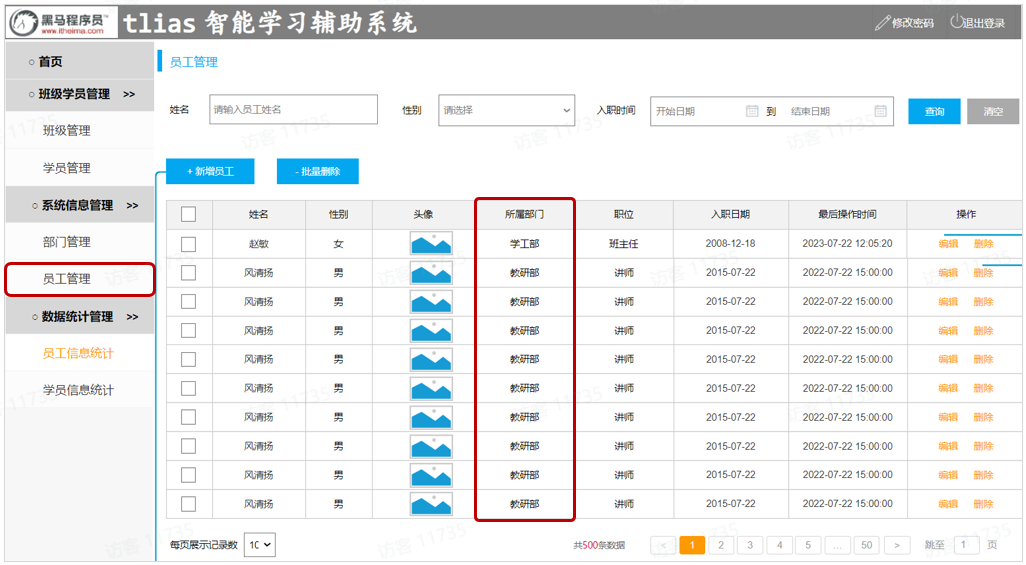
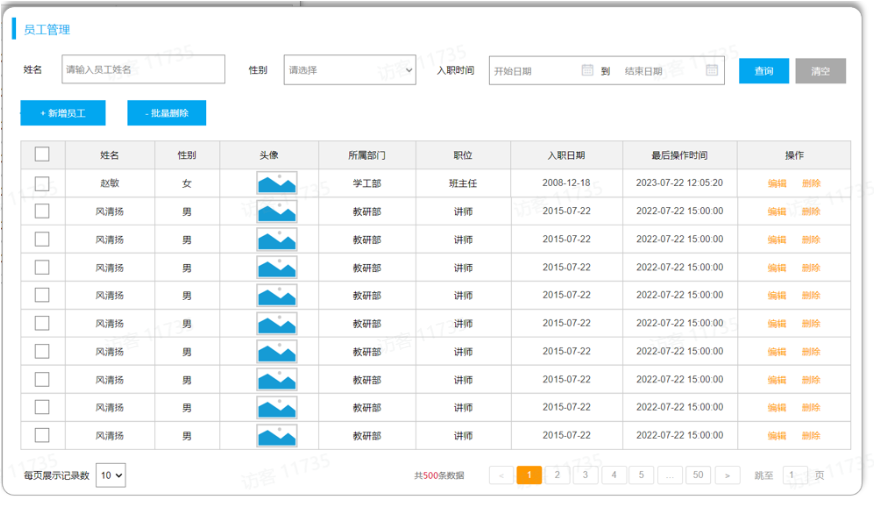
从页面原型中,我们可以看到,在查询员工信息的时候,除了要展示 姓名、性别、头像、职位、入职日期、最后操作时间这些员工信息外,还要展示出所属部门,那此时就需要从两张表中查询数据,一张是部门表,一张是员工表,此时就会涉及到多表操作。 所以这章的内容如下:

  • 多表关系
  • 多表查询
  • 员工列表查询

多表关系

概述

项目开发中,在进行数据库表结构设计时,会根据业务需求及业务模块之间的关系,分析并设计表结构,由于业务之间相互关联,所以各个表结构之间也存在着各种联系,基本上分为三种:

  • 一对多(多对一)
  • 多对多
  • 一对一

一对多(多对一)

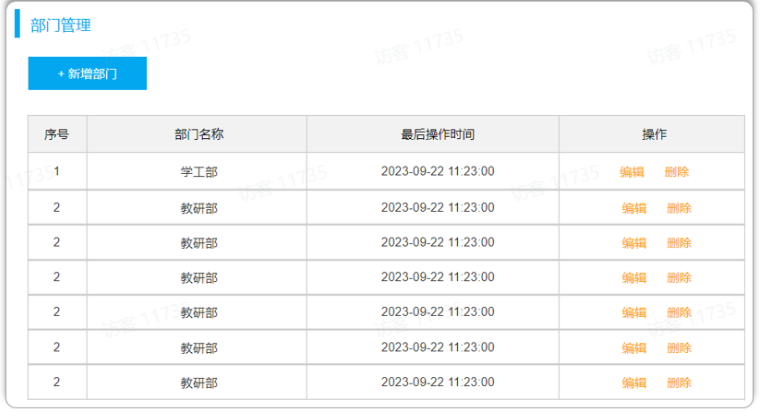
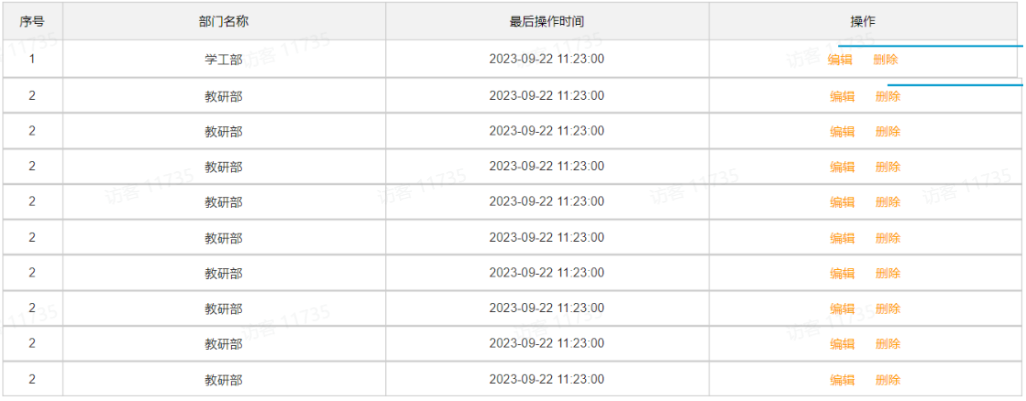
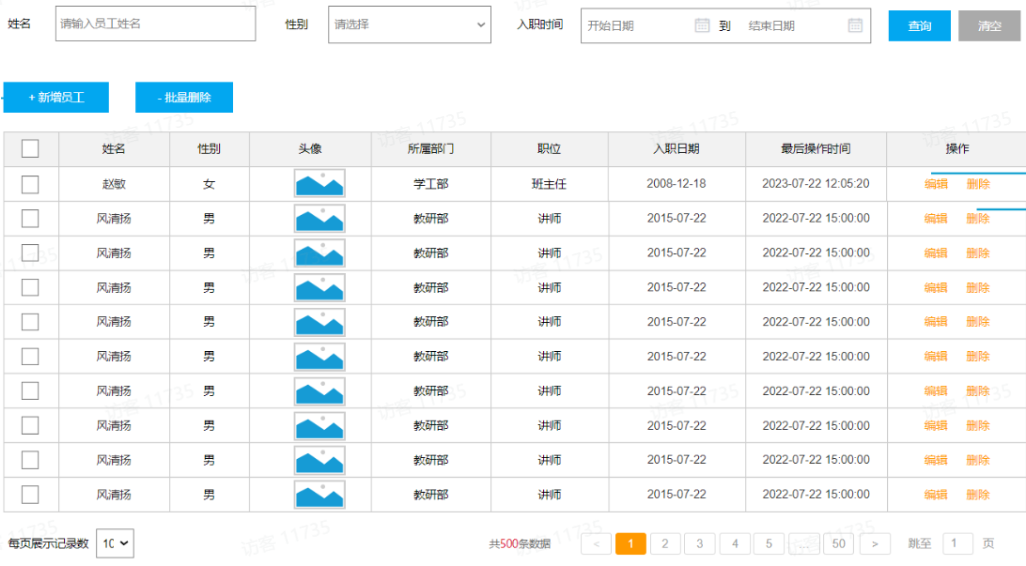
  • 场景:部门与员工的关系(一个部门下有多个员工)。
  • 部门管理的页面原型:

  • 员工管理的页面原型:

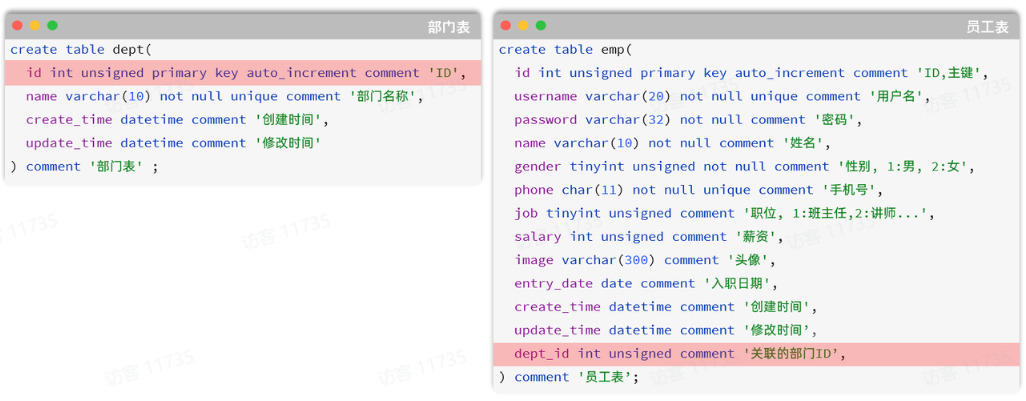
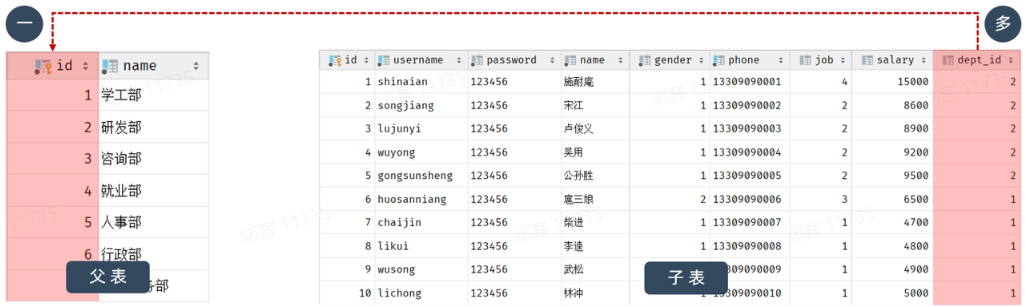
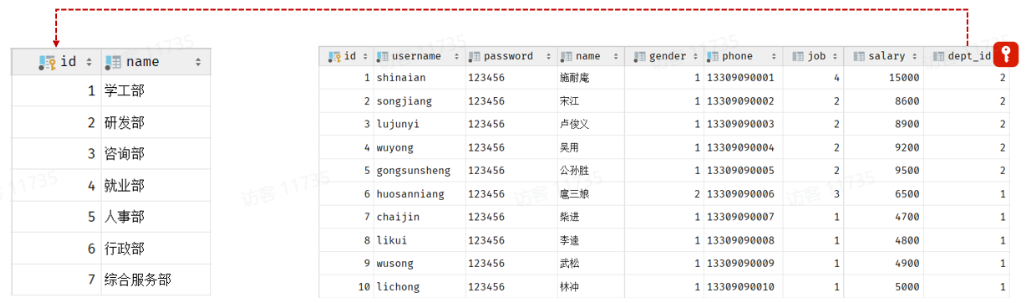
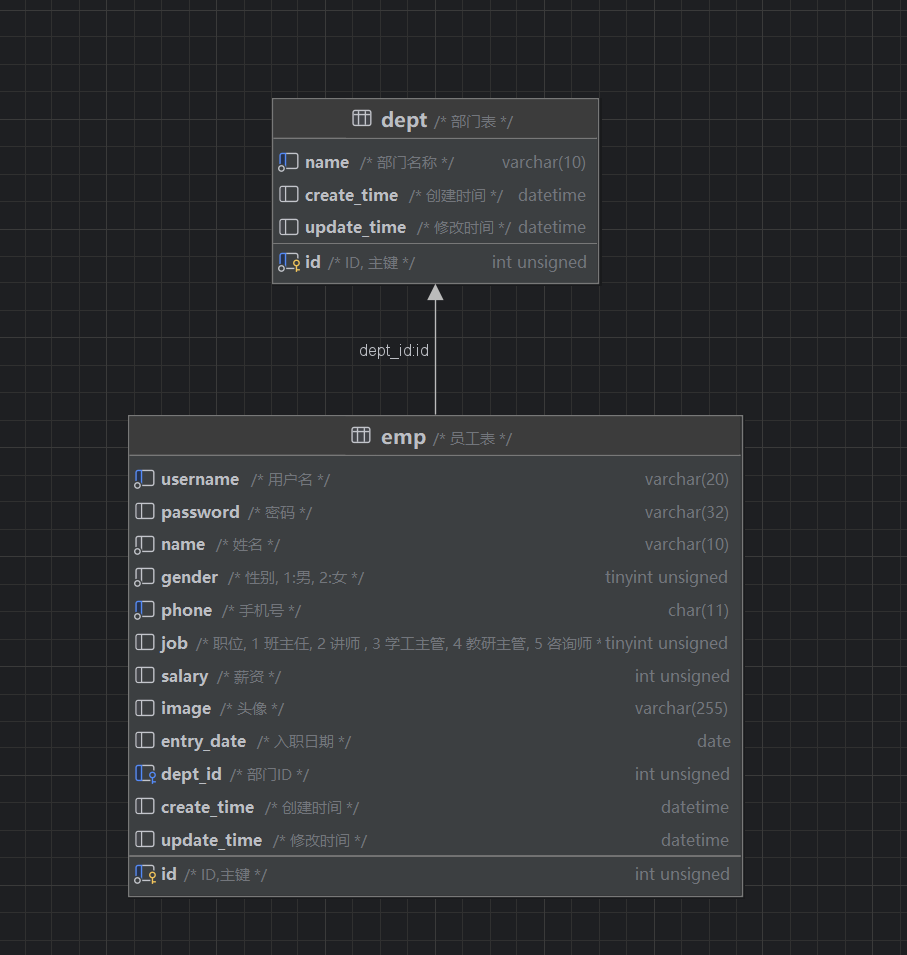
由于一个部门下,会关联多个员工。 而一个员工,是归属于某一个部门的 。那么此时,我们就需要在 emp 表中增加一个字段 dept_id 来标识这个员工属于哪一个部门,dept_id 关联的是 deptid 。 如下所示:

上述的 emp 员工表的 dept_id 字段,关联的是 dept 部门表的 id 。部门表是一的一方,也称为父表,员工表是多的一方,称之为子表

  • 一对多的关系如何实现?在数据库表中的一方,添加字段,来关联的一方的主键

那接下来,我们就可以将上述的两张表创建出来。具体的SQL语句如下:

 1
 2
 3
 4
 5
 6
 7
 8
 9
10
11
12
13
14
15
16
17
18
19
20
21
22
23
24
25
26
27
28
29
30
31
32
33
34
35
36
37
38
39
40
41
42
43
44
45
46
47
48
49
50
51
52
53
54
55
56
57
58
59
60
61
62
63
CREATE TABLE dept (
  id int unsigned PRIMARY KEY AUTO_INCREMENT COMMENT 'ID, 主键',
  name varchar(10) NOT NULL UNIQUE COMMENT '部门名称',
  create_time datetime DEFAULT NULL COMMENT '创建时间',
  update_time datetime DEFAULT NULL COMMENT '修改时间'
) COMMENT '部门表';

INSERT INTO dept VALUES (1,'学工部','2024-09-25 09:47:40','2023-04-25 09:47:40'),
                      (2,'教研部','2024-09-25 09:47:40','2024-10-09 15:17:04'),
                      (3,'咨询部2','2024-09-25 09:47:40','2024-11-30 21:26:24'),
                      (4,'就业部','2024-09-25 09:47:40','2024-09-25 09:47:40'),
                      (5,'人事部','2024-09-25 09:47:40','2024-09-25 09:47:40'),
                      (6,'行政部','2024-11-30 20:56:37','2024-11-30 20:56:37');

create table emp(
    id int unsigned primary key auto_increment comment 'ID,主键',
    username varchar(20) not null unique comment '用户名',
    password varchar(50) default '123456' comment '密码',
    name varchar(10) not null comment '姓名',
    gender tinyint unsigned not null comment '性别, 1:男, 2:女',
    phone char(11) not null unique comment '手机号',
    job tinyint unsigned comment '职位, 1 班主任, 2 讲师 , 3 学工主管, 4 教研主管, 5 咨询师',
    salary int unsigned comment '薪资',
    image varchar(300) comment '头像',
    entry_date date comment '入职日期',
    dept_id int unsigned comment '部门ID',
    create_time datetime comment '创建时间',
    update_time datetime comment '修改时间'
) comment '员工表';


INSERT INTO emp VALUES 
    (1,'shinaian','123456','施耐庵',1,'13309090001',4,15000,'5.png','2000-01-01',2,'2023-10-20 16:35:33','2023-11-16 16:11:26'),
    (2,'songjiang','123456','宋江',1,'13309090002',2,8600,'01.png','2015-01-01',2,'2023-10-20 16:35:33','2023-10-20 16:35:37'),
    (3,'lujunyi','123456','卢俊义',1,'13309090003',2,8900,'01.png','2008-05-01',2,'2023-10-20 16:35:33','2023-10-20 16:35:39'),
    (4,'wuyong','123456','吴用',1,'13309090004',2,9200,'01.png','2007-01-01',2,'2023-10-20 16:35:33','2023-10-20 16:35:41'),
    (5,'gongsunsheng','123456','公孙胜',1,'13309090005',2,9500,'01.png','2012-12-05',2,'2023-10-20 16:35:33','2023-10-20 16:35:43'),
    (6,'huosanniang','123456','扈三娘',2,'13309090006',3,6500,'01.png','2013-09-05',1,'2023-10-20 16:35:33','2023-10-20 16:35:45'),
    (7,'chaijin','123456','柴进',1,'13309090007',1,4700,'01.png','2005-08-01',1,'2023-10-20 16:35:33','2023-10-20 16:35:47'),
    (8,'likui','123456','李逵',1,'13309090008',1,4800,'01.png','2014-11-09',1,'2023-10-20 16:35:33','2023-10-20 16:35:49'),
    (9,'wusong','123456','武松',1,'13309090009',1,4900,'01.png','2011-03-11',1,'2023-10-20 16:35:33','2023-10-20 16:35:51'),
    (10,'linchong','123456','林冲',1,'13309090010',1,5000,'01.png','2013-09-05',1,'2023-10-20 16:35:33','2023-10-20 16:35:53'),
    (11,'huyanzhuo','123456','呼延灼',1,'13309090011',2,9700,'01.png','2007-02-01',2,'2023-10-20 16:35:33','2023-10-20 16:35:55'),
    (12,'xiaoliguang','123456','小李广',1,'13309090012',2,10000,'01.png','2008-08-18',2,'2023-10-20 16:35:33','2023-10-20 16:35:57'),
    (13,'yangzhi','123456','杨志',1,'13309090013',1,5300,'01.png','2012-11-01',1,'2023-10-20 16:35:33','2023-10-20 16:35:59'),
    (14,'shijin','123456','史进',1,'13309090014',2,10600,'01.png','2002-08-01',2,'2023-10-20 16:35:33','2023-10-20 16:36:01'),
    (15,'sunerniang','123456','孙二娘',2,'13309090015',2,10900,'01.png','2011-05-01',2,'2023-10-20 16:35:33','2023-10-20 16:36:03'),
    (16,'luzhishen','123456','鲁智深',1,'13309090016',2,9600,'01.png','2010-01-01',2,'2023-10-20 16:35:33','2023-10-20 16:36:05'),
    (17,'liying','12345678','李应',1,'13309090017',1,5800,'01.png','2015-03-21',1,'2023-10-20 16:35:33','2023-10-20 16:36:07'),
    (18,'shiqian','123456','时迁',1,'13309090018',2,10200,'01.png','2015-01-01',2,'2023-10-20 16:35:33','2023-10-20 16:36:09'),
    (19,'gudasao','123456','顾大嫂',2,'13309090019',2,10500,'01.png','2008-01-01',2,'2023-10-20 16:35:33','2023-10-20 16:36:11'),
    (20,'ruanxiaoer','123456','阮小二',1,'13309090020',2,10800,'01.png','2018-01-01',2,'2023-10-20 16:35:33','2023-10-20 16:36:13'),
    (21,'ruanxiaowu','123456','阮小五',1,'13309090021',5,5200,'01.png','2015-01-01',3,'2023-10-20 16:35:33','2023-10-20 16:36:15'),
    (22,'ruanxiaoqi','123456','阮小七',1,'13309090022',5,5500,'01.png','2016-01-01',3,'2023-10-20 16:35:33','2023-10-20 16:36:17'),
    (23,'ruanji','123456','阮籍',1,'13309090023',5,5800,'01.png','2012-01-01',3,'2023-10-20 16:35:33','2023-10-20 16:36:19'),
    (24,'tongwei','123456','童威',1,'13309090024',5,5000,'01.png','2006-01-01',3,'2023-10-20 16:35:33','2023-10-20 16:36:21'),
    (25,'tongmeng','123456','童猛',1,'13309090025',5,4800,'01.png','2002-01-01',3,'2023-10-20 16:35:33','2023-10-20 16:36:23'),
    (26,'yanshun','123456','燕顺',1,'13309090026',5,5400,'01.png','2011-01-01',3,'2023-10-20 16:35:33','2023-11-08 22:12:46'),
    (27,'lijun','123456','李俊',1,'13309090027',2,6600,'8.png','2004-01-01',2,'2023-10-20 16:35:33','2023-11-16 17:56:59'),
    (28,'lizhong','123456','李忠',1,'13309090028',5,5000,'6.png','2007-01-01',3,'2023-10-20 16:35:33','2023-11-17 16:34:22'),
    (30,'liyun','123456','李云',1,'13309090030',NULL,NULL,'01.png','2020-03-01',NULL,'2023-10-20 16:35:33','2023-10-20 16:36:31'),
    (36,'linghuchong','123456','令狐冲',1,'18809091212',2,6800,'1.png','2023-10-19',2,'2023-10-20 20:44:54','2023-11-09 09:41:04');
    

多表问题分析

问题

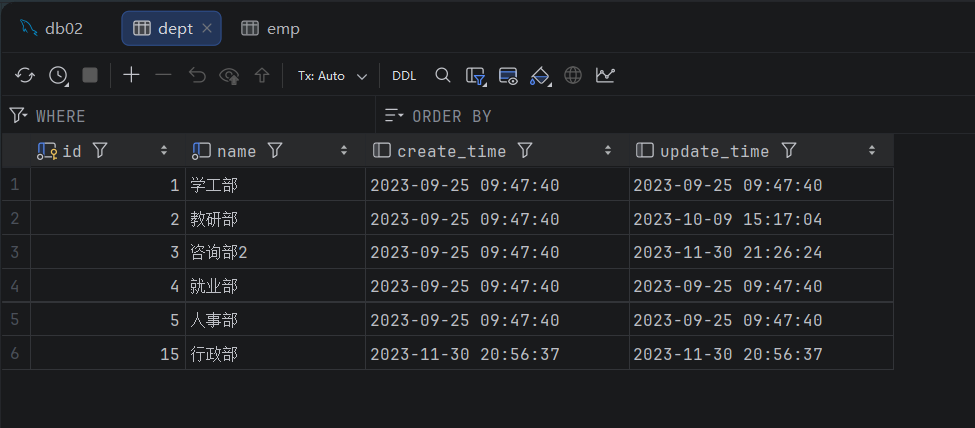
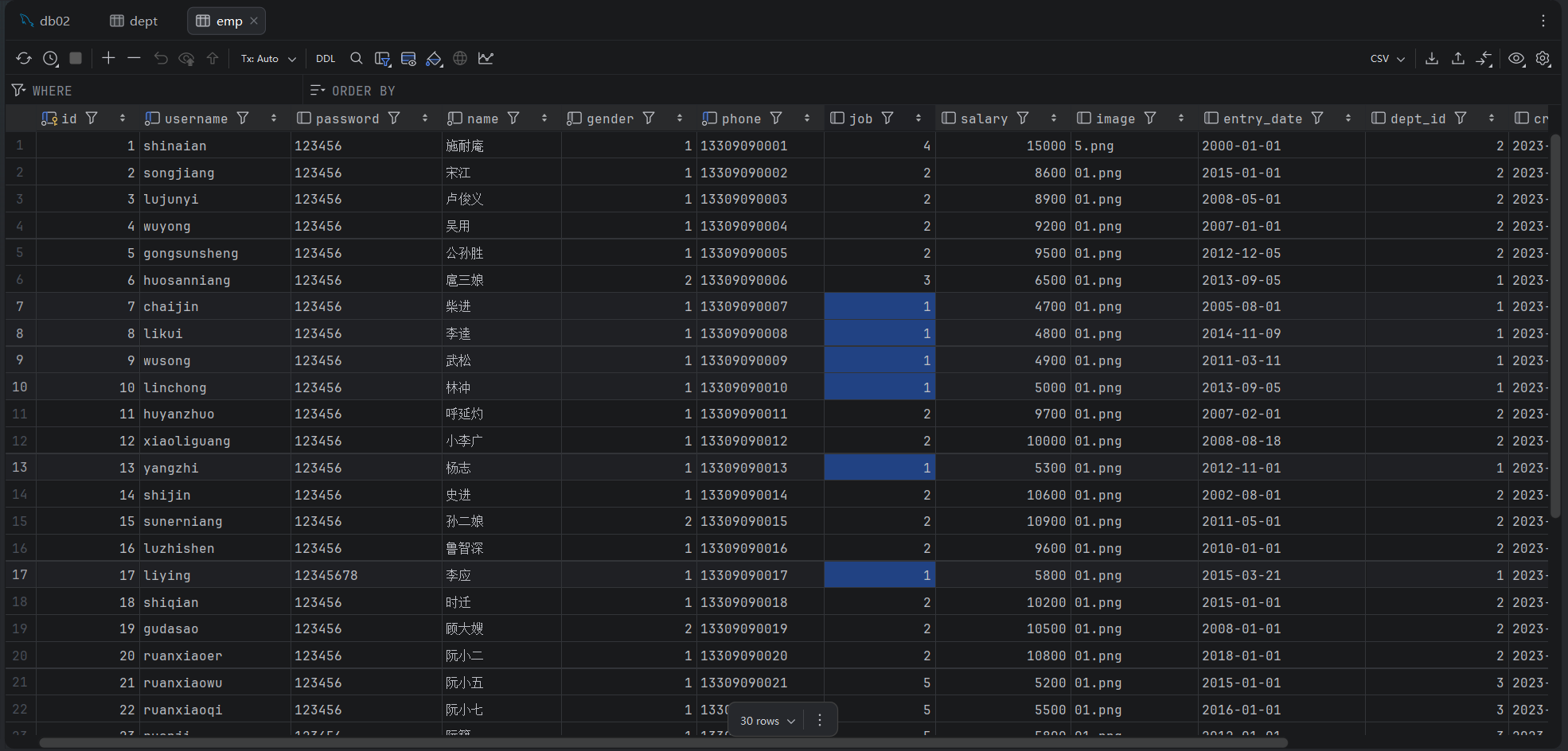
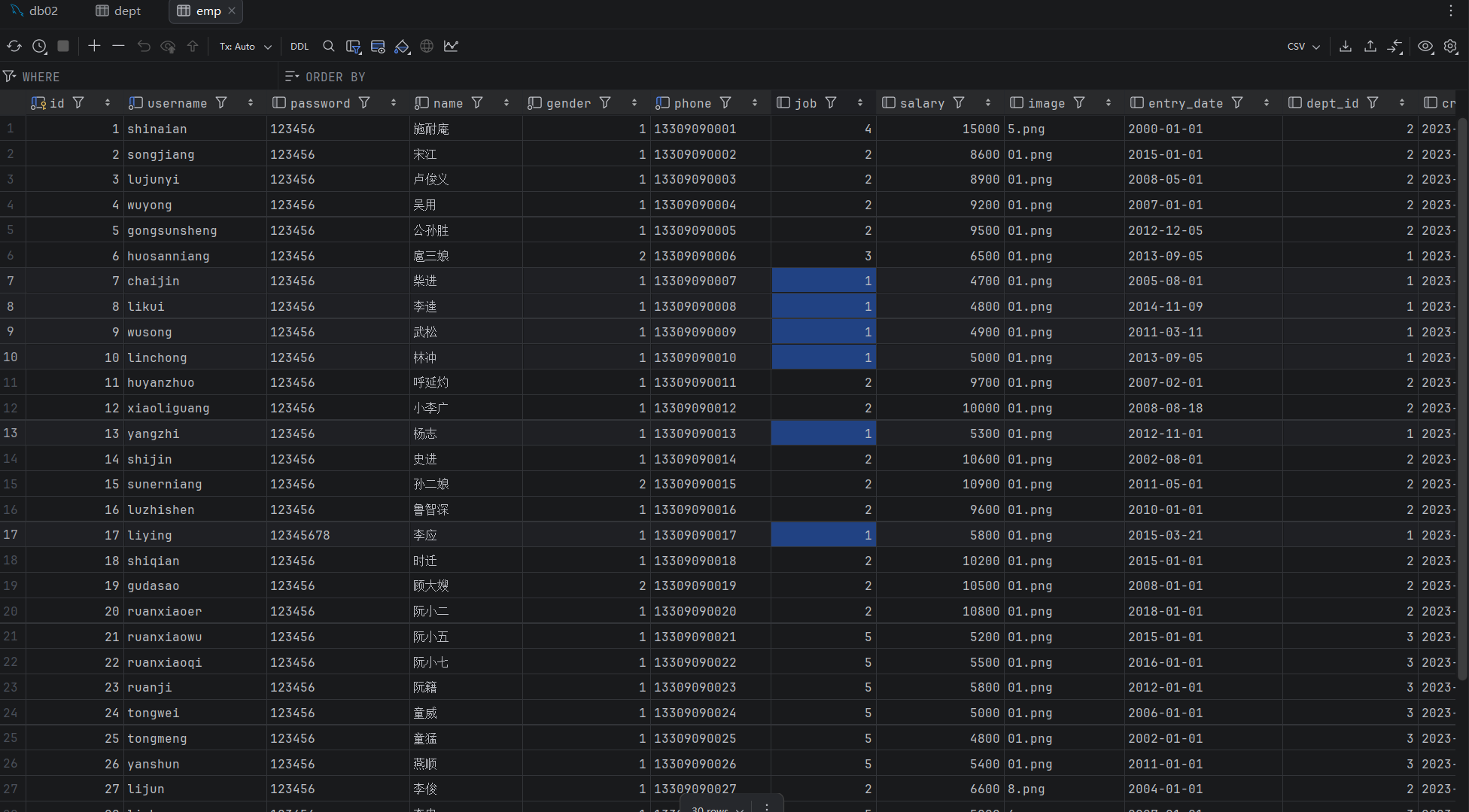
表结构创建完毕后,我们看到两张表的数据分别为:

我们看到,在1号部门下,是关联的有6个员工。 当删除了1号部门后,数据变为:
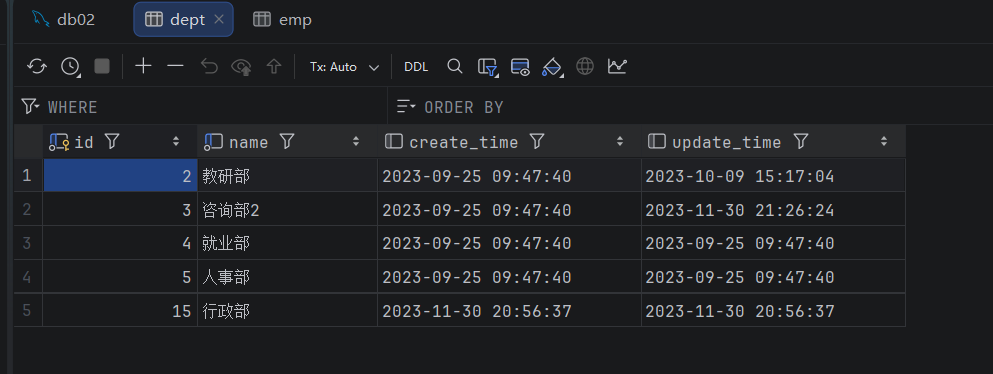
1号部门被删除了,但是依然还有6个员工是属于1号部门的。 此时:就出现数据的不完整、不一致了。

此时这些一号部门的员工就属于脏数据了

分析
  • 现象:部门数据可以直接删除,然而还有部分员工归属于该部门下,此时就出现了数据的不完整、不一致问题 。
  • 原因:目前上述的两张表,在数据库层面,并未建立关联,所以是无法保证数据的一致性和完整性的 。
  • 解决方案:想解决上述的问题呢,我们就可以通过数据库中的 外键约束 来解决。

外键约束:让两张表的数据建立连接,保证数据的一致性和完整性。

对应的关键字:foreign key

外键约束的语法:

 1
 2
 3
 4
 5
 6
 7
 8
 9
10
-- 创建表时指定
create table 表名(
        字段名    数据类型,
        ...
        [constraint]   [外键名称]  foreign  key (外键字段名)   references   主表 (主表列名)        
);


-- 建完表后,添加外键
alter table  表名  add constraint  外键名称  foreign key(外键字段名) references 主表(主表列名);

那接下来,我们就为员工表的dept_id 建立外键约束,来关联部门表的主键。

当我们添加外键约束时,我们得保证当前数据库表中的数据是完整的。 所以,我们需要将之前删除掉的数据再添加回来。

方式1:通过SQL语句操作

1
2
-- 修改表: 添加外键约束
alter table emp  add  constraint  fk_dept_id  foreign key (dept_id)  references  dept(id);

我们可以打开图形化界面查看

此时就可以清晰的查看哪些表是关联的了

此时在去删除父表,就会发现已经报错了

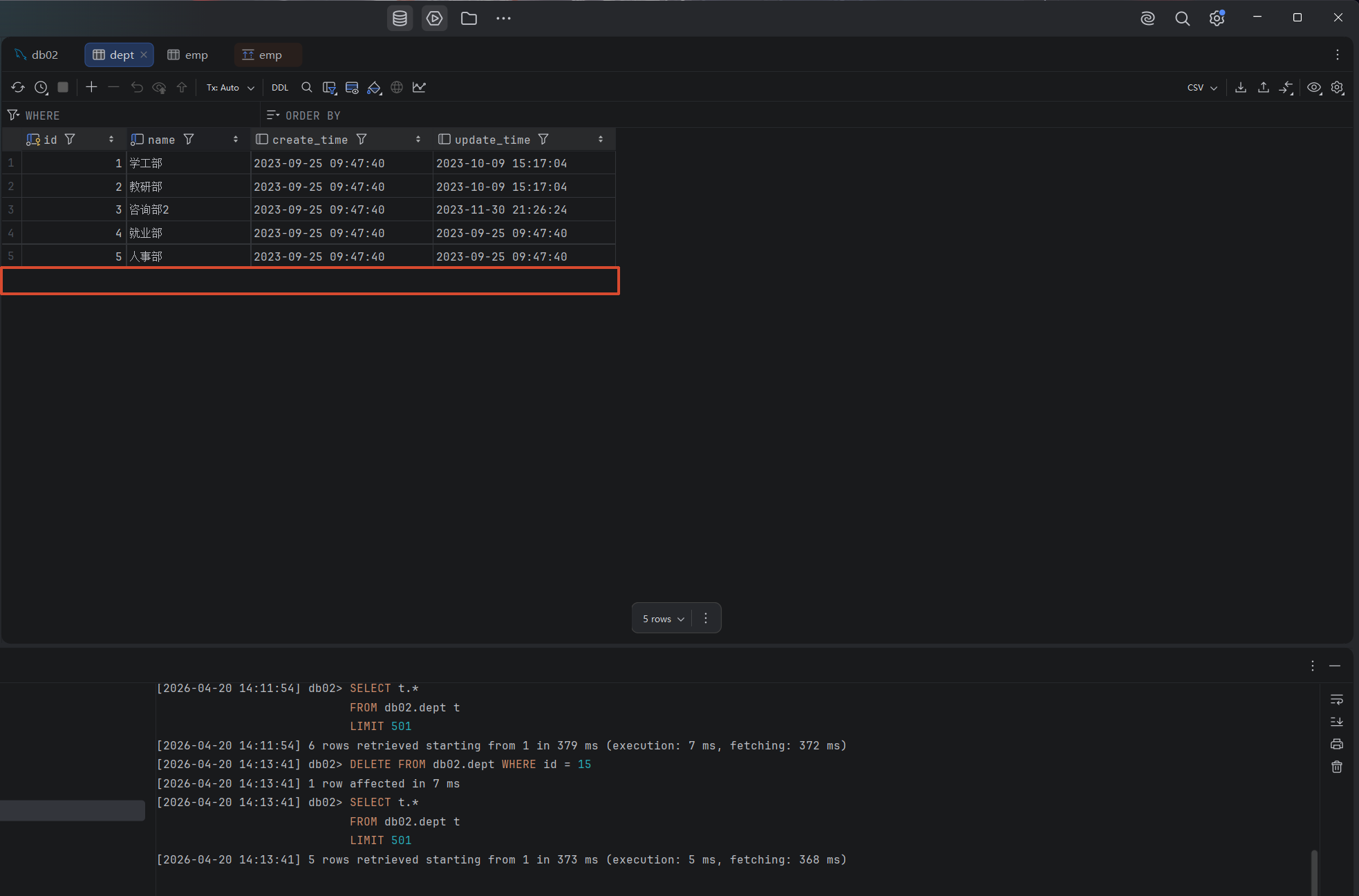
但此时还是可以删除没有外键约束的部门表:

例如删除员工表中没有的id:15
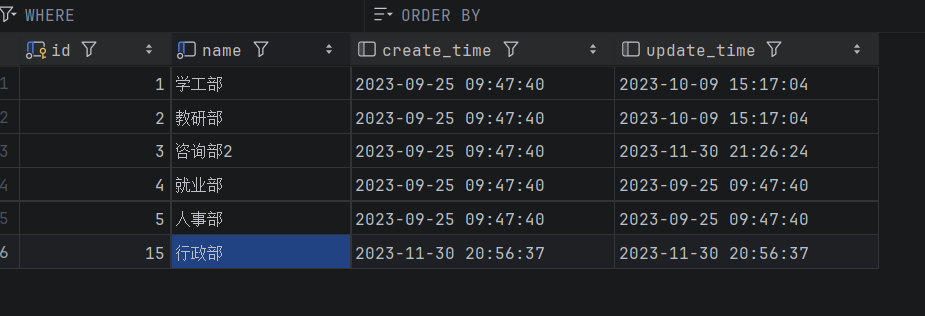
可以发现并没有报错
方式2:图形化界面操作

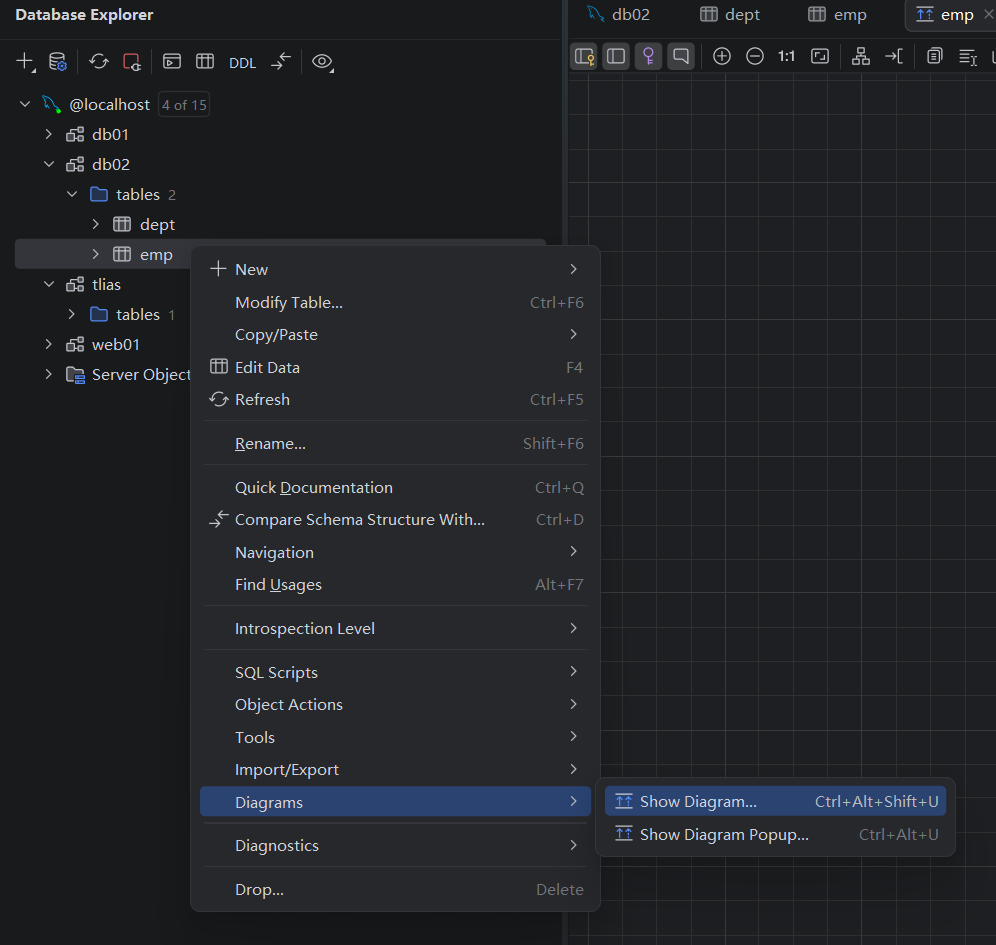
在左侧菜单栏,在emp表上右键,选择 modify Table... (old UI)
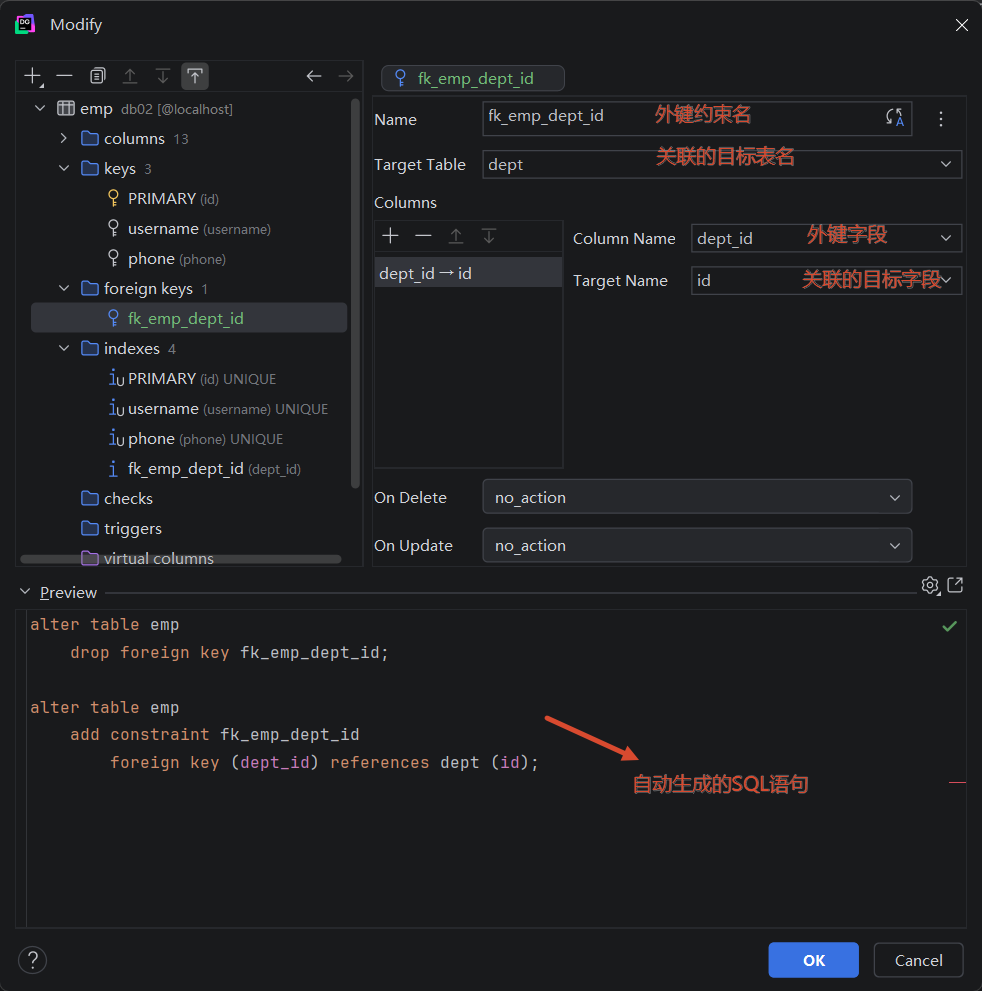
外键约束
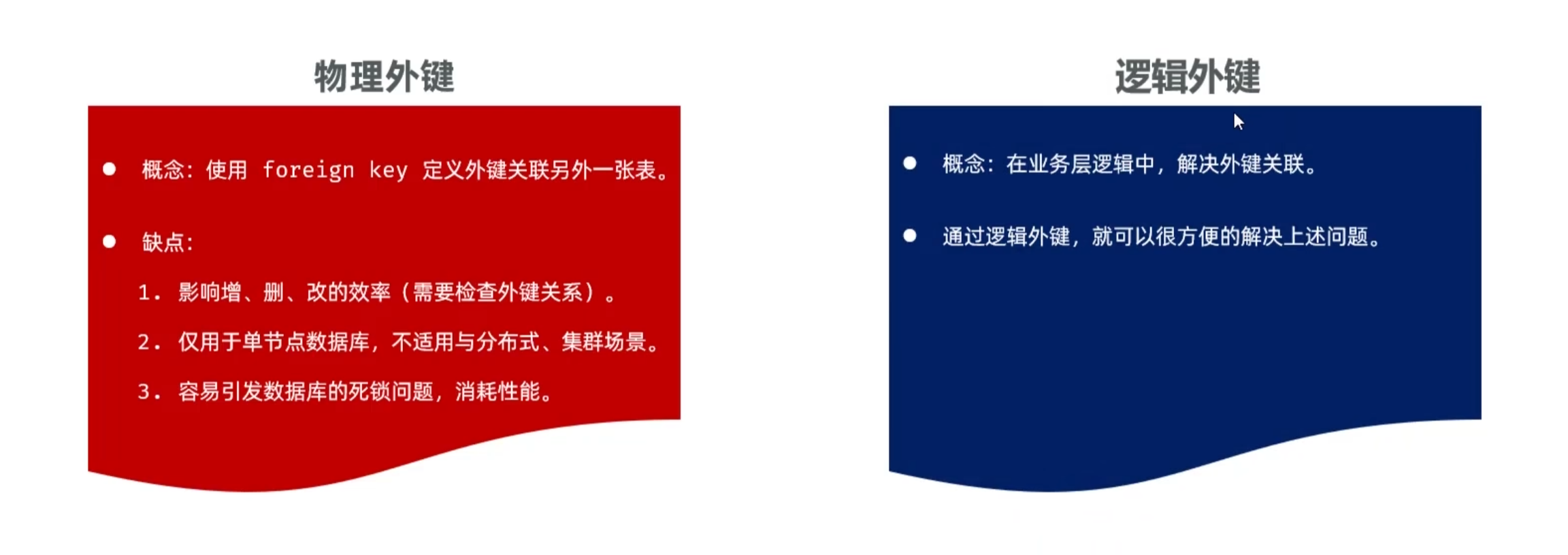
注意:在现在的企业开发中,很少会使用物理外键,都是使用逻辑外键。 甚至在一些数据库开发规范中,会明确指出禁止使用物理外键 foreign key

一对一

  • 案例: 用户与身份证信息 的关系
  • 关系: 一对一关系,多用于单表拆分,将一张表的基础字段放在一张表中,其他字段放在另一张表中,以提升操作效率
  • 实现: 在任意一方加入外键,关联另外一方的主键,并且设置外键为唯一的(UNIQUE)

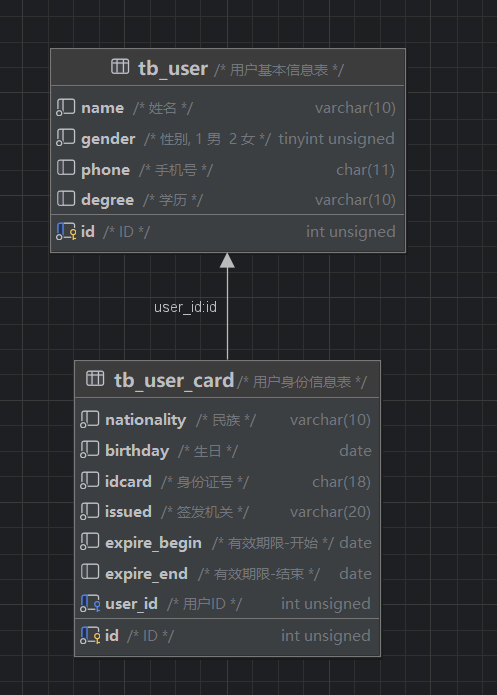
一对一的应用场景: 用户表(基本信息+身份信息)

  • 基本信息:用户的ID、姓名、性别、手机号、学历
  • 身份信息:民族、生日、身份证号、身份证签发机关,身份证的有效期(开始时间、结束时间)

如果在业务系统当中,对用户的基本信息查询频率特别的高,但是对于用户的身份信息查询频率很低,此时出于提高查询效率的考虑,我就可以将这张大表拆分成两张小表,第一张表存放的是用户的基本信息,而第二张表存放的就是用户的身份信息。他们两者之间一对一的关系,一个用户只能对应一个身份证,而一个身份证也只能关联一个用户。

那么在数据库层面怎么去体现上述两者之间是一对一的关系呢?

其实一对一我们可以看成一种特殊的一对多。一对多我们是怎么设计表关系的?是不是在多的一方添加外键。同样我们也可以通过外键来体现一对一之间的关系,我们只需要在任意一方来添加一个外键就可以了。

SQL脚本:

 1
 2
 3
 4
 5
 6
 7
 8
 9
10
11
12
13
14
15
16
17
18
19
20
21
22
23
24
25
26
27
28
29
30
31
-- 用户基本信息表
create table tb_user(
    id int unsigned  primary key auto_increment comment 'ID',
    name varchar(10) not null comment '姓名',
    gender tinyint unsigned not null comment '性别, 1 男  2 女',
    phone char(11) comment '手机号',
    degree varchar(10) comment '学历'
) comment '用户基本信息表';
-- 测试数据
insert into tb_user values (1,'白眉鹰王',1,'18812340001','初中'),
                        (2,'青翼蝠王',1,'18812340002','大专'),
                        (3,'金毛狮王',1,'18812340003','初中'),
                        (4,'紫衫龙王',2,'18812340004','硕士');

-- 用户身份信息表
create table tb_user_card(
    id int unsigned  primary key auto_increment comment 'ID',
    nationality varchar(10) not null comment '民族',
    birthday date not null comment '生日',
    idcard char(18) not null comment '身份证号',
    issued varchar(20) not null comment '签发机关',
    expire_begin date not null comment '有效期限-开始',
    expire_end date comment '有效期限-结束',
    user_id int unsigned not null unique comment '用户ID',
    constraint fk_user_id foreign key (user_id) references tb_user(id)
) comment '用户身份信息表';
-- 测试数据
insert into tb_user_card values (1,'汉','1960-11-06','100000100000100001','朝阳区公安局','2000-06-10',null,1),
        (2,'汉','1971-11-06','100000100000100002','静安区公安局','2005-06-10','2025-06-10',2),
        (3,'汉','1963-11-06','100000100000100003','昌平区公安局','2006-06-10',null,3),
        (4,'回','1980-11-06','100000100000100004','海淀区公安局','2008-06-10','2028-06-10',4);

多对多

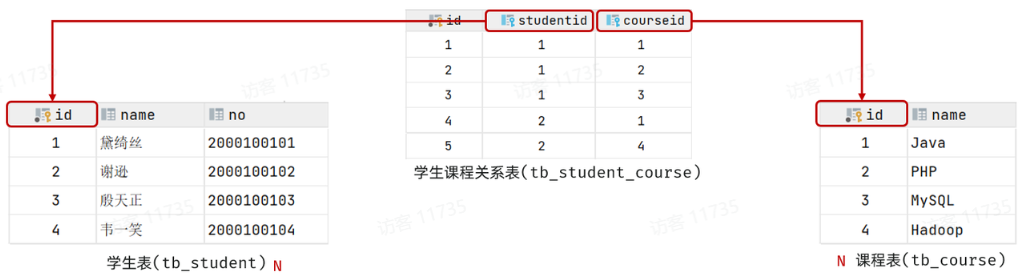
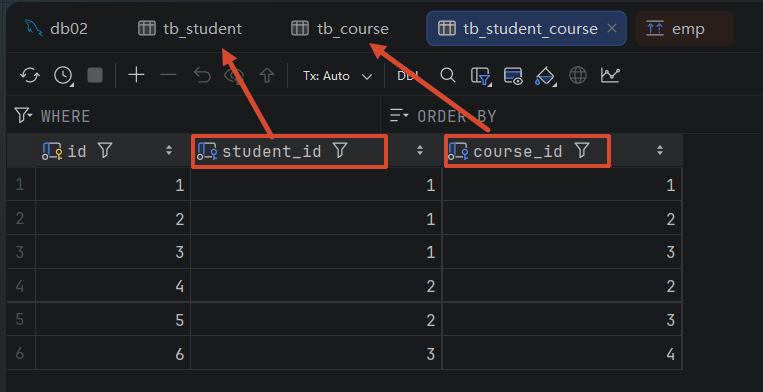
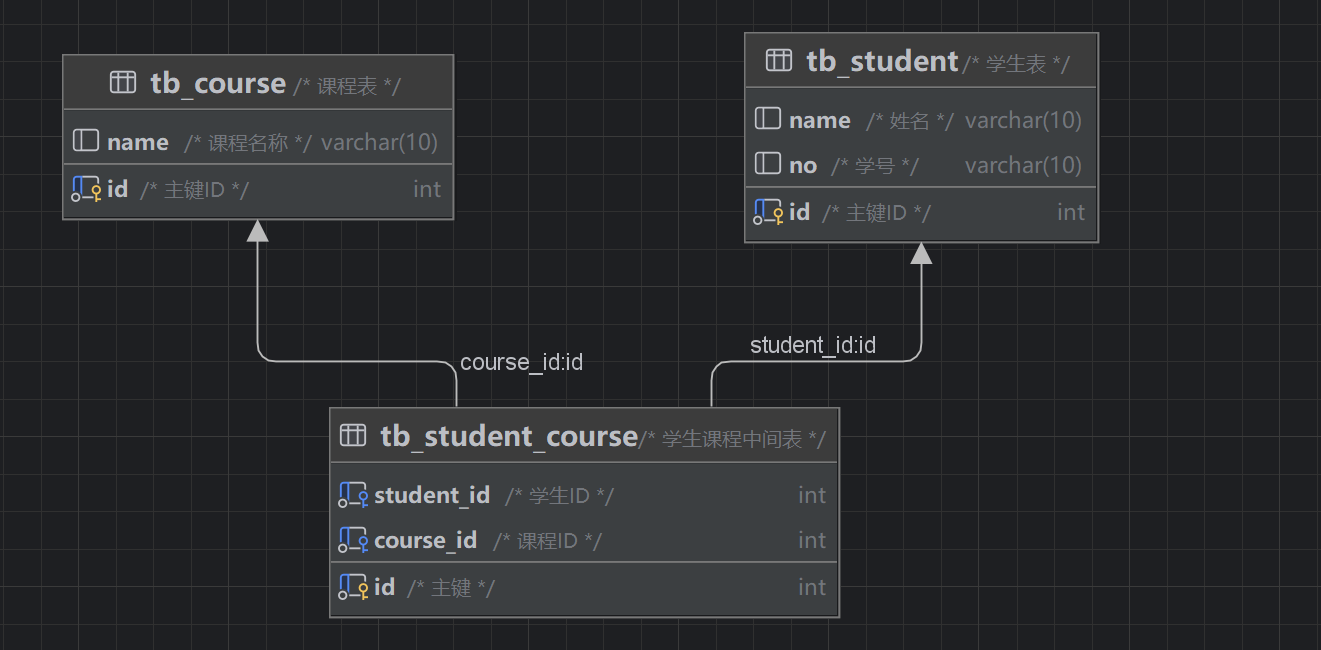
  • 案例: 学生 与 课程的关系
  • 关系: 一个学生可以选修多门课程,一门课程也可以供多个学生选择
  • 实现: 建立第三张中间表,中间表至少包含两个外键,分别关联两方主键

 1
 2
 3
 4
 5
 6
 7
 8
 9
10
11
12
13
14
15
16
17
18
19
20
21
22
23
24
25
26
27
28
29
30
31
-- 学生表
create table tb_student(
    id int auto_increment primary key comment '主键ID',
    name varchar(10) comment '姓名',
    no varchar(10) comment '学号'
) comment '学生表';
-- 学生表测试数据
insert into tb_student(name, no) values ('黛绮丝', '2000100101'),
                                        ('谢逊', '2000100102'),
                                        ('殷天正', '2000100103'),
                                        ('韦一笑', '2000100104');

-- 课程表
create table tb_course(
   id int auto_increment primary key comment '主键ID',
   name varchar(10) comment '课程名称'
) comment '课程表';
-- 课程表测试数据
insert into tb_course (name) values ('Java'), ('PHP'), ('MySQL') , ('Hadoop');

-- 学生课程表(中间表)
create table tb_student_course(
   id int auto_increment comment '主键' primary key,
   student_id int not null comment '学生ID',
   course_id  int not null comment '课程ID',
   constraint fk_courseid foreign key (course_id) references tb_course (id),
   constraint fk_studentid foreign key (student_id) references tb_student (id)
)comment '学生课程中间表';

-- 学生课程表测试数据
insert into tb_student_course(student_id, course_id) values (1,1),(1,2),(1,3),(2,2),(2,3),(3,4);

案例

  • 需求:请根据资料中提供的页面原型,设计员工模块涉及到的表结构

  • 步骤:

    • 阅读页面原型及需求文档,分析各个模块涉及到的表结构,及表结构之间的关系。
    • 根据页面原型及需求文档,分析各个表结构中具体的字段及约束。
  • 分析:

    涉及到的模块有:

    • 部门管理

    部门管理涉及到一张部门表,这个前面我们都已经设计过了。 无需再进行设计了。

    • 员工管理

    上述在员工列表查询的页面原型,当我们点击 “新增员工” 按钮时,会弹出一个新增员工的表单,表单展示形式如下:
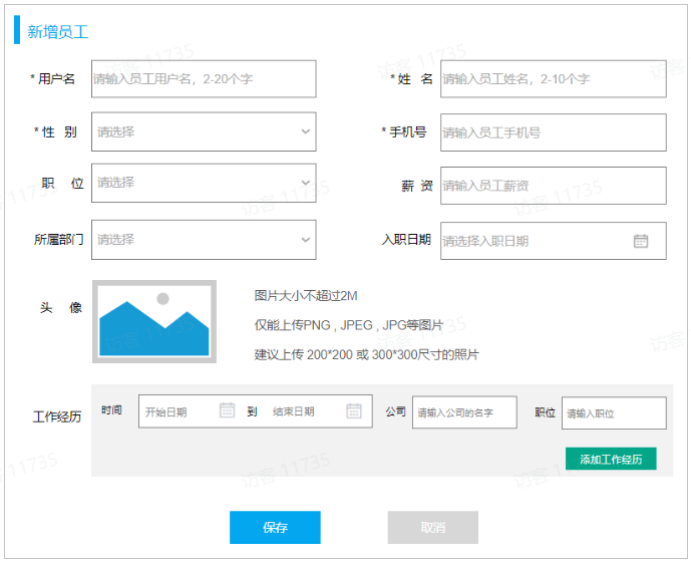
    ​ 在上述的页面原型中,我们可以看到,每一个员工是归属于某一个部门的,而一个部门下可以有多个员工,所以部门与员工之间的关系是一对多的关系。

    ​ 从页面员工中,我们可以看到,员工还有工作经历的信息。而每一个员工,是可以添加多个工作经历的。 所以,工作经历我们可以再设计一张表,而员工与员工的工作经历之间的关系,是一对多的关系。

    ​ 那么,这里总共会涉及三张表,分别是:部门表、员工表、员工工作经历表。

    ​ 最终,具体的表结构如下:

     1
     2
     3
     4
     5
     6
     7
     8
     9
    10
    11
    12
    13
    14
    15
    16
    17
    18
    19
    20
    21
    22
    23
    24
    25
    26
    27
    28
    29
    30
    31
    32
    33
    34
    
    -- 部门表
    create table dept (
      id int unsigned PRIMARY KEY AUTO_INCREMENT COMMENT 'ID, 主键',
      name varchar(10) NOT NULL UNIQUE COMMENT '部门名称',
      create_time datetime COMMENT '创建时间',
      update_time datetime COMMENT '修改时间'
    ) COMMENT '部门表';
    
    -- 员工表
    create table emp(
        id int unsigned primary key auto_increment comment 'ID,主键',
        username varchar(20) not null unique comment '用户名',
        password varchar(50) default '123456' comment '密码',
        name varchar(10) not null comment '姓名',
        gender tinyint unsigned not null comment '性别, 1:男, 2:女',
        phone char(11) not null unique comment '手机号',
        job tinyint unsigned comment '职位, 1 班主任, 2 讲师 , 3 学工主管, 4 教研主管, 5 咨询师',
        salary int unsigned comment '薪资',
        image varchar(300) comment '头像',
        entry_date date comment '入职日期',
        dept_id int unsigned comment '部门ID',  -- 关联的是dept部门表的ID
        create_time datetime comment '创建时间',
        update_time datetime comment '修改时间'
    ) comment '员工表';
    
    -- 员工工作经历表
    create table emp_expr(
        id int unsigned primary key auto_increment comment 'ID, 主键',
        emp_id  int unsigned null comment '员工ID', -- 关联的是emp员工表的ID
        begin  date null comment '开始时间',
        end date null comment '结束时间',
        company varchar(50) null comment '公司名称',
        job varchar(50) null comment '职位'
    ) comment '工作经历';
    

注意:在上述的表结构设计中,我们使用的都是逻辑外键。

多表查询

概述

数据准备

 1
 2
 3
 4
 5
 6
 7
 8
 9
10
11
12
13
14
15
16
17
18
19
20
21
22
23
24
25
26
27
28
29
30
31
32
33
34
35
36
37
38
39
40
41
42
43
44
45
46
47
48
49
50
51
52
53
54
55
56
57
58
59
60
61
62
63
64
65
-- 部门管理
create table dept(
    id int unsigned primary key auto_increment comment 'ID, 主键',
    name varchar(10) not null unique comment '部门名称',
    create_time datetime comment '创建时间',
    update_time datetime comment '修改时间'
) comment '部门表' ;

insert into dept (id, name, create_time, update_time) values
        (1,'学工部',now(),now()),
        (2,'教研部',now(),now()),
        (3,'咨询部',now(),now()),
        (4,'就业部',now(),now()),
        (5,'人事部',now(),now());


-- 员工管理
create table emp(
    id int unsigned primary key auto_increment comment 'ID,主键',
    username varchar(20) not null unique comment '用户名',
    password varchar(32) not null comment '密码',
    name varchar(10) not null comment '姓名',
    gender tinyint unsigned not null comment '性别, 1:男, 2:女',
    phone char(11) not null unique comment '手机号',
    job tinyint unsigned comment '职位, 1:班主任,2:讲师,3:学工主管,4:教研主管,5:咨询师',
    salary int unsigned comment '薪资',
    image varchar(255) comment '头像',
    entry_date date comment '入职日期',
    dept_id int unsigned COMMENT '关联的部门ID',
    create_time datetime comment '创建时间',
    update_time datetime comment '修改时间'
) comment '员工表';


-- 准备测试数据
INSERT INTO `emp` VALUES (1,'shinaian','123456','施耐庵',1,'13309090001',4,15000,'https://dawn-itcast.oss-cn-hangzhou.aliyuncs.com/01.png','2000-01-01',2,'2024-10-27 16:35:33','2024-10-27 16:35:35'),
          (2,'songjiang','123456','宋江',1,'13309090002',2,8600,'https://dawn-itcast.oss-cn-hangzhou.aliyuncs.com/01.png','2015-01-01',2,'2024-10-27 16:35:33','2024-10-27 16:35:37'),
          (3,'lujunyi','123456','卢俊义',1,'13309090003',2,8900,'https://dawn-itcast.oss-cn-hangzhou.aliyuncs.com/01.png','2008-05-01',2,'2024-10-27 16:35:33','2024-10-27 16:35:39'),
          (4,'wuyong','123456','吴用',1,'13309090004',2,9200,'https://dawn-itcast.oss-cn-hangzhou.aliyuncs.com/01.png','2007-01-01',2,'2024-10-27 16:35:33','2024-10-27 16:35:41'),
          (5,'gongsunsheng','123456','公孙胜',1,'13309090005',2,9500,'https://dawn-itcast.oss-cn-hangzhou.aliyuncs.com/01.png','2012-12-05',2,'2024-10-27 16:35:33','2024-10-27 16:35:43'),
          (6,'huosanniang','123456','扈三娘',2,'13309090006',3,6500,'https://dawn-itcast.oss-cn-hangzhou.aliyuncs.com/01.png','2013-09-05',1,'2024-10-27 16:35:33','2024-10-27 16:35:45'),
          (7,'chaijin','123456','柴进',1,'13309090007',1,4700,'https://dawn-itcast.oss-cn-hangzhou.aliyuncs.com/01.png','2005-08-01',1,'2024-10-27 16:35:33','2024-10-27 16:35:47'),
          (8,'likui','123456','李逵',1,'13309090008',1,4800,'https://dawn-itcast.oss-cn-hangzhou.aliyuncs.com/01.png','2014-11-09',1,'2024-10-27 16:35:33','2024-10-27 16:35:49'),
          (9,'wusong','123456','武松',1,'13309090009',1,4900,'https://dawn-itcast.oss-cn-hangzhou.aliyuncs.com/01.png','2011-03-11',1,'2024-10-27 16:35:33','2024-10-27 16:35:51'),
          (10,'lichong','123456','林冲',1,'13309090010',1,5000,'https://dawn-itcast.oss-cn-hangzhou.aliyuncs.com/01.png','2013-09-05',1,'2024-10-27 16:35:33','2024-10-27 16:35:53'),
          (11,'huyanzhuo','123456','呼延灼',1,'13309090011',2,9700,'https://dawn-itcast.oss-cn-hangzhou.aliyuncs.com/01.png','2007-02-01',2,'2024-10-27 16:35:33','2024-10-27 16:35:55'),
          (12,'xiaoliguang','123456','小李广',1,'13309090012',2,10000,'https://dawn-itcast.oss-cn-hangzhou.aliyuncs.com/01.png','2008-08-18',2,'2024-10-27 16:35:33','2024-10-27 16:35:57'),
          (13,'yangzhi','123456','杨志',1,'13309090013',1,5300,'https://dawn-itcast.oss-cn-hangzhou.aliyuncs.com/01.png','2012-11-01',1,'2024-10-27 16:35:33','2024-10-27 16:35:59'),
          (14,'shijin','123456','史进',1,'13309090014',2,10600,'https://dawn-itcast.oss-cn-hangzhou.aliyuncs.com/01.png','2002-08-01',2,'2024-10-27 16:35:33','2024-10-27 16:36:01'),
          (15,'sunerniang','123456','孙二娘',2,'13309090015',2,10900,'https://dawn-itcast.oss-cn-hangzhou.aliyuncs.com/01.png','2011-05-01',2,'2024-10-27 16:35:33','2024-10-27 16:36:03'),
          (16,'luzhishen','123456','鲁智深',1,'13309090016',2,9600,'https://dawn-itcast.oss-cn-hangzhou.aliyuncs.com/01.png','2010-01-01',2,'2024-10-27 16:35:33','2024-10-27 16:36:05'),
          (17,'liying','12345678','李应',1,'13309090017',1,5800,'https://dawn-itcast.oss-cn-hangzhou.aliyuncs.com/01.png','2015-03-21',1,'2024-10-27 16:35:33','2024-10-27 16:36:07'),
          (18,'shiqian','123456','时迁',1,'13309090018',2,10200,'https://dawn-itcast.oss-cn-hangzhou.aliyuncs.com/01.png','2015-01-01',2,'2024-10-27 16:35:33','2024-10-27 16:36:09'),
          (19,'gudasao','123456','顾大嫂',2,'13309090019',2,10500,'https://dawn-itcast.oss-cn-hangzhou.aliyuncs.com/01.png','2008-01-01',2,'2024-10-27 16:35:33','2024-10-27 16:36:11'),
          (20,'ruanxiaoer','123456','阮小二',1,'13309090020',2,10800,'https://dawn-itcast.oss-cn-hangzhou.aliyuncs.com/01.png','2018-01-01',2,'2024-10-27 16:35:33','2024-10-27 16:36:13'),
          (21,'ruanxiaowu','123456','阮小五',1,'13309090021',5,5200,'https://dawn-itcast.oss-cn-hangzhou.aliyuncs.com/01.png','2015-01-01',3,'2024-10-27 16:35:33','2024-10-27 16:36:15'),
          (22,'ruanxiaoqi','123456','阮小七',1,'13309090022',5,5500,'https://dawn-itcast.oss-cn-hangzhou.aliyuncs.com/01.png','2016-01-01',3,'2024-10-27 16:35:33','2024-10-27 16:36:17'),
          (23,'ruanji','123456','阮籍',1,'13309090023',5,5800,'https://dawn-itcast.oss-cn-hangzhou.aliyuncs.com/01.png','2012-01-01',3,'2024-10-27 16:35:33','2024-10-27 16:36:19'),
          (24,'tongwei','123456','童威',1,'13309090024',5,5000,'https://dawn-itcast.oss-cn-hangzhou.aliyuncs.com/01.png','2006-01-01',3,'2024-10-27 16:35:33','2024-10-27 16:36:21'),
          (25,'tongmeng','123456','童猛',1,'13309090025',5,4800,'https://dawn-itcast.oss-cn-hangzhou.aliyuncs.com/01.png','2002-01-01',3,'2024-10-27 16:35:33','2024-10-27 16:36:23'),
          (26,'yanshun','123456','燕顺',1,'13309090026',5,5400,'https://dawn-itcast.oss-cn-hangzhou.aliyuncs.com/01.png','2011-01-01',3,'2024-10-27 16:35:33','2024-10-27 16:36:25'),
          (27,'lijun','123456','李俊',1,'13309090027',5,6600,'https://dawn-itcast.oss-cn-hangzhou.aliyuncs.com/01.png','2004-01-01',3,'2024-10-27 16:35:33','2024-10-27 16:36:27'),
          (28,'lizhong','123456','李忠',1,'13309090028',5,5000,'https://dawn-itcast.oss-cn-hangzhou.aliyuncs.com/01.png','2007-01-01',3,'2024-10-27 16:35:33','2024-10-27 16:36:29'),
          (29,'songqing','123456','宋清',1,'13309090029',NULL,5100,'https://dawn-itcast.oss-cn-hangzhou.aliyuncs.com/01.png','2020-01-01',NULL,'2024-10-27 16:35:33','2024-10-27 16:36:31'),
          (30,'liyun','123456','李云',1,'13309090030',NULL,NULL,'https://dawn-itcast.oss-cn-hangzhou.aliyuncs.com/01.png','2020-03-01',NULL,'2024-10-27 16:35:33','2024-10-27 16:36:31');

介绍

  • 多表查询:查询时从多张表中获取所需数据

单表查询的SQL语句:select 字段列表 from 表名;

那么要执行多表查询,只需要使用逗号分隔多张表即可,如: select 字段列表 from 表1, 表2;

1
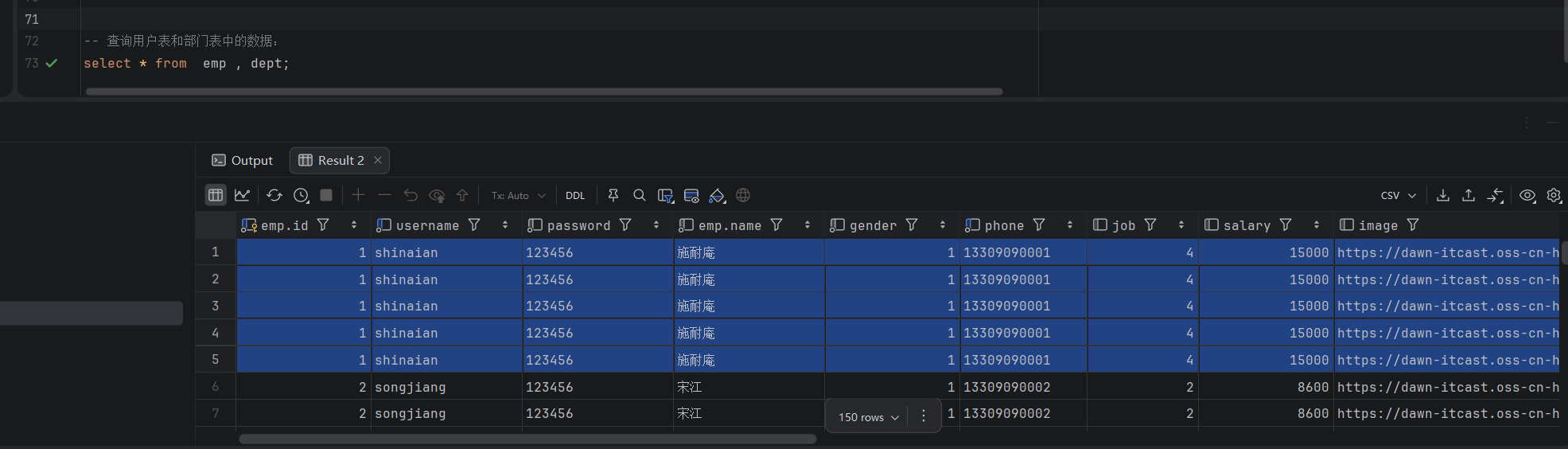
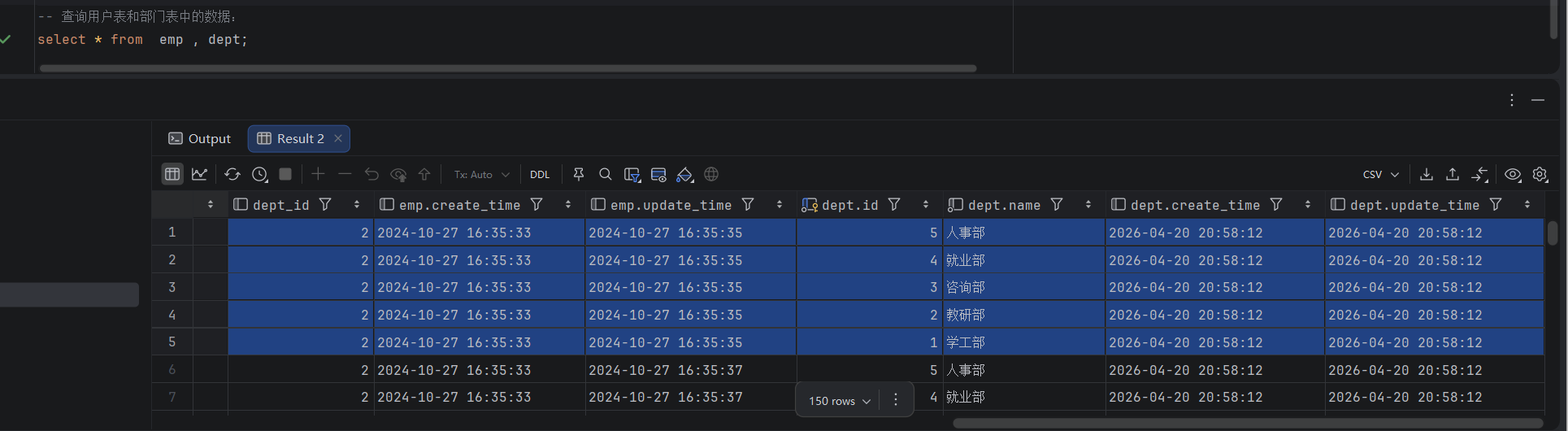
select * from  emp , dept;

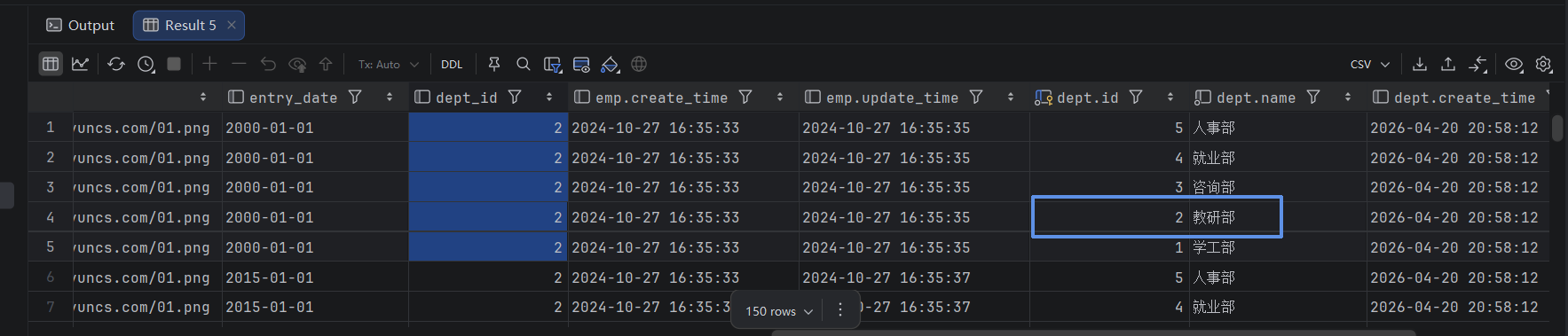
此时,我们看到查询结果中包含了大量的结果集,总共150条记录,而这其实就是员工表所有的记录(30行)与部门表所有记录(5行)的所有组合情况,这种现象称之为笛卡尔积

笛卡尔积:笛卡尔乘积是指在数学中,两个集合(A集合和B集合)的所有组合情况。
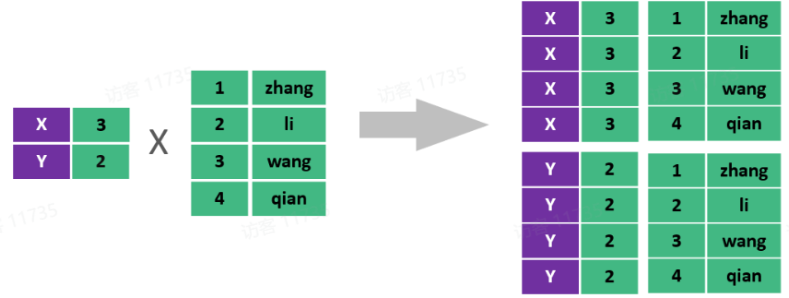
在多表查询时,需要消除无效的笛卡尔积,只保留表关联部分的数据。
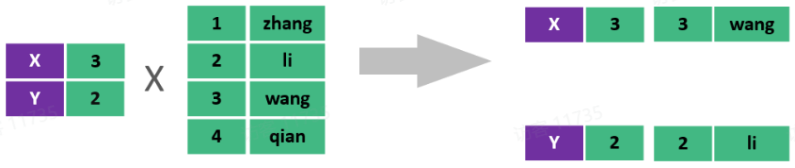
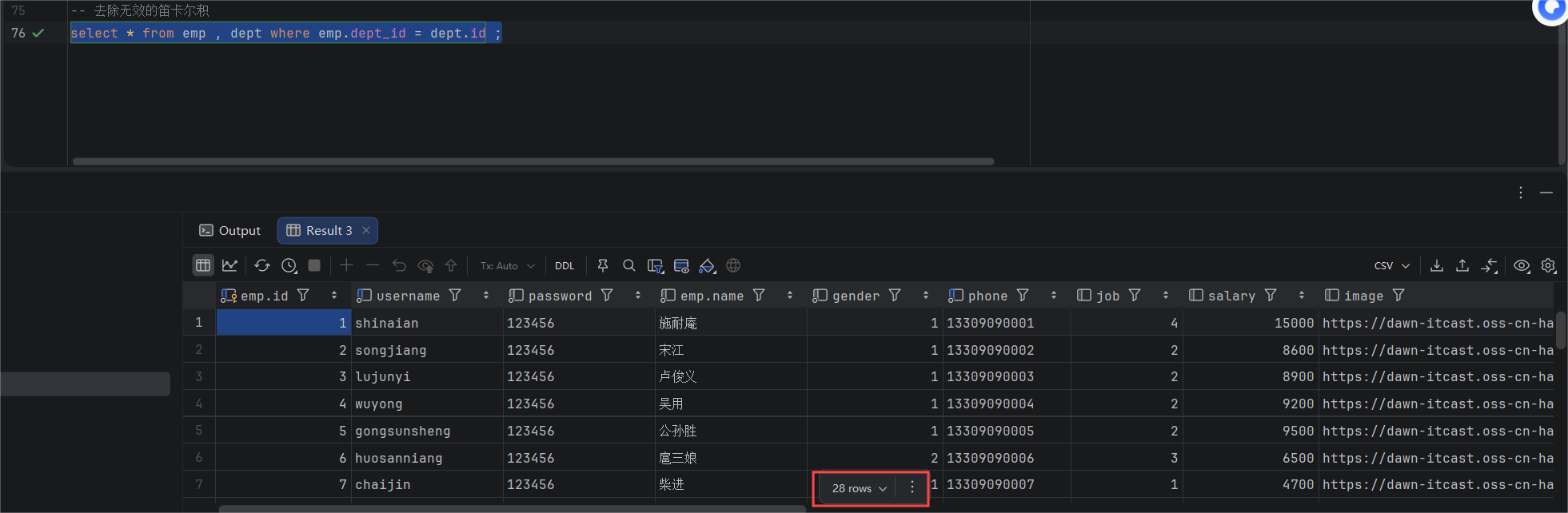
在SQL语句中,如何去除无效的笛卡尔积呢?只需要给多表查询加上连接查询的条件即可。

1
select * from emp , dept where emp.dept_id = dept.id ;

即让员工表中的dept_id字段等于部门表中的主键id即可

这样,我们就查询出来了所有的员工,及其这个员工所属的部门信息。 而由于id为29、30的员工,没有dept_id字段值,所以在多表查询时,根据连接查询的条件并没有查询到。

分类

多表查询可以分为:
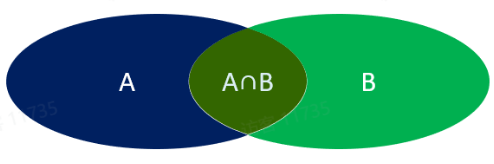
  • 连接查询
    • 内连接:相当于查询A、B交集部分数据【A∩B深绿色】
    • 外连接
      • 左外连接:查询左表所有数据(包括两张表交集部分数据)【A中蓝色】
      • 右外连接:查询右表所有数据(包括两张表交集部分数据)【B中浅绿】
  • 子查询
内连接

内连接查询:查询两表或多表中交集部分数据。

内连接从语法上可以分为:

  • 隐式内连接(常见)
  • 显式内连接

隐式内连接语法:

1
select  字段列表   from   1 , 2   where  条件 ... ;

显式内连接语法:

1
select  字段列表   from   1  [ inner ]  join 2  on  连接条件 ... ;

案例1. 查询所有员工的ID, 姓名 , 及所属的部门名称 (隐式、显式内连接实现)

1
2
3
4
5
-- 隐式
select emp.id,emp.name from emp,dept where emp.dept_id = dept.id;

-- 显示
select emp.id,emp.name from emp inner join dept on emp.dept_id = dept.id;

案例2:查询 性别为男, 且工资 高于8000 的员工的ID, 姓名, 及所属的部门名称(隐式、显式内连接实现)

1
2
3
4
5
-- 隐式
select emp.id,emp.name,dept.name from emp,dept where emp.dept_id = dept.id and emp.gender = 1 and salary > 8000;

-- 显式
select emp.id,emp.name,dept.name from emp join dept on emp.dept_id = dept.id where emp.gender = 1 and salary > 8000;

在多表联查时,我们指定字段时,需要在字段名前面加上表名,来指定具体是哪一张的字段。 如:emp.dept_id

给表起别名简化书写:

1
2
3
select  字段列表 from 1 as 别名1 , 2 as  别名2  where  条件 ... ;

select  字段列表 from 1 别名1 , 2  别名2  where  条件 ... ;  -- as 可以省略

使用了别名的多表查询:

1
select e.id,e.name,d.name from emp e join dept d on e.dept_id = d.id where e.gender = 1 and salary > 8000;

注意事项: 一旦为表起了别名,就不能再使用表名来指定对应的字段了,此时只能够使用别名来指定字段。

外连接
  • 外连接分为两种:左外连接和右外连接。

左外连接语法:

1
select  字段列表   from   1  left  [ outer ]  join 2  on  连接条件 ... ;

左外连接相当于查询表1(左表)的所有数据,当然也包含表1和表2交集部分的数据。

右外连接语法:

1
select  字段列表   from   1  right  [ outer ]  join 2  on  连接条件 ... ;

右外连接相当于查询表2(右表)的所有数据,当然也包含表1和表2交集部分的数据。

案例1:查询员工表所有员工的姓名, 和对应的部门名称 (左外连接)

1
select e.name,d.name from emp e left outer join dept d on e.dept_id = d.id

案例2:查询部门表所有部门的名称, 和对应的员工名称 (右外连接)

1
select d.name,e.name from emp e right  join dept d on e.dept_id = d.id

案例3:查询工资高于8000的所有员工的姓名, 和对应的部门名称 (左外连接)

1
select e.name,d.name from emp e left  join dept d on e.dept_id = d.id where e.salary > 8000;

注意事项:

左外连接和右外连接是可以相互替换的,只需要调整连接查询时SQL语句中表的先后顺序就可以了。而我们在日常开发使用时,更偏向于左外连接。

子查询
  • 介绍:SQL语句中嵌套select语句,称为嵌套查询,又称子查询。
  • 形式:select * from t1 where column1 = (select column1 from t2 …);
  • 说明:子查询外部的语句可以是insert / update / delete / select 的任何一个,最常见的是 select。
  • 分类:
    • 标量子查询:子查询返回的结果为单个值
    • 列子查询:子查询返回的结果为一列
    • 行子查询:子查询返回的结果为一行
    • 表子查询:子查询返回的结果为多行多列

提示:子查询的要点是,先对需求做拆分,明确具体的步骤,然后再逐步编写SQL语句。

标量子查询

子查询返回的结果是单个值(数字、字符串、日期等),最简单的形式,这种子查询称为标量子查询

常用的操作符: = <> > >= < <=

案例1:查询最早入职的员工信息

1
2
3
4
5
6
7
-- a.获取最早入职时间
select min(entry_date) from emp;

-- b.查询最早入职的员工信息
select * from emp where entry_date = '2000-01-01';

select * from emp where entry_date = (select min(entry_date) from emp);

案例2:询在"阮小五"入职之后入职的员工信息

1
2
3
4
5
6
select emp.entry_date from emp where name = '阮小五';

-- b.查询在该时间之后入职的员工信息
select * from emp where entry_date > '2015-01-01';

select * from emp where entry_date > (select emp.entry_date from emp where name = '阮小五');

列子查询

子查询返回的结果是一列(可以是多行),这种子查询称为列子查询。

常用的操作符:

操作符 描述
in 在指定的范围之内,多选一
not in 不在指定的集合范围之内

案例:查询"教研部"和"咨询部"的所有员工信息

1
2
3
4
5
6
-- a.查询"教研部"和"咨询部"的部门ID
select dept.id from dept where name ='教研部' or name = '咨询部';
-- b.查询指定部门ID的员工信息
select * from emp,dept where dept.id in(2,3);

select * from emp,dept where dept.id in(select dept.id from dept where name ='教研部' or name = '咨询部');

行子查询

子查询返回的结果是一行(可以是多列),这种子查询称为行子查询。

常用的操作符:= 、<> 、IN 、NOT IN

案例:查询与"李忠"的薪资及职位都相同的员工信息

1
2
3
4
5
6
-- a. 查询"李忠"的薪资和职位
select salary,job from emp where name = '李忠';
-- b. 查询指定薪资和职位的员工信息
select * from emp where salary = 5000 and job = 5;

select * from emp where salary = (select salary from emp where name = '李忠') and job = (select job from emp where name = '李忠');
1
2
3
4
5
-- 优化:
select salary,job from emp where name = '李忠';
select * from emp where (salary, job) = (5000,5);

select * from emp where (salary, job) = (select salary , job from emp where name = '李忠');

表子查询

子查询返回的结果是多行多列,常作为临时表,这种子查询称为表子查询

案例:获取每个部门中薪资最高的员工信息

1
2
3
4
5
6
-- a.获取每个部门的最高薪资
select dept_id,max(salary) from emp group by dept_id;

-- b.查询每个部门中薪资最高的员工信息
select * from emp e,(select dept_id,max(salary) max_sal from emp group by dept_id) a
    where e.dept_id = a.dept_id and e.salary = a.max_sal;

在完成a后,将a的查询结果视为一张新的表,再去完成b

案例

根据需求,完成多表查询的SQL语句的编写。

    1. 查询 “教研部” 性别为 男,且在 “2011-05-01” 之后入职的员工信息 。
    1
    2
    
    -- 表:dept,emp
    select e.* from emp e,dept d where e.dept_id = d.id and d.name = '教研部' and gender = 1 and entry_date > '2011-05-01' ;
    
    1. 查询工资 低于公司平均工资的且性别为男 的员工信息 。
    1
    2
    3
    4
    5
    6
    7
    8
    
    -- 表:emp
    -- 2.1 查询公司平均工资
    select  avg(salary) from emp;
    
    -- 2.2 查询工资低于公司平均工资的且性别为男的员工信息
    select * from emp where salary < 7548.2759 and gender = 1;
    
    select * from emp where salary < (select  avg(salary) from emp) and gender = 1;
    
    1. 查询部门人数超过10人的部门名称 。
    1
    2
    
    -- 表:dept,emp
    select d.name,count(*) from emp e,dept d where e.dept_id = d.id group by d.name having count(*) > 10;
    
    1. 查询在 “2010-05-01” 后入职,且薪资高于 10000 的 “教研部” 员工信息,并根据薪资倒序排序。
    1
    2
    
    select e.* from emp e,dept d where e.dept_id = d.id and entry_date > '2010-05-01'
                                and e.salary > 10000 and d.name = '教研部' order by salary desc;
    
    1. 查询工资 低于本部门平均工资的员工信息 。【难】(类似于上面的表子查询)
    1
    2
    
    select e.* from emp e,(select dept_id,avg(salary) avg_sal from emp group by dept_id) as a
            where e.dept_id = a.dept_id and e.salary < a.avg_sal
    

员工列表查询

具体的需求如下:
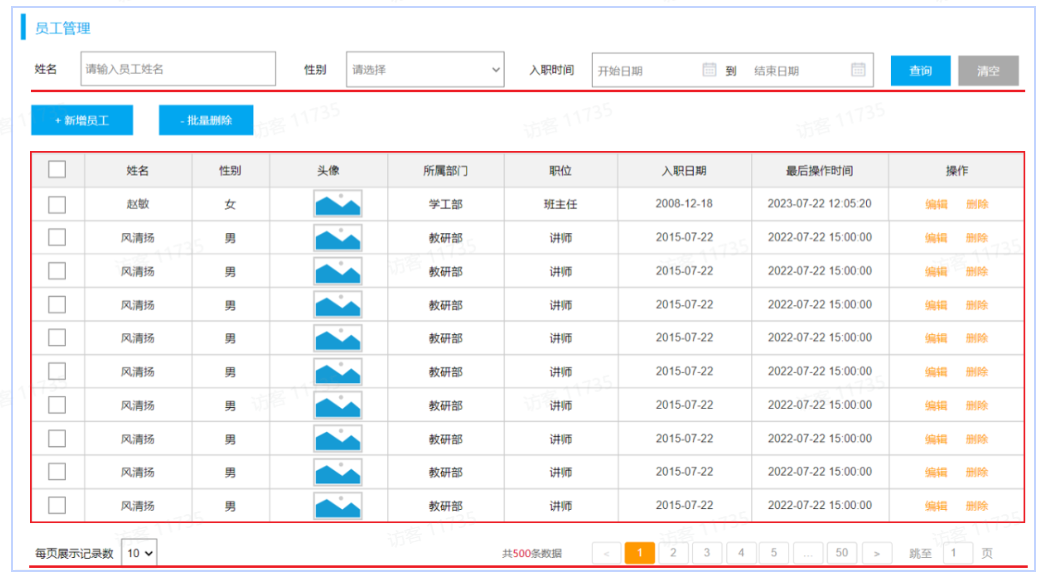
在查询员工列表数据时,既需要查询 员工的基本信息,还需要查询员工所属的部门名称,所以这里呢,会涉及到多表查询的操作。

而且,在查询员工列表数据时,既要考虑搜索栏中的查询条件,还要考虑对查询的结果进行分页处理。

那么接下来,我们在实现这个功能时,将会分为三个部分来逐一实现:

准备工作

需求:查询所有员工信息,并查询出部门名称。(涉及到的表:emp、dept)
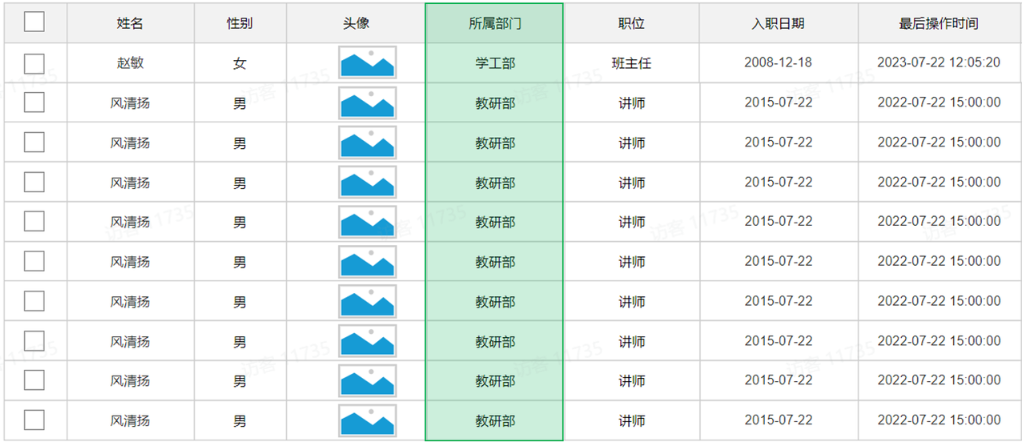
基础代码准备

1). 创建员工管理相关表结构

 1
 2
 3
 4
 5
 6
 7
 8
 9
10
11
12
13
14
15
16
17
18
19
20
21
22
23
24
25
26
27
28
29
30
31
32
33
34
35
36
37
38
39
40
41
42
43
44
45
46
47
48
49
50
51
52
53
54
55
56
57
58
59
60
-- 员工表
create table emp(
    id int unsigned primary key auto_increment comment 'ID,主键',
    username varchar(20) not null unique comment '用户名',
    password varchar(50) default '123456' comment '密码',
    name varchar(10) not null comment '姓名',
    gender tinyint unsigned not null comment '性别, 1:男, 2:女',
    phone char(11) not null unique comment '手机号',
    job tinyint unsigned comment '职位, 1 班主任, 2 讲师 , 3 学工主管, 4 教研主管, 5 咨询师',
    salary int unsigned comment '薪资',
    image varchar(300) comment '头像',
    entry_date date comment '入职日期',
    dept_id int unsigned comment '部门ID',
    create_time datetime comment '创建时间',
    update_time datetime comment '修改时间'
) comment '员工表';


INSERT INTO emp VALUES 
    (1,'shinaian','123456','施耐庵',1,'13309090001',4,15000,'https://web-framework.oss-cn-hangzhou.aliyuncs.com/2023/1.jpg','2000-01-01',2,'2023-10-20 16:35:33','2023-11-16 16:11:26'),
    (2,'songjiang','123456','宋江',1,'13309090002',2,8600,'https://web-framework.oss-cn-hangzhou.aliyuncs.com/2023/1.jpg','2015-01-01',2,'2023-10-20 16:35:33','2023-10-20 16:35:37'),
    (3,'lujunyi','123456','卢俊义',1,'13309090003',2,8900,'https://web-framework.oss-cn-hangzhou.aliyuncs.com/2023/1.jpg','2008-05-01',2,'2023-10-20 16:35:33','2023-10-20 16:35:39'),
    (4,'wuyong','123456','吴用',1,'13309090004',2,9200,'https://web-framework.oss-cn-hangzhou.aliyuncs.com/2023/1.jpg','2007-01-01',2,'2023-10-20 16:35:33','2023-10-20 16:35:41'),
    (5,'gongsunsheng','123456','公孙胜',1,'13309090005',2,9500,'https://web-framework.oss-cn-hangzhou.aliyuncs.com/2023/1.jpg','2012-12-05',2,'2023-10-20 16:35:33','2023-10-20 16:35:43'),
    (6,'huosanniang','123456','扈三娘',2,'13309090006',3,6500,'https://web-framework.oss-cn-hangzhou.aliyuncs.com/2023/1.jpg','2013-09-05',1,'2023-10-20 16:35:33','2023-10-20 16:35:45'),
    (7,'chaijin','123456','柴进',1,'13309090007',1,4700,'https://web-framework.oss-cn-hangzhou.aliyuncs.com/2023/1.jpg','2005-08-01',1,'2023-10-20 16:35:33','2023-10-20 16:35:47'),
    (8,'likui','123456','李逵',1,'13309090008',1,4800,'https://web-framework.oss-cn-hangzhou.aliyuncs.com/2023/1.jpg','2014-11-09',1,'2023-10-20 16:35:33','2023-10-20 16:35:49'),
    (9,'wusong','123456','武松',1,'13309090009',1,4900,'https://web-framework.oss-cn-hangzhou.aliyuncs.com/2023/1.jpg','2011-03-11',1,'2023-10-20 16:35:33','2023-10-20 16:35:51'),
    (10,'linchong','123456','林冲',1,'13309090010',1,5000,'https://web-framework.oss-cn-hangzhou.aliyuncs.com/2023/1.jpg','2013-09-05',1,'2023-10-20 16:35:33','2023-10-20 16:35:53'),
    (11,'huyanzhuo','123456','呼延灼',1,'13309090011',2,9700,'https://web-framework.oss-cn-hangzhou.aliyuncs.com/2023/1.jpg','2007-02-01',2,'2023-10-20 16:35:33','2023-10-20 16:35:55'),
    (12,'xiaoliguang','123456','小李广',1,'13309090012',2,10000,'https://web-framework.oss-cn-hangzhou.aliyuncs.com/2023/1.jpg','2008-08-18',2,'2023-10-20 16:35:33','2023-10-20 16:35:57'),
    (13,'yangzhi','123456','杨志',1,'13309090013',1,5300,'https://web-framework.oss-cn-hangzhou.aliyuncs.com/2023/1.jpg','2012-11-01',1,'2023-10-20 16:35:33','2023-10-20 16:35:59'),
    (14,'shijin','123456','史进',1,'13309090014',2,10600,'https://web-framework.oss-cn-hangzhou.aliyuncs.com/2023/1.jpg','2002-08-01',2,'2023-10-20 16:35:33','2023-10-20 16:36:01'),
    (15,'sunerniang','123456','孙二娘',2,'13309090015',2,10900,'https://web-framework.oss-cn-hangzhou.aliyuncs.com/2023/1.jpg','2011-05-01',2,'2023-10-20 16:35:33','2023-10-20 16:36:03'),
    (16,'luzhishen','123456','鲁智深',1,'13309090016',2,9600,'https://web-framework.oss-cn-hangzhou.aliyuncs.com/2023/1.jpg','2010-01-01',2,'2023-10-20 16:35:33','2023-10-20 16:36:05'),
    (17,'liying','12345678','李应',1,'13309090017',1,5800,'https://web-framework.oss-cn-hangzhou.aliyuncs.com/2023/1.jpg','2015-03-21',1,'2023-10-20 16:35:33','2023-10-20 16:36:07'),
    (18,'shiqian','123456','时迁',1,'13309090018',2,10200,'https://web-framework.oss-cn-hangzhou.aliyuncs.com/2023/1.jpg','2015-01-01',2,'2023-10-20 16:35:33','2023-10-20 16:36:09'),
    (19,'gudasao','123456','顾大嫂',2,'13309090019',2,10500,'https://web-framework.oss-cn-hangzhou.aliyuncs.com/2023/1.jpg','2008-01-01',2,'2023-10-20 16:35:33','2023-10-20 16:36:11'),
    (20,'ruanxiaoer','123456','阮小二',1,'13309090020',2,10800,'https://web-framework.oss-cn-hangzhou.aliyuncs.com/2023/1.jpg','2018-01-01',2,'2023-10-20 16:35:33','2023-10-20 16:36:13'),
    (21,'ruanxiaowu','123456','阮小五',1,'13309090021',5,5200,'https://web-framework.oss-cn-hangzhou.aliyuncs.com/2023/1.jpg','2015-01-01',3,'2023-10-20 16:35:33','2023-10-20 16:36:15'),
    (22,'ruanxiaoqi','123456','阮小七',1,'13309090022',5,5500,'https://web-framework.oss-cn-hangzhou.aliyuncs.com/2023/1.jpg','2016-01-01',3,'2023-10-20 16:35:33','2023-10-20 16:36:17'),
    (23,'ruanji','123456','阮籍',1,'13309090023',5,5800,'https://web-framework.oss-cn-hangzhou.aliyuncs.com/2023/1.jpg','2012-01-01',3,'2023-10-20 16:35:33','2023-10-20 16:36:19'),
    (24,'tongwei','123456','童威',1,'13309090024',5,5000,'https://web-framework.oss-cn-hangzhou.aliyuncs.com/2023/1.jpg','2006-01-01',3,'2023-10-20 16:35:33','2023-10-20 16:36:21'),
    (25,'tongmeng','123456','童猛',1,'13309090025',5,4800,'https://web-framework.oss-cn-hangzhou.aliyuncs.com/2023/1.jpg','2002-01-01',3,'2023-10-20 16:35:33','2023-10-20 16:36:23'),
    (26,'yanshun','123456','燕顺',1,'13309090026',5,5400,'https://web-framework.oss-cn-hangzhou.aliyuncs.com/2023/1.jpg','2011-01-01',3,'2023-10-20 16:35:33','2023-11-08 22:12:46'),
    (27,'lijun','123456','李俊',1,'13309090027',2,6600,'https://web-framework.oss-cn-hangzhou.aliyuncs.com/2023/1.jpg','2004-01-01',2,'2023-10-20 16:35:33','2023-11-16 17:56:59'),
    (28,'lizhong','123456','李忠',1,'13309090028',5,5000,'https://web-framework.oss-cn-hangzhou.aliyuncs.com/2023/1.jpg','2007-01-01',3,'2023-10-20 16:35:33','2023-11-17 16:34:22'),
    (30,'liyun','123456','李云',1,'13309090030',NULL,NULL,'https://web-framework.oss-cn-hangzhou.aliyuncs.com/2023/1.jpg','2020-03-01',NULL,'2023-10-20 16:35:33','2023-10-20 16:36:31'),
    (36,'linghuchong','123456','令狐冲',1,'18809091212',2,6800,'https://web-framework.oss-cn-hangzhou.aliyuncs.com/2023/1.jpg','2023-10-19',2,'2023-10-20 20:44:54','2023-11-09 09:41:04');
    

-- 员工工作经历信息
create table emp_expr(
    id int unsigned primary key auto_increment comment 'ID, 主键',
    emp_id int unsigned comment '员工ID',
    begin date comment '开始时间',
    end  date comment '结束时间',
    company varchar(50) comment '公司名称',
    job varchar(50) comment '职位'
)comment '工作经历';

2). 准备emp表对应的实体类Emp、EmpExpr

 1
 2
 3
 4
 5
 6
 7
 8
 9
10
11
12
13
14
15
16
17
18
19
20
21
22
23
24
25
26
27
package com.itheima.pojo;

import lombok.Data;

import java.time.LocalDate;
import java.time.LocalDateTime;
import java.util.List;

@Data
public class Emp {
    private Integer id; //ID,主键
    private String username; //用户名
    private String password; //密码
    private String name; //姓名
    private Integer gender; //性别, 1:男, 2:女
    private String phone; //手机号
    private Integer job; //职位, 1:班主任,2:讲师,3:学工主管,4:教研主管,5:咨询师
    private Integer salary; //薪资
    private String image; //头像
    private LocalDate entryDate; //入职日期
    private Integer deptId; //关联的部门ID
    private LocalDateTime createTime; //创建时间
    private LocalDateTime updateTime; //修改时间

    //封装部门名称数
    private String deptName; //部门名称
}
 1
 2
 3
 4
 5
 6
 7
 8
 9
10
11
12
13
14
15
16
17
18
package com.itheima.pojo;

import lombok.Data;

import java.time.LocalDate;

/**
 * 工作经历
 */
@Data
public class EmpExpr {
    private Integer id; //ID
    private Integer empId; //员工ID
    private LocalDate begin; //开始时间
    private LocalDate end; //结束时间
    private String company; //公司名称
    private String job; //职位
}

3). 准备Emp员工管理的基础结构,包括Controller、Service、Mapper

EmpMapper:

 1
 2
 3
 4
 5
 6
 7
 8
 9
10
package com.itheima.mapper;

import com.itheima.pojo.Emp;
import org.apache.ibatis.annotations.Mapper;
import java.util.List;

@Mapper
public interface EmpMapper {

}

EmpService:

1
2
3
4
package com.itheima.service;

public interface EmpService {
}

EmpServiceImpl:

 1
 2
 3
 4
 5
 6
 7
 8
 9
10
11
12
13
14
15
16
17
package com.itheima.service.impl;

import com.itheima.mapper.EmpMapper;
import com.itheima.service.EmpService;
import org.springframework.beans.factory.annotation.Autowired;
import org.springframework.stereotype.Service;

/**
 * 员工管理
 */
@Service
public class EmpServiceImpl implements EmpService {

    @Autowired
    private EmpMapper empMapper;

}

EmpController:

 1
 2
 3
 4
 5
 6
 7
 8
 9
10
11
12
13
14
15
16
17
18
package com.itheima.controller;

import com.itheima.service.EmpService;
import lombok.extern.slf4j.Slf4j;
import org.springframework.beans.factory.annotation.Autowired;
import org.springframework.web.bind.annotation.RestController;

/**
 * 员工管理
 */
@Slf4j
@RestController
public class EmpController {

    @Autowired
    private EmpService empService;

}

分页查询

分析

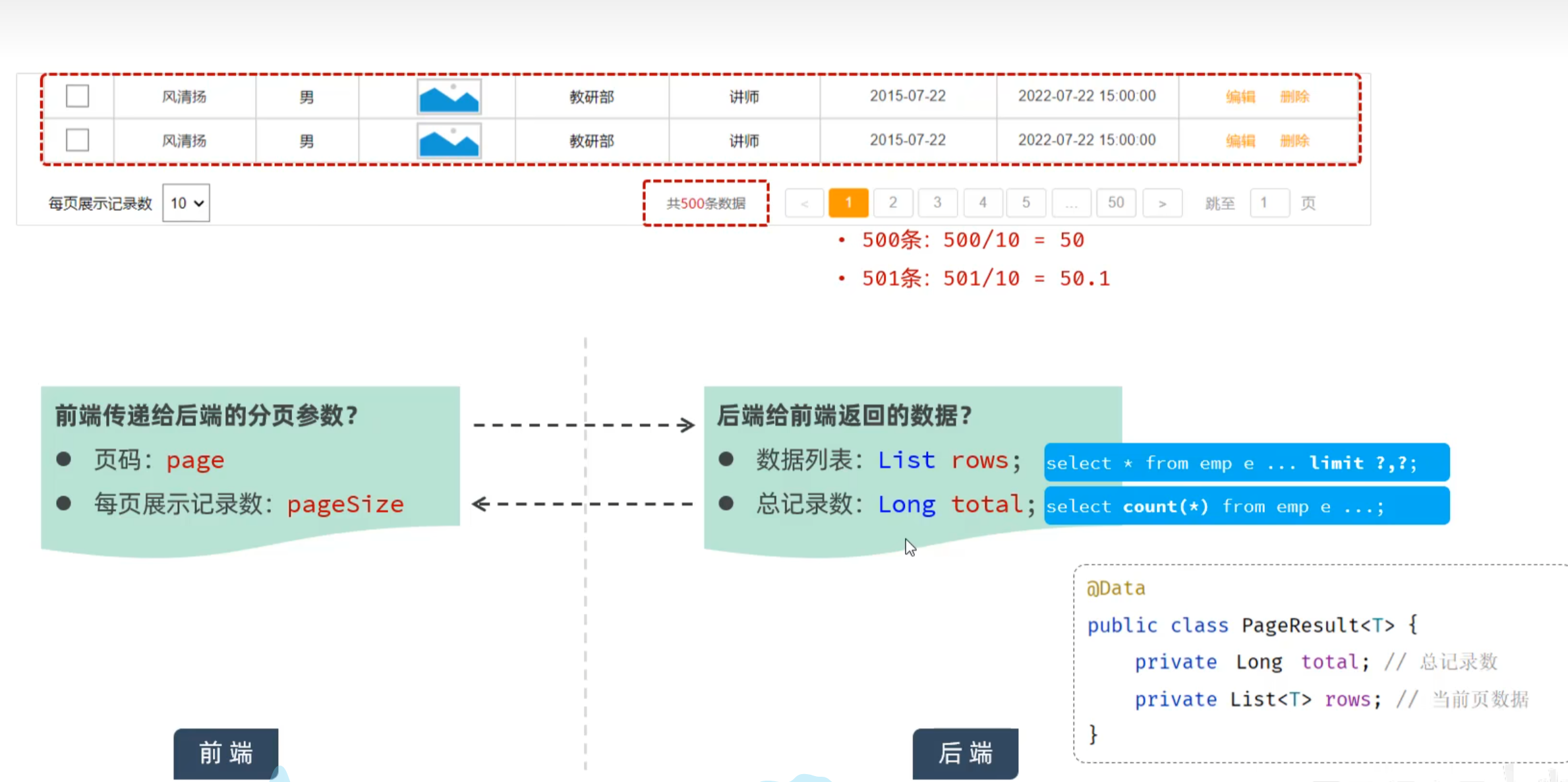
每次只展示一页的数据,比如:一页展示10条数据,如果还想看其他的数据,可以通过点击页码进行查询。

在员工管理的需求中,就要求我们进行分页查询,展示出对应的数据。 具体的页面原型如下:
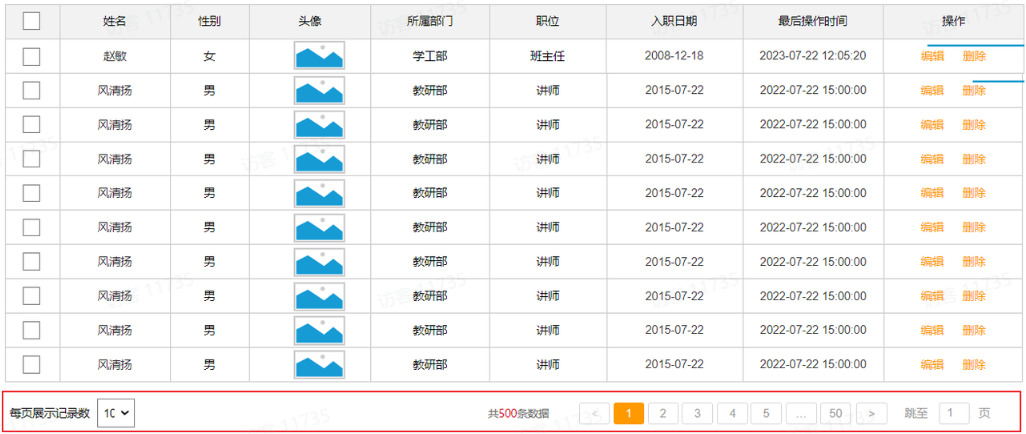
要想从数据库中进行分页查询,我们要使用LIMIT关键字,格式为:limit 开始索引 每页显示的条数。

1). 查询第1页数据的SQL语句是:

1
select * from emp  limit 0,10;

2). 查询第2页数据的SQL语句是:

1
select * from emp  limit 10,10;

3). 查询第3页的数据的SQL语句是:

1
select * from emp  limit 20,10;

观察以上SQL语句,发现: 开始索引一直在改变 , 每页显示条数是固定的

开始索引的计算公式: 开始索引 = (当前页码 - 1) * 每页显示条数

我们继续基于页面原型,继续分析,得出以下结论:

  1. 前端在请求服务端时,传递的参数
    1. 当前页码 page
    2. 每页显示条数 pageSize
  2. 后端需要响应什么数据给前端
    1. 所查询到的数据列表(存储到List 集合中)
    2. 总记录数

后台给前端返回的数据包含:List集合(数据列表)、total(总记录数)

而这两部分我们通常封装到PageResult对象中,并将该对象转换为json格式的数据响应回给浏览器。

1
2
3
4
5
6
7
@Data
@NoArgsConstructor
@AllArgsConstructor
public class PageResult {
        private Long total; //总记录数
        private List rows; //当前页数据列表
}

接口描述

1). 基本信息

请求路径:/emps

请求方式:GET

接口描述:该接口用于员工列表数据的条件分页查询

2). 请求参数
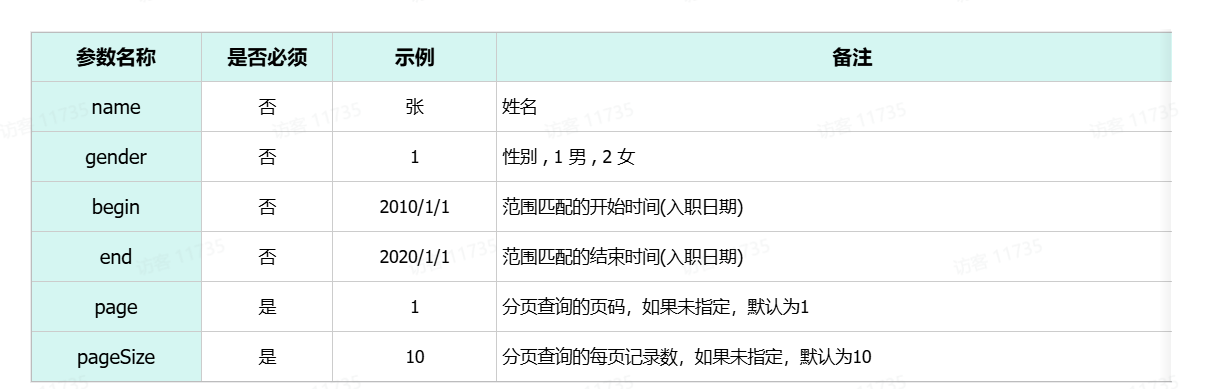
请求数据样例:

1
/emps?name=&gender=1&begin=2007-09-01&end=2022-09-01&page=1&pageSize=10

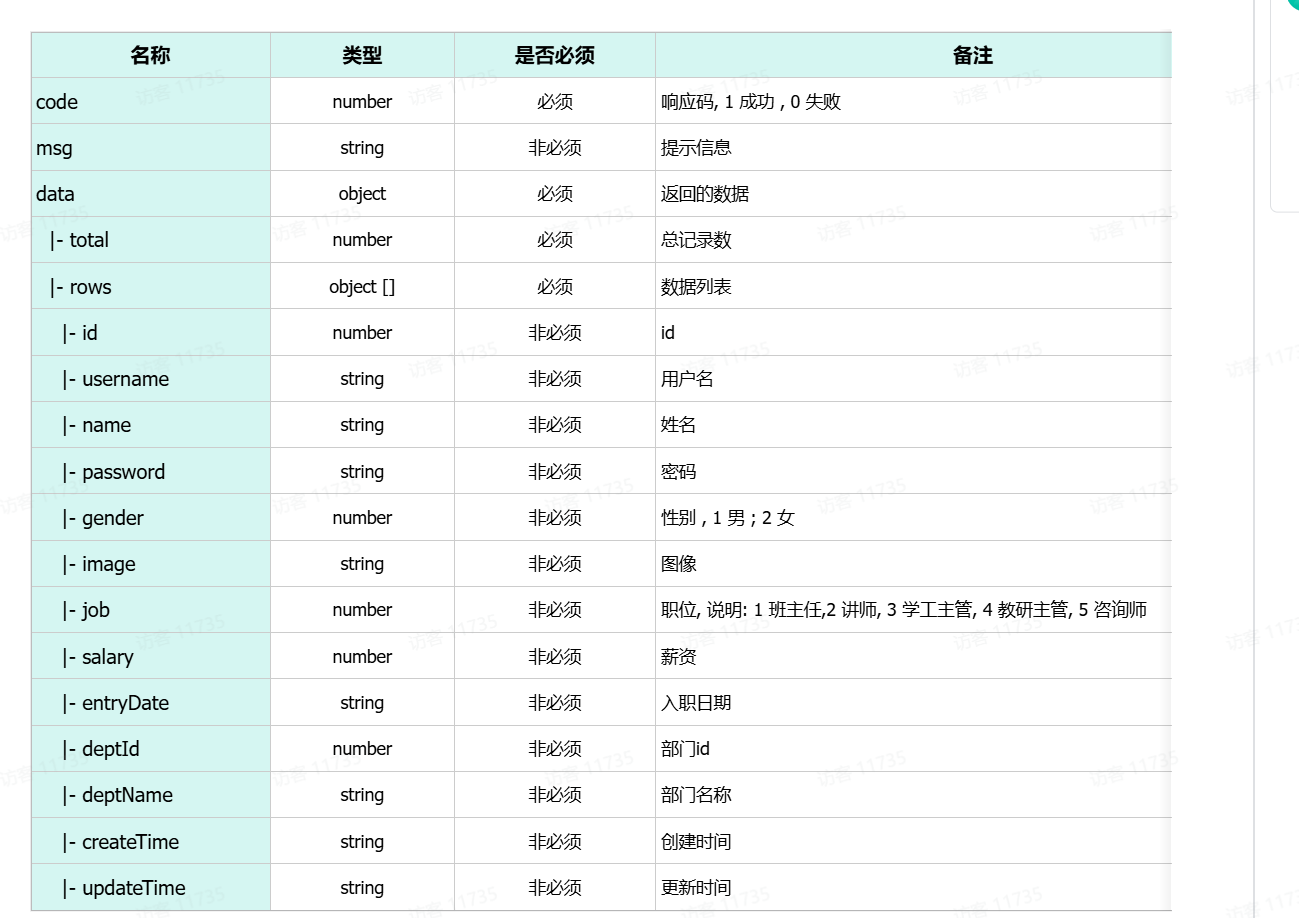
3). 响应数据

参数格式:application/json

参数说明:

响应数据样例:

 1
 2
 3
 4
 5
 6
 7
 8
 9
10
11
12
13
14
15
16
17
18
19
20
21
22
23
24
25
26
27
28
29
30
31
32
33
34
35
36
37
38
39
{
  "code": 1,
  "msg": "success",
  "data": {
    "total": 2,
    "rows": [
       {
        "id": 1,
        "username": "jinyong",
        "password": "123456",
        "name": "金庸",
        "gender": 1,
        "image": "https://web-framework.oss-cn-hangzhou.aliyuncs.com/2022-09-02-00-27-53B.jpg",
        "job": 2,
        "salary": 8000,
        "entryDate": "2015-01-01",
        "deptId": 2,
        "deptName": "教研部",
        "createTime": "2022-09-01T23:06:30",
        "updateTime": "2022-09-02T00:29:04"
      },
      {
        "id": 2,
        "username": "zhangwuji",
        "password": "123456",
        "name": "张无忌",
        "gender": 1,
        "image": "https://web-framework.oss-cn-hangzhou.aliyuncs.com/2022-09-02-00-27-53B.jpg",
        "job": 2,
        "salary": 6000,
        "entryDate": "2015-01-01",
        "deptId": 2,
        "deptName": "教研部",
        "createTime": "2022-09-01T23:06:30",
        "updateTime": "2022-09-02T00:29:04"
      }
    ]
  }
}

目前我们只考虑分页查询,先不考虑查询条件,而上述的接口文档中,与分页查询相关的参数就两个,一个是page,一个是pageSize。

原始方式

代码实现

通过查看接口文档:员工列表查询

请求路径:/emps

请求方式:GET

请求参数:跟随在请求路径后的参数字符串。 例:/emps?page=1&pageSize=10

响应数据:json格式
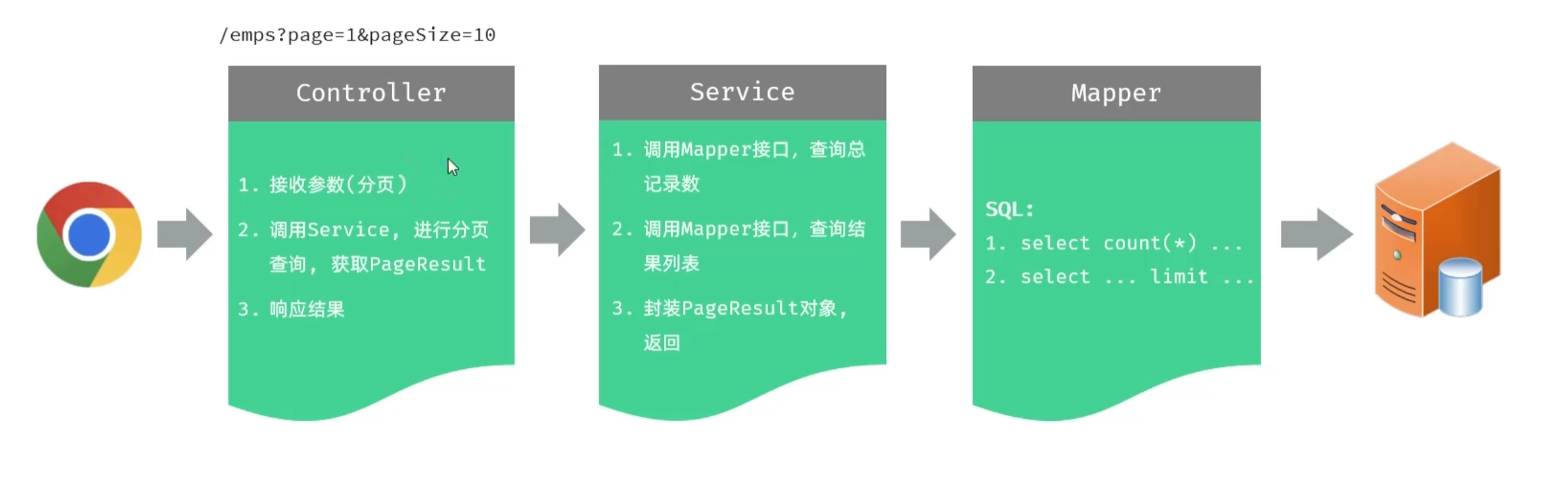
1). EmpController

 1
 2
 3
 4
 5
 6
 7
 8
 9
10
11
12
13
14
15
16
17
18
19
20
21
22
23
24
25
26
27
28
29
30
31
32
33
package com.itheima.controller;

import com.itheima.pojo.Emp;
import com.itheima.pojo.PageResult;
import com.itheima.pojo.Result;
import com.itheima.service.EmpService;
import lombok.extern.slf4j.Slf4j;
import org.springframework.beans.factory.annotation.Autowired;
import org.springframework.web.bind.annotation.GetMapping;
import org.springframework.web.bind.annotation.RequestMapping;
import org.springframework.web.bind.annotation.RequestParam;
import org.springframework.web.bind.annotation.RestController;

/**
 * 员工管理
 */
@Slf4j
@RequestMapping("/emps")
@RestController
public class EmpController {

    @Autowired
    private EmpService empService;

    @GetMapping
    public Result page(@RequestParam(defaultValue = "1") Integer page ,
                       @RequestParam(defaultValue = "10") Integer pageSize){
        log.info("查询员工信息, page={}, pageSize={}", page, pageSize);
        PageResult<Emp> pageResult = empService.page(page, pageSize);
        return Result.success(pageResult);
    }

}

@RequestParam(defaultValue=“默认值”) //设置请求参数默认值

2). EmpService

 1
 2
 3
 4
 5
 6
 7
 8
 9
10
11
12
13
package com.itheima.service;

import com.itheima.pojo.Emp;
import com.itheima.pojo.PageResult;

public interface EmpService {
    /*
    * 分页查询
    * @param page 页码
    * @param pageSize 每页记录数
    * */
    PageResult<Emp> page(Integer page, Integer pageSize);
}

3). EmpServiceImpl

 1
 2
 3
 4
 5
 6
 7
 8
 9
10
11
12
13
14
15
16
17
18
19
20
21
22
23
24
25
26
27
28
29
30
31
32
33
package com.itheima.service.impl;

import com.itheima.mapper.EmpMapper;
import com.itheima.pojo.Emp;
import com.itheima.pojo.PageResult;
import com.itheima.service.EmpService;
import org.springframework.beans.factory.annotation.Autowired;
import org.springframework.stereotype.Service;

import java.util.List;

/**
 * 员工管理
 */
@Service
public class EmpServiceImpl implements EmpService {

    @Autowired
    private EmpMapper empMapper;

    @Override
    public PageResult page(Integer page, Integer pageSize) {
        //1. 获取总记录数
        Long total = empMapper.count();

        //2. 获取结果列表
        Integer start = (page - 1) * pageSize;
        List<Emp> rows = empMapper.list(start, pageSize);

        //3. 封装结果
        return new PageResult<Emp>(total,rows);
    }
}

4). EmpMapper

 1
 2
 3
 4
 5
 6
 7
 8
 9
10
11
12
13
14
15
16
17
18
19
20
21
22
23
24
25
package com.itheima.mapper;

import com.itheima.pojo.Emp;
import org.apache.ibatis.annotations.Mapper;
import org.apache.ibatis.annotations.Select;

import java.util.List;

@Mapper
public interface EmpMapper {

    /*
     * 查询总记录数
     * */
    @Select("select count(*) from emp e left join dept d on e.dept_id = d.id")
    Long count();
    /*
    * 分页查询
    * */
    @Select("select e.*, d.name deptName from emp e left join dept d on e.dept_id = d.id " +
            "order by e.update_time desc limit #{start},#{pageSize}")
    public List<Emp> list(Integer start, Integer pageSize);


}

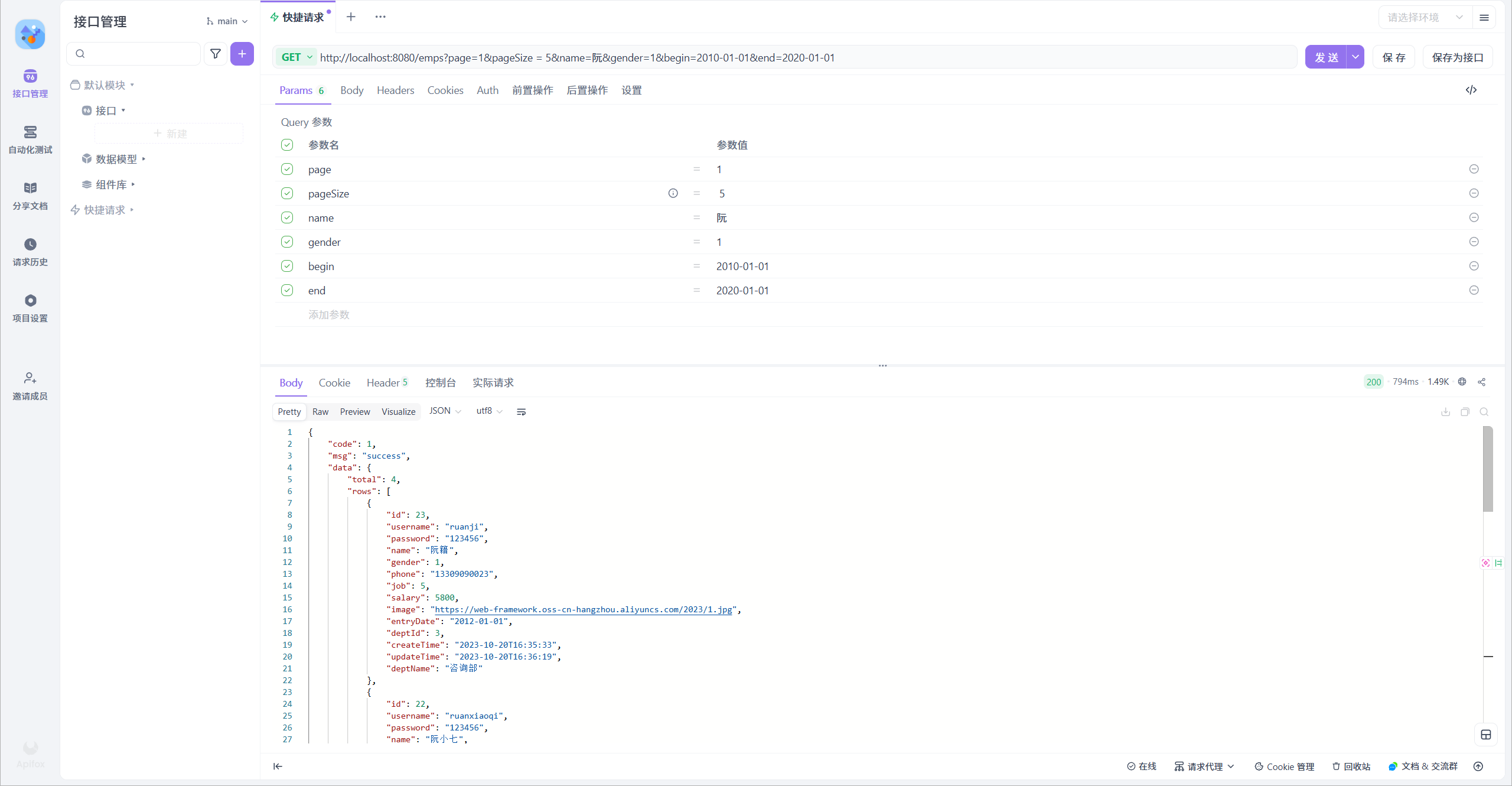
功能测试:

功能开发完成后,重新启动项目,使用Apifox,发起GET请求:
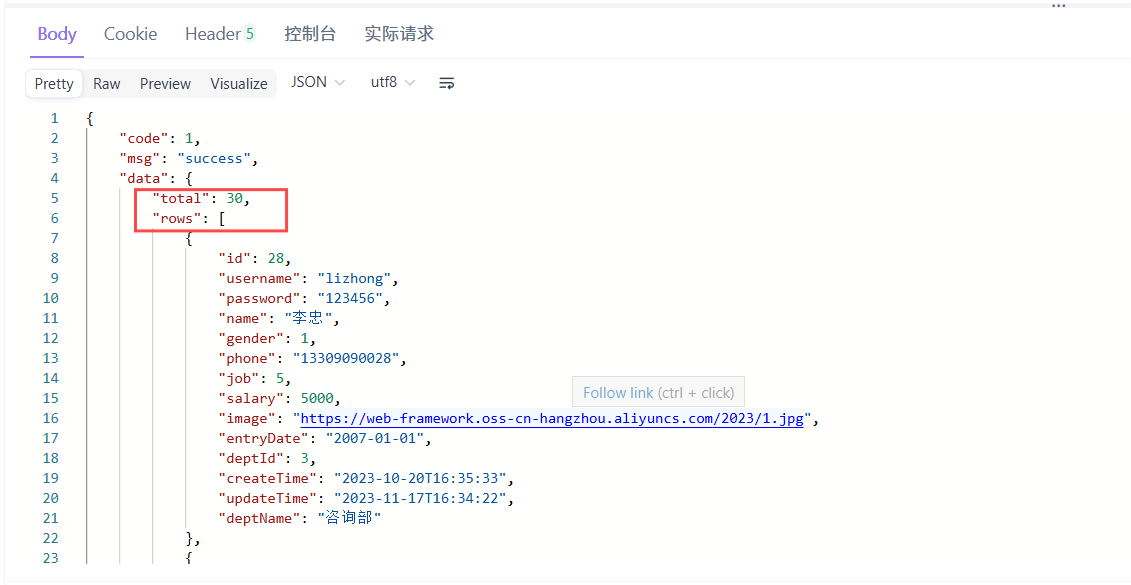
前后端联调测试:

打开浏览器,测试后端功能接口:
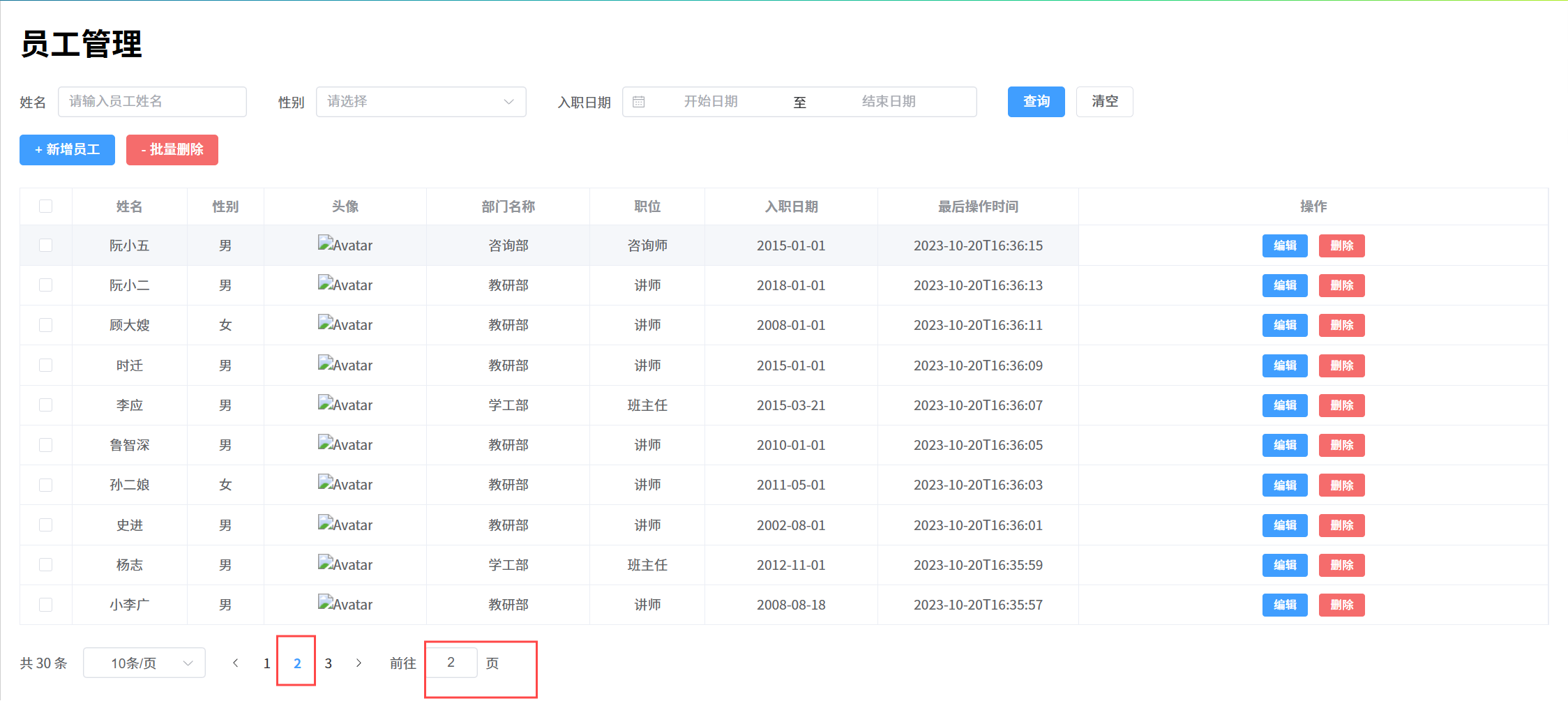
点击下面的页码,可以正常的查询出对应的数据 。

PageHelper分页插件

PageHelper是第三方提供的Mybatis框架中的一款功能强大、方便易用的分页插件,支持任何形式的单标、多表的分页查询。

官网:https://pagehelper.github.io/

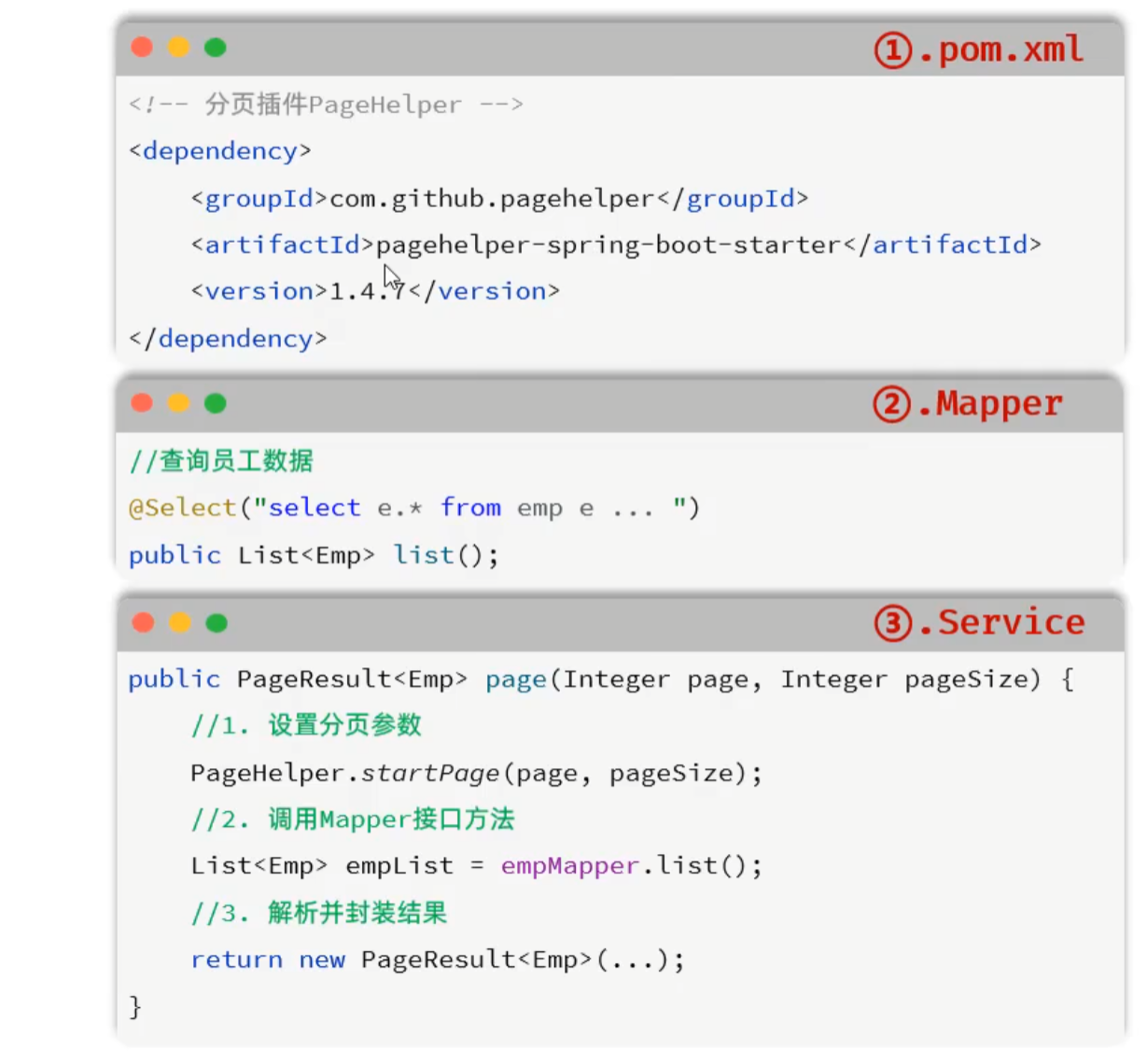
那接下来,我们可以对比一下,使用PageHelper分页插件进行分页 与 原始方式进行分页代码实现的上的差别。
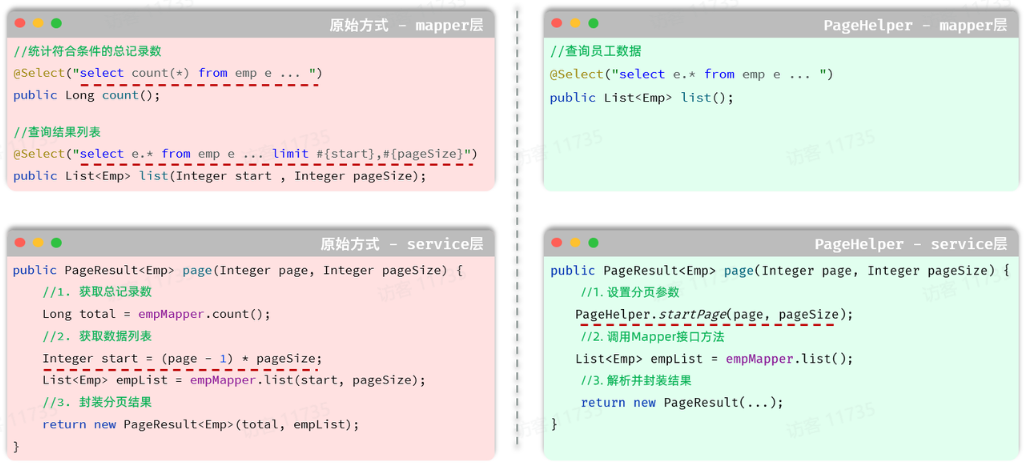
  • Mapper接口层:
    • 原始的分页查询功能中,我们需要在Mapper接口中定义两条SQL语句。
    • PageHelper实现分页查询之后,只需要编写一条SQL语句,而且不需要考虑分页操作,就是一条正常的查询语句。
  • Service层:
    • 需要根据页码、每页展示记录数,手动的计算起始索引。
    • 无需手动计算起始索引,直接告诉PageHelper需要查询那一页的数据,每页展示多少条记录即可。
  • 使用步骤:引入PageHelper的依赖
    • 定义Mapper接口的查询方法(无需考虑分页)
    • 在Service方法中实现分页查询

代码实现:

当使用了PageHelper分页插件进行分页,就无需再Mapper中进行手动分页了。 在Mapper中我们只需要进行正常的列表查询即可。在Service层中,调用Mapper的方法之前设置分页参数,在调用Mapper方法执行查询之后,解析分页结果,并将结果封装到PageResult对象中返回。

1). 在pom.xml引入依赖

1
2
3
4
5
6
<!--分页插件PageHelper-->
<dependency>
    <groupId>com.github.pagehelper</groupId>
    <artifactId>pagehelper-spring-boot-starter</artifactId>
    <version>1.4.7</version>
</dependency>

2). EmpMapper

1
2
3
4
5
/**
 * 查询所有的员工及其对应的部门名称
 */
@Select("select e.*, d.name deptName from emp as e left join dept as d on e.dept_id = d.id")
public List<Emp> list();

3). EmpServiceImpl

 1
 2
 3
 4
 5
 6
 7
 8
 9
10
11
12
13
14
15
@Override
public PageResult page(Integer page, Integer pageSize) {
    //1. 设置分页参数
    PageHelper.startPage(page,pageSize);

    //2. 执行查询
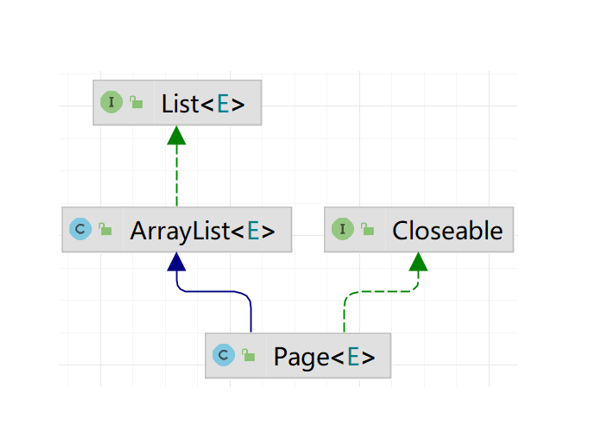
    //此处能够将List集合强转为page原因是empList实际类型就是page
    //为什么实际类型是page能拿List来接收呢?
    //原因是因为Page<E>是ArrayList<E>的子类,而ArrayList<E>又实现了List<E>的接口【如上面图示】
    List<Emp> empList = empMapper.list();

    //3. 封装结果
    Page<Emp> p = (Page<Emp>) empList;
    return new PageResult(p.getTotal(), p.getResult());
}

功能测试

功能开发完成后,我们重启项目工程,打开Apifox,发起GET请求,访问 :http://localhost:8080/emps?page=1&pageSize=5
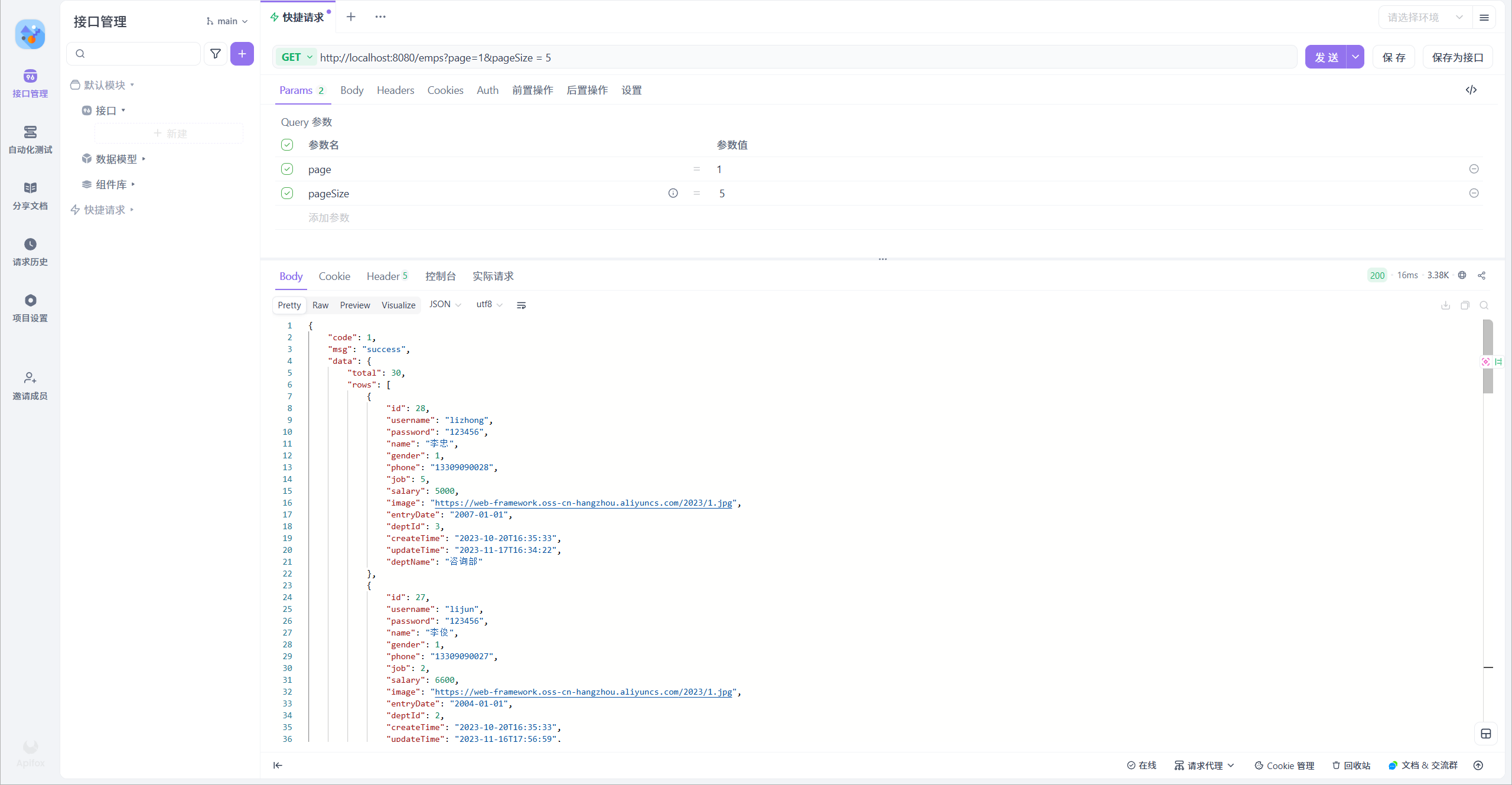
我们可以看到数据可以正常查询返回,是可以正常实现分页查询的。

实现机制

我们打开Idea的控制台,可以看到在进行分页查询时,输出的SQL语句。
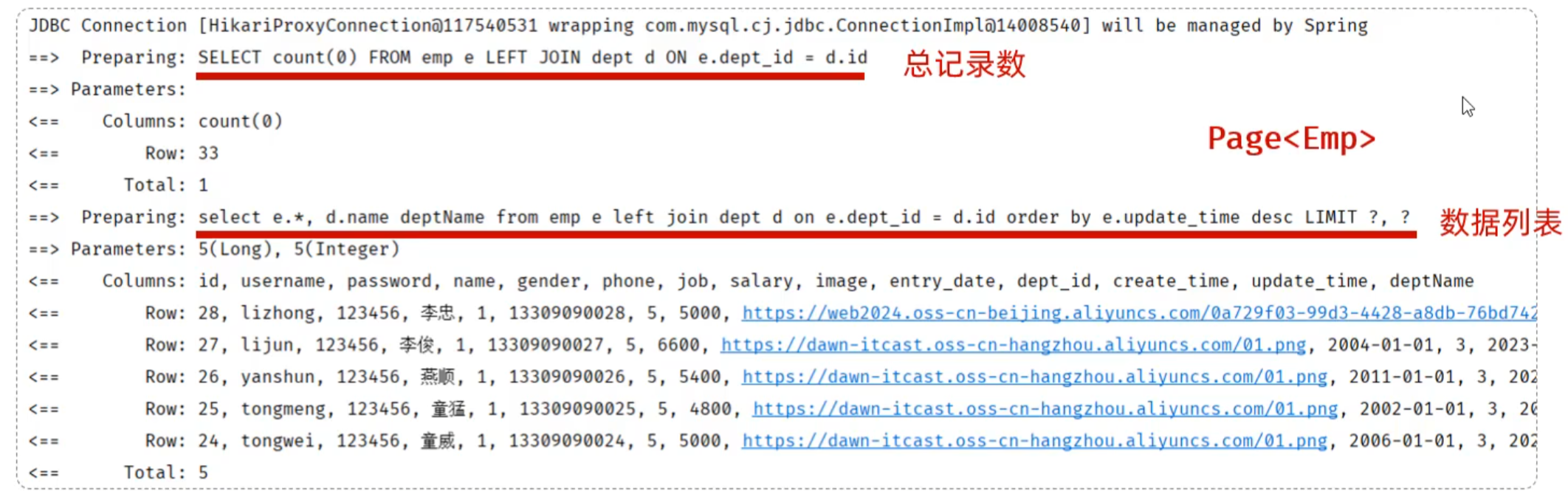
我们看到执行了两条SQL语句,而这两条SQL语句,其实是从我们在Mapper接口中定义的SQL演变而来的。

  • 第一条SQL语句,用来查询总记录数。

    其实就是将我们编写的SQL语句进行的改造增强,将查询返回的字段列表替换成了 count(0) 来统计总记录数。

  • 第二条SQL语句,用来进行分页查询,查询指定页码对应 的数据列表。

其实就是将我们编写的SQL语句进行的改造增强,在SQL语句之后拼接上了limit进行分页查询,而由于测试时查询的是第一页,起始索引是0,所以简写为limit ?。

而PageHelper在进行分页查询时,会执行上述两条SQL语句,并将查询到的总记录数,与数据列表封装到了 Page<Emp> 对象中,我们再获取查询结果时,只需要调用Page对象的方法就可以获取。

注意:

  • PageHelper实现分页查询时,SQL语句的结尾一定一定一定不要加分号(;).。
  • PageHelper只会对紧跟在其后的第一条SQL语句进行分页处理。

条件分页查询

完了分页查询后,下面我们需要在分页查询的基础上,添加条件。

需求
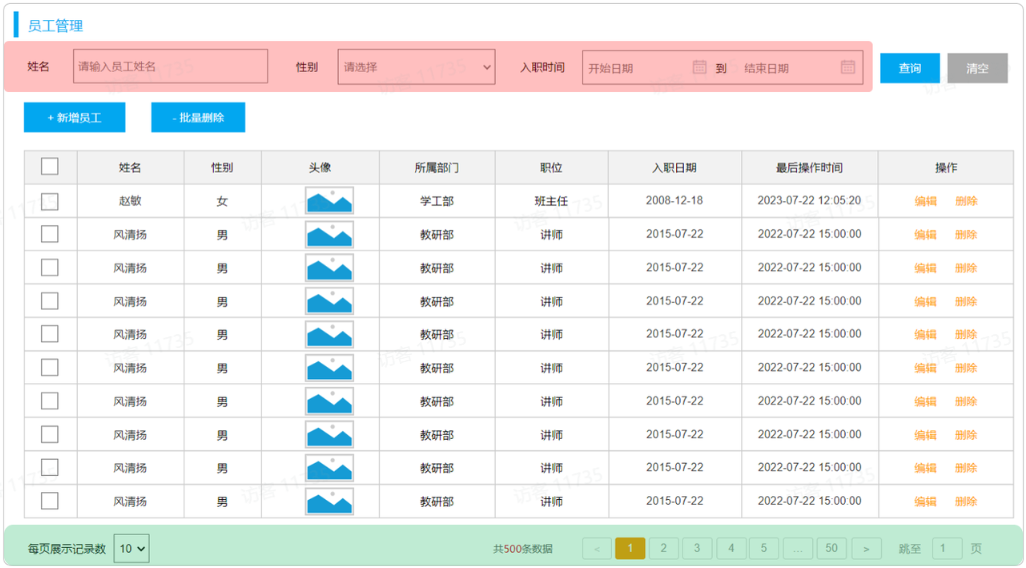
通过员工管理的页面原型我们可以看到,员工列表页面的查询,不仅仅需要考虑分页,还需要考虑查询条件。 分页查询我们已经实现了,接下来,我们需要考虑在分页查询的基础上,再加上查询条件。

我们看到页面原型及需求中描述,搜索栏的搜索条件有三个,分别是:

  • 姓名:模糊匹配
  • 性别:精确匹配
  • 入职日期:范围匹配

接口描述

查看上一小节的接口文档

思路

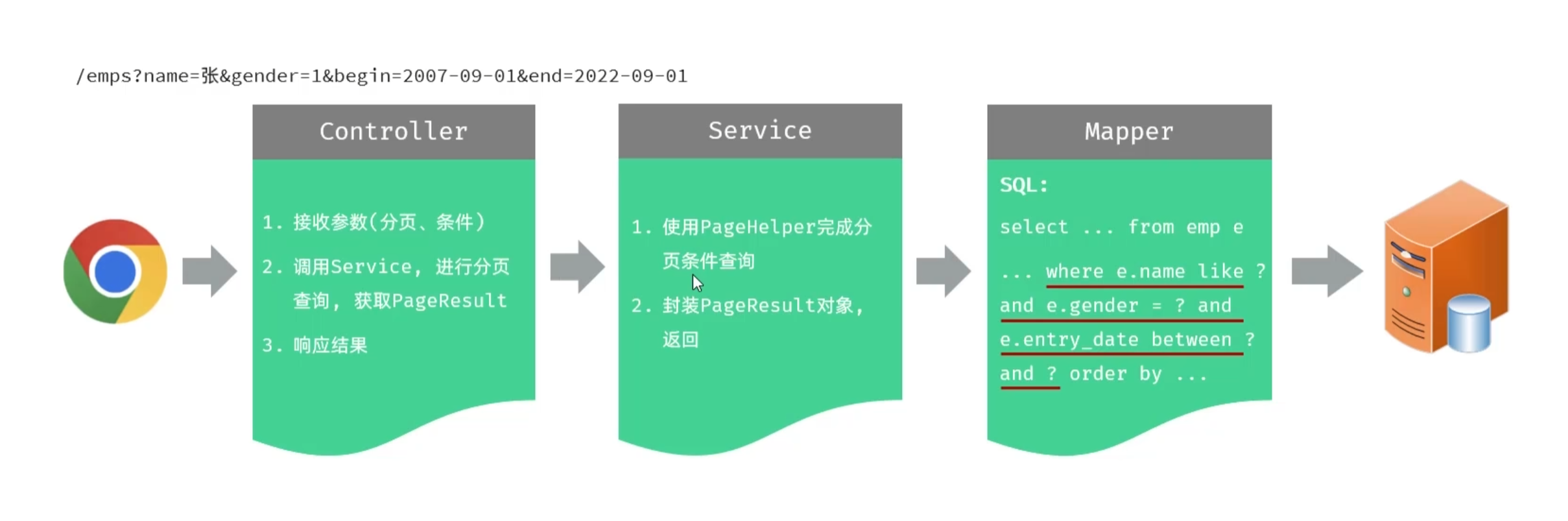
三层架构职责:

功能开发

1). 在EmpController方法中通过多个方法形参,依次接收这几个参数

 1
 2
 3
 4
 5
 6
 7
 8
 9
10
11
12
13
14
15
16
17
18
19
20
@Slf4j
@RequestMapping("/emps")
@RestController
public class EmpController {

    @Autowired
    private EmpService empService;

    @GetMapping
    public Result page(@RequestParam(defaultValue = "1") Integer page ,
                       @RequestParam(defaultValue = "10") Integer pageSize,
                       String name, Integer gender,
                       @DateTimeFormat(pattern = "yyyy-MM-dd") LocalDate begin,
                       @DateTimeFormat(pattern = "yyyy-MM-dd") LocalDate end){
        log.info("分页查询:{}, {}, {}, {}, {}, {}", page, pageSize, name, gender, begin, end);
        PageResult<Emp> pageResult = empService.page(page, pageSize, name, gender, begin, end);
        return Result.success(pageResult);
    }

}

日期时间类型参数接收时,需要通过 @DateTimeFormat 注解指定前端传递的日期格式

2). 修改EmpService及EmpServiceImpl中的代码逻辑

EmpService:

1
2
3
4
5
6
7
8
public interface EmpService {
    /*
    * 分页查询
    * @param page 页码
    * @param pageSize 每页记录数
    * */
    PageResult<Emp> page(Integer page, Integer pageSize, String name, Integer gender, LocalDate begin,LocalDate end);
}

EmpServiceImpl:

 1
 2
 3
 4
 5
 6
 7
 8
 9
10
11
12
13
14
15
16
17
18
19
20
21
22
@Service
public class EmpServiceImpl implements EmpService {
    /*
     * PageHelper分页查询
     * @param page 页码
     * @param pageSize 每页记录数
     * @return
     * */
    @Autowired
    private EmpMapper empMapper;

    @Override
    public PageResult<Emp> page(Integer page, Integer pageSize, String name, Integer gender, LocalDate begin, LocalDate end){
        //1.设置分页参数
        PageHelper.startPage(page,pageSize);
        //2.调佣Mapper接口方法
        List<Emp> empList = empMapper.list(name, gender, begin, end);
        //3.解析并封装结果
        Page<Emp> p = (Page<Emp>) empList;
        return new PageResult<Emp>(p.getTotal(),p.getResult());
    }
}

3). 调整EmpMapper接口方法

1
2
3
4
5
6
7
8
9
@Mapper
public interface EmpMapper {
    
    /**
     * 查询所有的员工及其对应的部门名称
     */
    public List<Emp> list(String name, Integer gender, LocalDate begin, LocalDate end);
    
}

由于SQL语句比较复杂,建议将SQL语句配置在XML映射文件中。

4). 新增Mapper映射文件EmpMapper.xml

 1
 2
 3
 4
 5
 6
 7
 8
 9
10
11
12
13
14
15
<!--定义Mapper映射文件的约束和基本结构-->
<!DOCTYPE mapper
        PUBLIC "-//mybatis.org//DTD Mapper 3.0//EN"
        "http://mybatis.org/dtd/mybatis-3-mapper.dtd">
<mapper namespace="com.itheima.mapper.EmpMapper">
    <select id="list" resultType="com.itheima.pojo.Emp">
        select e.*, d.name deptName from emp as e left join dept as d on e.dept_id = d.id
        //注意不能像下面注释这行这样书写,否则会变成'%?%',就会报错
        //where e.name like ('%#{name},%')
        //此时就可以用到concat函数进行字符串的拼接
        where e.name like concat('%',#{name},'%')
          and e.gender = #{gender}
          and e.entry_date between #{begin} and #{end}
    </select>
</mapper>

功能测试:

程序优化1

在上述分页条件查询中,请求参数比较多,有6个,如下所示:

  • 请求参数:/emps?name=张&gender=1&begin=2007-09-01&end=2022-09-01&page=1&pageSize=10

那我们在controller层方法中,接收请求参数的时候,直接在controller方法中声明这样6个参数即可,这样做,功能可以实现,但是不方便维护和管理。
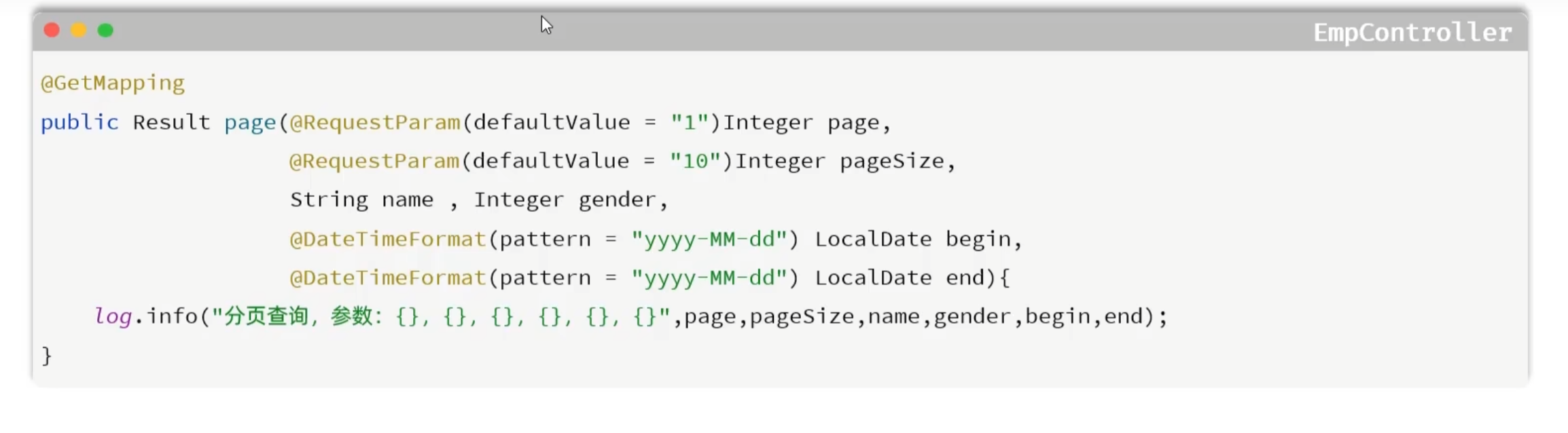
  • 如果controller方法的参数较多,且未来可能继续增加,这会使得方法签名变得复杂难以维护,此时可以考虑将多个请求参数封装为一个对象。
  • 请求参数:/emps?name=张&gender=1&begin=2007-09-01&end=2022-09-01&page=1&pageSize=10
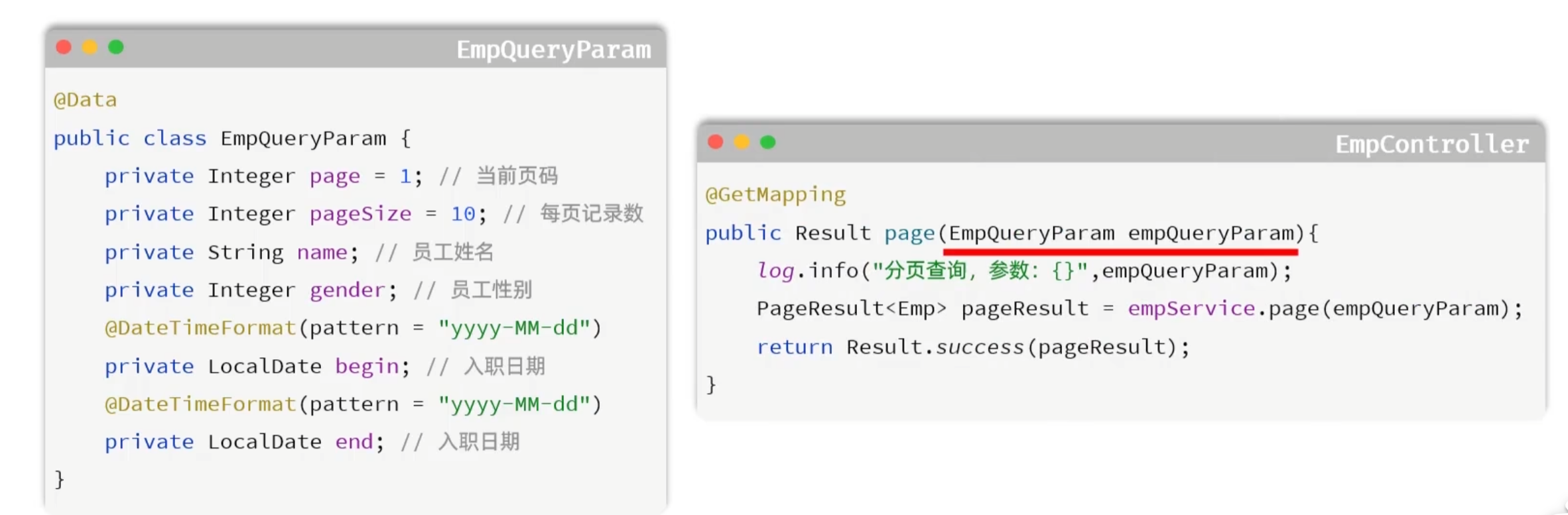
优化思路:定义一个实体类,来封装这几个请求参数。 【需要保证,前端传递的请求参数和实体类的属性名是一样的】

1). 定义实体类:EmpQueryParam

 1
 2
 3
 4
 5
 6
 7
 8
 9
10
11
12
13
14
15
16
17
18
19
package com.itheima.pojo;

import lombok.Data;
import org.springframework.format.annotation.DateTimeFormat;
import java.time.LocalDate;

@Data
public class EmpQueryParam {
    
    private Integer page = 1; //页码
    private Integer pageSize = 10; //每页展示记录数
    private String name; //姓名
    private Integer gender; //性别
    @DateTimeFormat(pattern = "yyyy-MM-dd")
    private LocalDate begin; //入职开始时间
    @DateTimeFormat(pattern = "yyyy-MM-dd")
    private LocalDate end; //入职结束时间
    
}

2). EmpController接收请求参数

1
2
3
4
5
6
@GetMapping
public Result page(EmpQueryParam empQueryParam) {
    log.info("查询请求参数: {}", empQueryParam);
    PageResult pageResult = empService.page(empQueryParam);
    return Result.success(pageResult);
}

3). 修改EmpService接口方法

1
2
3
4
5
6
7
public interface EmpService {
    /**
     * 分页查询
     */
    //PageResult page(Integer page, Integer pageSize, String name, Integer gender, LocalDate begin, LocalDate end);
    PageResult page(EmpQueryParam empQueryParam);
}

4). 修改EmpServiceImpl中的page方法

 1
 2
 3
 4
 5
 6
 7
 8
 9
10
11
12
13
14
15
16
17
18
19
20
21
22
23
24
25
26
27
@Service
public class EmpServiceImpl implements EmpService {

    @Autowired
    private EmpMapper empMapper;

    /*@Override
    public PageResult page(Integer page, Integer pageSize, String name, Integer gender, LocalDate begin, LocalDate end) {
        //1. 设置PageHelper分页参数
        PageHelper.startPage(page, pageSize);
        //2. 执行查询
        List<Emp> empList = empMapper.list(name, gender, begin, end);
        //3. 封装分页结果
        Page<Emp> p = (Page<Emp>) empList;
        return new PageResult(p.getTotal(), p.getResult());
    }*/

    public PageResult page(EmpQueryParam empQueryParam) {
        //1. 设置PageHelper分页参数
        PageHelper.startPage(empQueryParam.getPage(), empQueryParam.getPageSize());
        //2. 执行查询
        List<Emp> empList = empMapper.list(empQueryParam);
        //3. 封装分页结果
        Page<Emp> p = (Page<Emp>)empList;
        return new PageResult(p.getTotal(), p.getResult());
    }
}

5). 修改EmpMapper接口方法

 1
 2
 3
 4
 5
 6
 7
 8
 9
10
11
12
13
14
@Mapper
public interface EmpMapper {

    /**
     * 查询所有的员工及其对应的部门名称
     */
//    @Select("select e.*, d.name as deptName from emp e left join dept d on e.dept_id = d.id")
//    public List<Emp> list(String name, Integer gender, LocalDate begin, LocalDate end);
    
    /**
     * 根据查询条件查询员工
     */
    List<Emp> list(EmpQueryParam empQueryParam);
}

EmpMapper.xml 中的配置无需修改。

代码优化完毕之后,重新启动运行测试,依然正常运行:
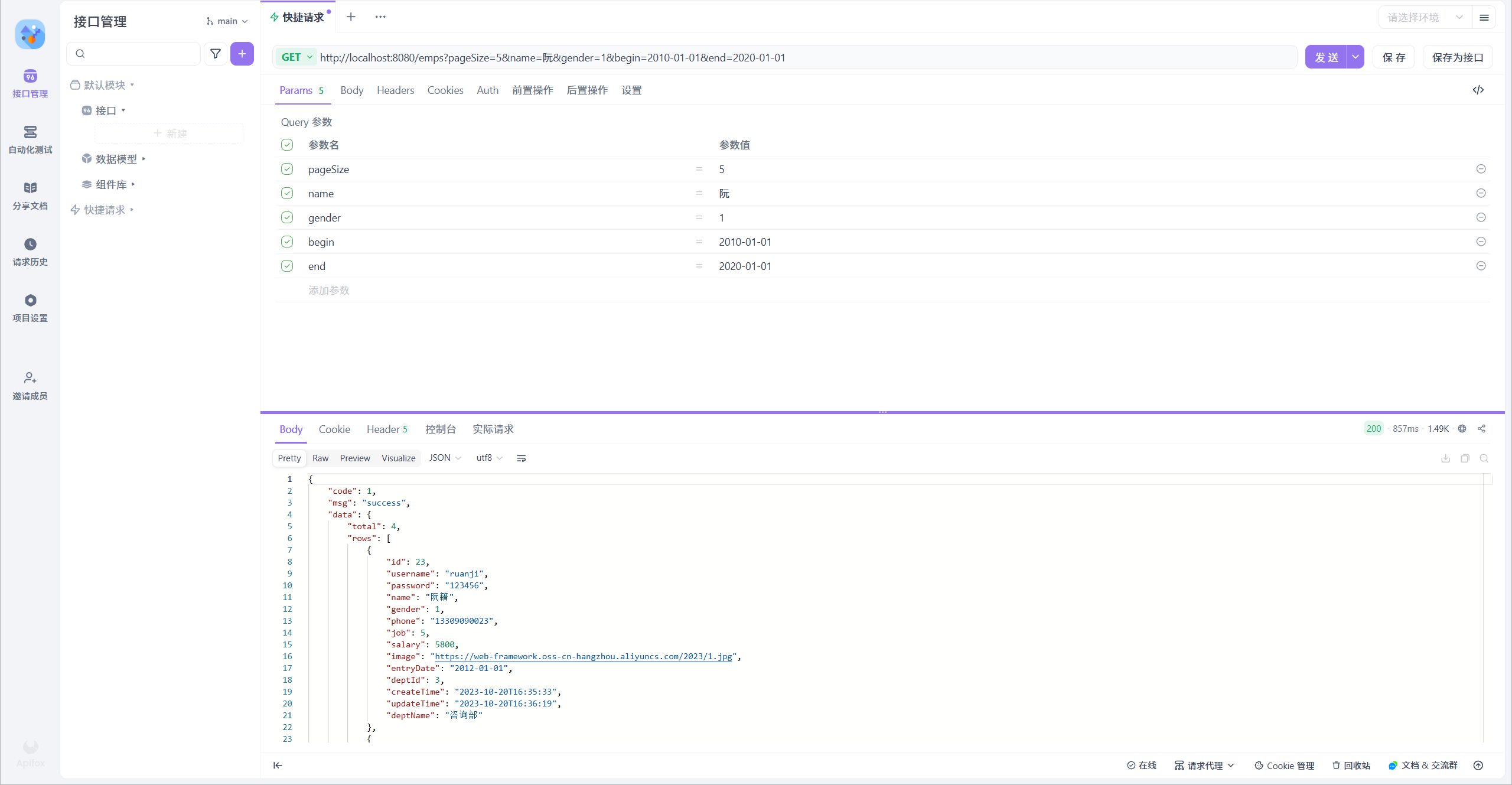
此时我们如果想要单独根据某一条件进行查询,就会发现条件被写死了
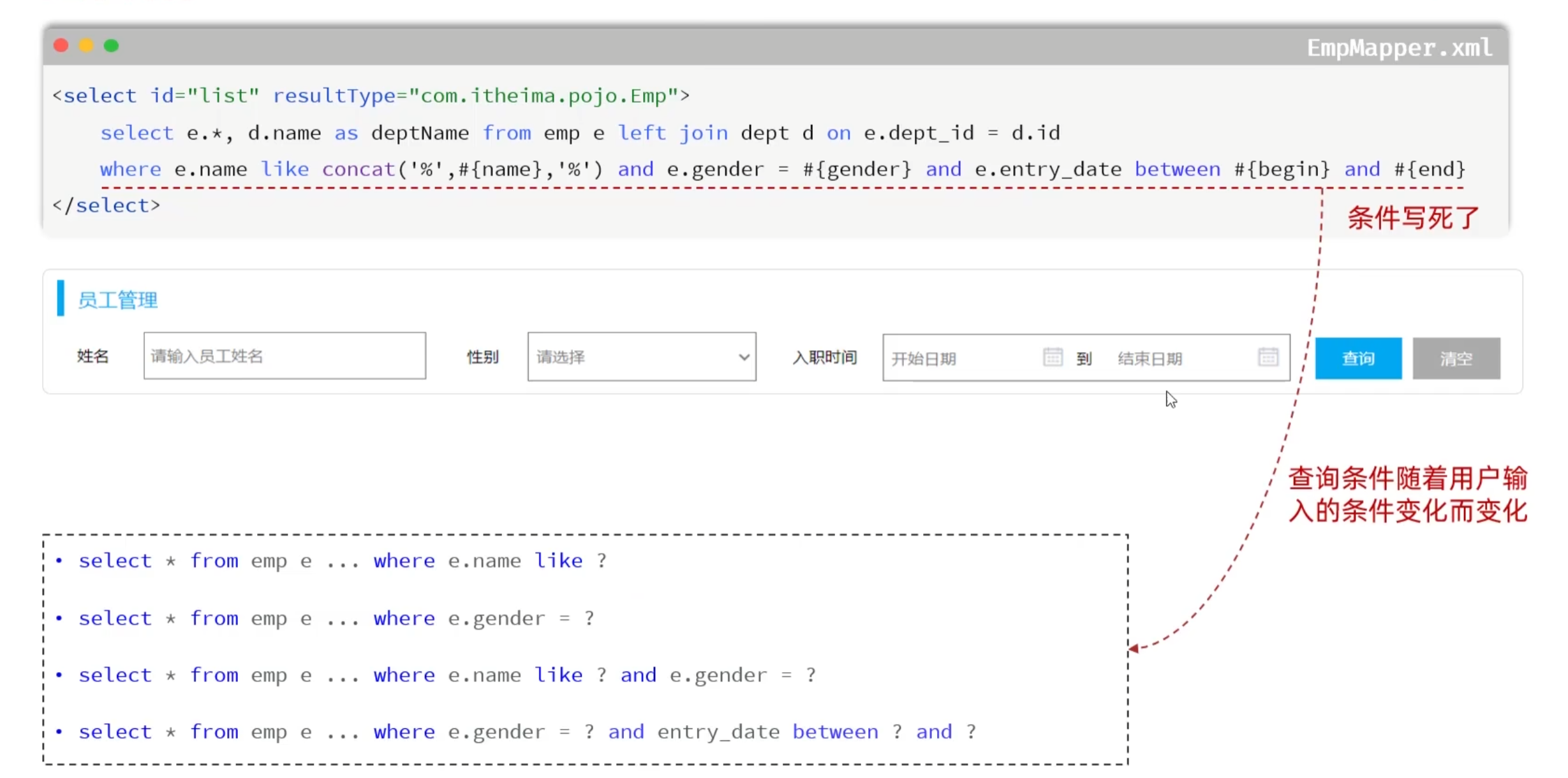
这时就需要用到动态SQL

程序优化2

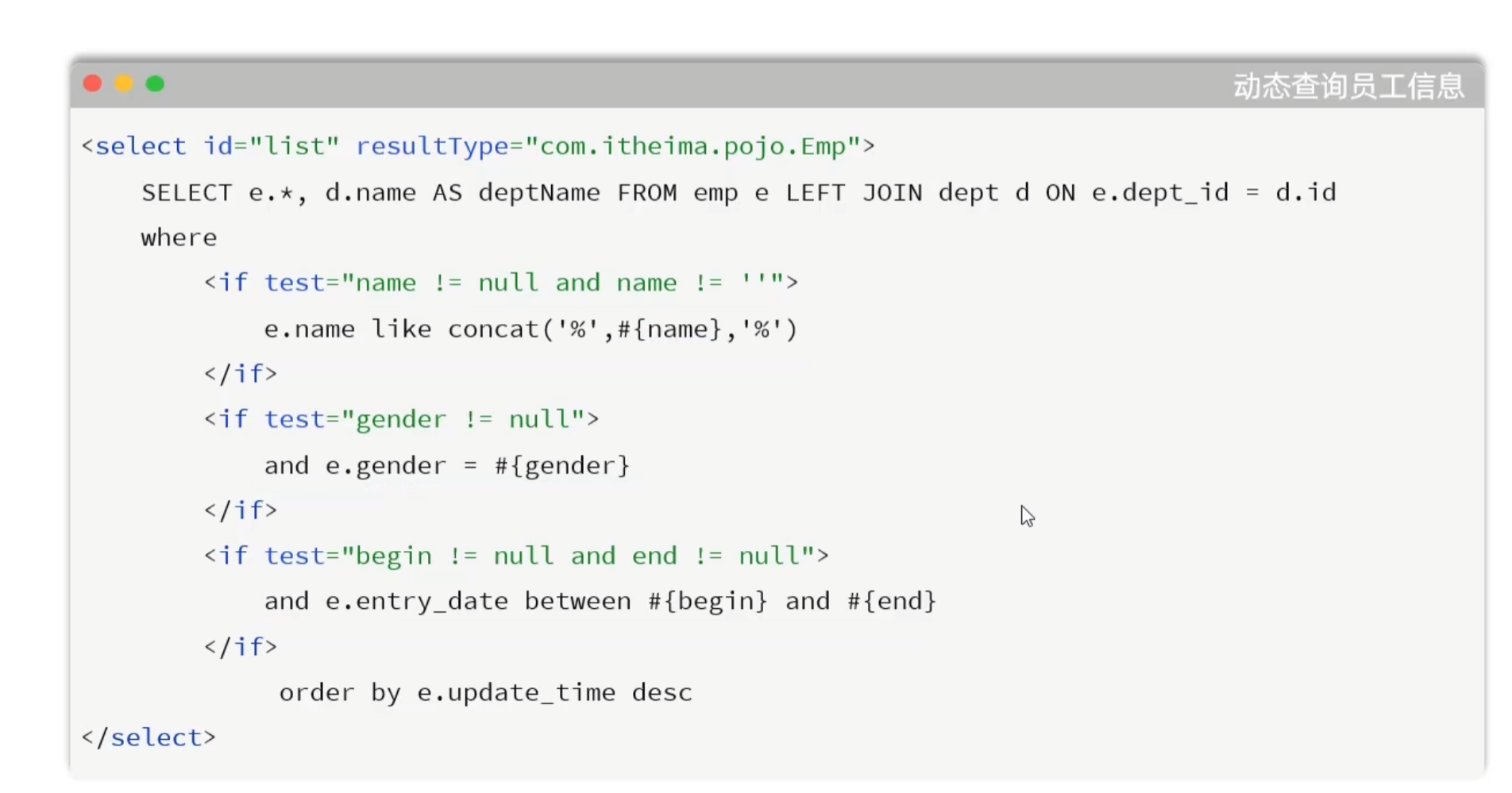
动态SQL

  • 随着用户的输入或外部条件的变化而变化的SQL语句,我们称为动态SQL

  • < if >:判断条件是否成立,如果条件为true,则拼接SQL。

  • < where >:根据查询条件,来生成where关键字,并会自动去除条件前面多余的and或or。
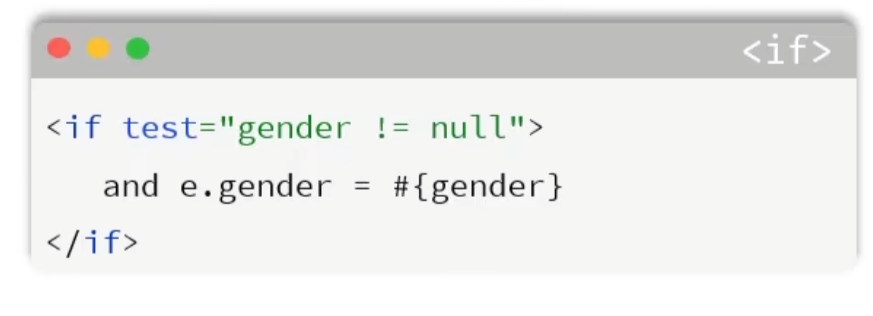
  • 如果只输入 姓名 这个查询条件,则SQL语句中只根据name字段查询,SQL如下:

1
select e.*, d.name deptName from emp as e left join dept as d on e.dept_id = d.id where e.name like concat('%',#{name},'%')
  • 如果只输入 性别 这个查询条件,则SQL语句中只根据gender字段查询,SQL如下:
1
select e.*, d.name deptName from emp as e left join dept as d on e.dept_id = d.id where e.gender = #{gender};
  • 如果输入 姓名性别 这两个查询条件,则SQL语句中要根据name、gender两个字段查询,SQL如下:
1
2
select e.*, d.name deptName from emp as e left join dept as d on e.dept_id = d.id
where e.name like concat('%',#{name},'%') and e.gender = #{gender};

具体的代码实现如下:

 1
 2
 3
 4
 5
 6
 7
 8
 9
10
11
12
13
14
15
16
17
18
19
<!--定义Mapper映射文件的约束和基本结构-->
<!DOCTYPE mapper
        PUBLIC "-//mybatis.org//DTD Mapper 3.0//EN"
        "http://mybatis.org/dtd/mybatis-3-mapper.dtd">
<mapper namespace="com.itheima.mapper.EmpMapper">
    <select id="list" resultType="com.itheima.pojo.Emp">
        select e.*, d.name deptName from emp as e left join dept as d on e.dept_id = d.id
        where
            <if test="name != null and name != ''">
                e.name like concat('%',#{name},'%')
            </if>
            <if test="gender != null">
                and e.gender = #{gender}
            </if>
            <if test="begin != null and end != null">
                and e.entry_date between #{begin} and #{end}
            </if>
    </select>
</mapper>

此时取消勾选Apifox中的某些参数会发现依旧能查询成功,并且在idea控制台中也会显示根据哪几个条件进行模糊匹配
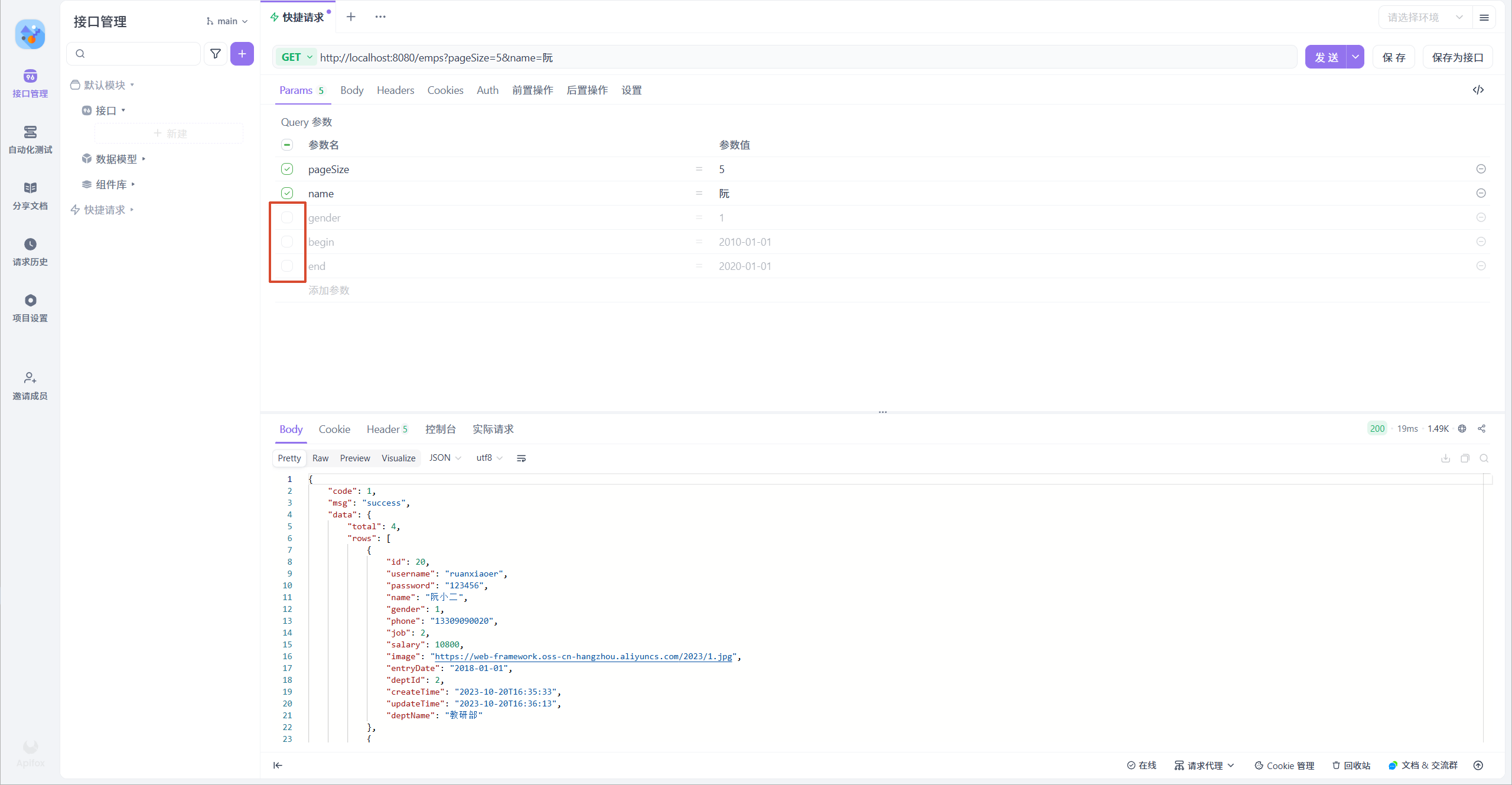
但是此时如果将name删除,就会报出500的错误

所以就需要用到上面介绍的where标签
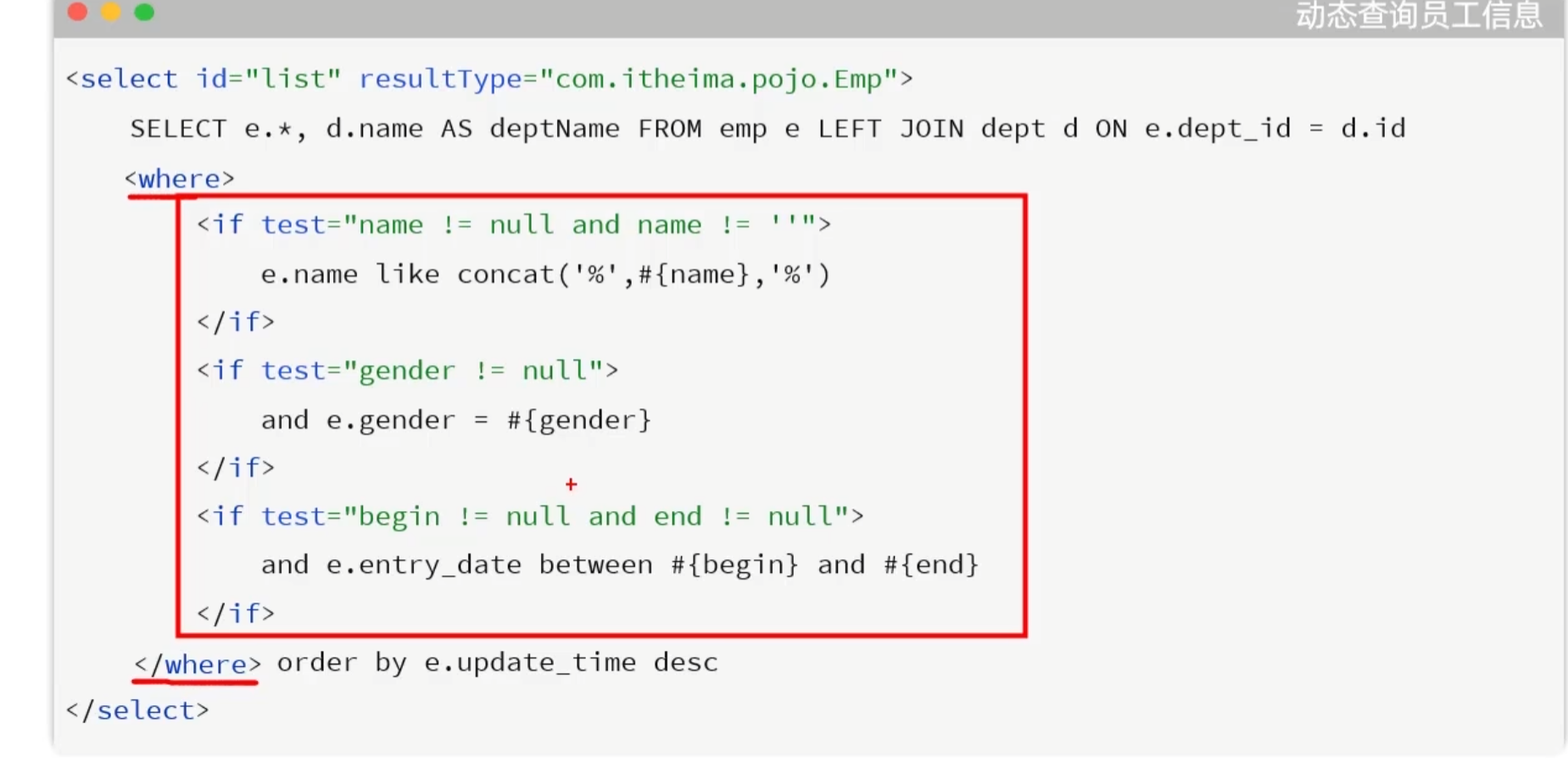
完整代码:

 1
 2
 3
 4
 5
 6
 7
 8
 9
10
11
12
13
14
15
16
17
18
19
20
<!--定义Mapper映射文件的约束和基本结构-->
<!DOCTYPE mapper
        PUBLIC "-//mybatis.org//DTD Mapper 3.0//EN"
        "http://mybatis.org/dtd/mybatis-3-mapper.dtd">
<mapper namespace="com.itheima.mapper.EmpMapper">
    <select id="list" resultType="com.itheima.pojo.Emp">
        select e.*, d.name deptName from emp as e left join dept as d on e.dept_id = d.id
        <where>
            <if test="name != null and name != ''">
                e.name like concat('%',#{name},'%')
            </if>
            <if test="gender != null">
                and e.gender = #{gender}
            </if>
            <if test="begin != null and end != null">
                and e.entry_date between #{begin} and #{end}
            </if>
        </where>
    </select>
</mapper>
本站于2026年3月31日建立
使用 Hugo 构建
主题 StackJimmy 设计